ZBrushCentral

Question about projection an Alpha on a rounded object (answered)

I am not sure if questions go here is not please move. Anywho I was wondering is anyone knows how to have an alpha pattern project onto a rounded object, say a pattern around the edge of a table. I tried to use projection master in zbrush 3.5 but it stretches around the edges. here is an example of what i am trying to do, the pattern the runs along the outer edge of the table.

Attachments

KA-2.jpg

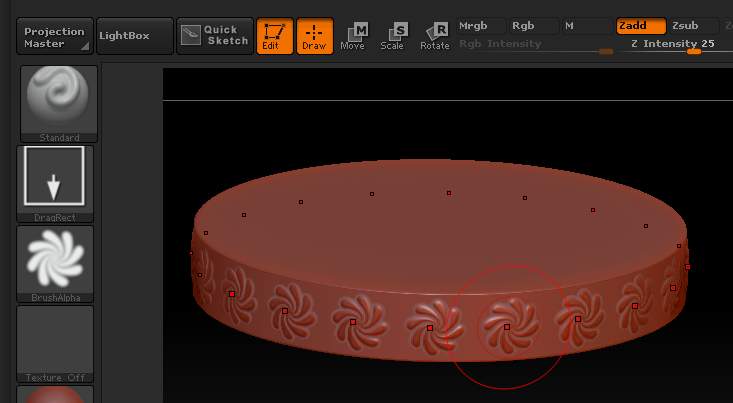
You can use radial symmetry and a DragRect stroke. Activate symmetry in the Transform palette, select the correct axis then turn on the ® button. Set the count in the slider.

[attach=232193]radial.jpg[/attach]

Attachments

radial.jpg

Is there any way to have control over the pattern after you place it on your mesh. Reason I ask is because when I bring in the alpha it squishes it because the pattern is a line like the example I posted. I need a way to be able to re position it after the fact.

You can use the Drag Dot stroke instead, setting the Draw Size so that you get the size you want.

Alternatively, use Projection Master to project one portion at a time, rotating the model by a set amount using the Deformation>Rotate slider between each pick up.

Your image looks like the kind of situation where I’ve used stencils pretty successfully. You can make any alpha into a stencil in ZBrush. Just bring the pattern in as an alpha and then select Make ST in the alpha palette. Make sure to then turn the alpha off (so your not using the alpha over the stencil). Hold the space bar to access the stencil controller and check out the stencil palette for more cool features. The methods marcus_civis mentions are better for speed and precise symmetrical placement, but stencils may help you out, too.

One other note: I always put my stencil modeling on a separate layer so I can tweak z intensity after I finish modeling.

Awesome thanks guys. I figured out a work around. What I didn’t realize is that Zbrush brings in all alphas (not matter how long) as square images. So I went back and made an alpha that tiled horizontally (and was square) then used the radial symmetry along the “Y” axis to place the alpha on the model and then lined it up so no seams showed.

ZBrush 4 doesn’t. Why aren’t you using that?

I have 3.5r3 and i saw they are giving free upgrades but i dont know how to get it

Submit a ticket at Pixologic Support, and include the relevant purchase information:
https://support.pixologic.com/