ZBrushCentral

pronounced poly edges on obj import

When I import an obj file into ZBrush the poly edges are very pronounced. Even after subdividing the object several times, edges are still evident in the displacement map. Is there a way to import an obj so poly edges are smooth and don’t affect the displacement map?

The image is at SDiv 3, subdivided with Smt on.

Attachments
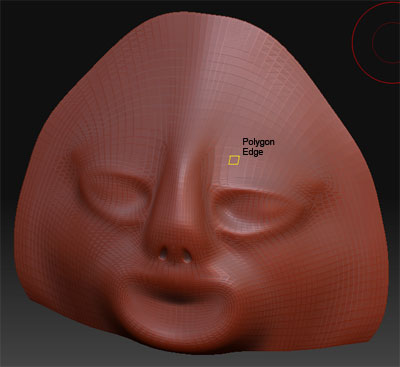
poly_edge.jpg

zbrush doesn’t use a smoothing algorithm so all edges are displayed as “hard”

The reason it doesn’t is because every application has a different way to display the smoothing effect on a mesh. So if it looked right in Max, it will look different in XSI, or Maya, or anything else.

So Zbrush just takes the actual geometry, not an approximation of it.

Anyway, to get rid of the edges in the displacement, add more subdivision levels until you can’t notice the hard edges.

I hope that helps.

thanks goast666,

I have tried subdividing the first couple SDiv without Smt to maintain the boundary then turn on Smt for the remaining SDiv’s (to my maximum SDiv limit), but this keeps the polygon edges. Guess the only to do it so it is smooth is do all the SDiv’s with Smt on. Seems like I’ve tried using Import & Crease to maintain smoothing groups (and boundary), but if I remember right there were some issues with it as well.:confused:

You can try just adding a crease before you subD.
Tool>geometry>crease

You can change how ZBrush displays a model but note that this is only how it is displayed in ZBrush - how the model displays in another app will depend on how it implements smoothing. Also the smooth model will only display when you are not sculpting/moving your model.

  1. Switch off the Transform:Quick button
  2. Set Tool>Display Properties>DSmooth to 1.
  3. Set Tool>Display Properties>DRes to 6.

You can experiment with the settings to see which suits your requirements.

HTH,

Thanks goast666 and marcus_civis. I’ll play around with it some more.

Nice plugins Marcus :+1:
Bill