ZBrushCentral

Projection on intersecting meshes

Hi,

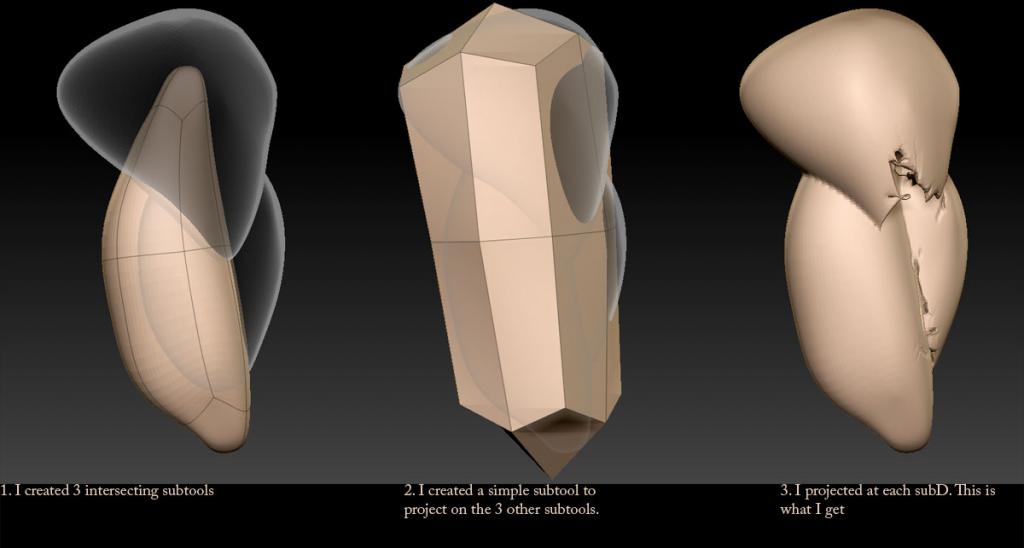
I wanted to know if it was possible to project a simple mesh onto a group of intersecting subtools and get a perfect result. Right now, some part of the mesh tends to be projected inside the intersecting meshes as you can see:

I also tried remesh and dynamesh but it doesnt give me a perfect crisp result even if I set the resolution high. And once I project I get the same problem.

Attachments
Projection_Problem-1_zpsbdbc9d9f.jpg

2 things:

1-It looks like your cage isn’t out far enough. I don’t remember the name of the slider in Z but it will give you a realtime update showing how far out your mesh is for the projection.

2-Zbrush will rarely give you a perfect projection on multiple meshes. If they are not one solid mesh zbrush tends to fail at intersecting geometry. A lot of people will use another software for baking for this reason.

In defence of Dynamesh, it will give you excellent results if you know how to use it. I would suggest you watch the “Military Assets with Joseph Drust” videos, especially the “Modeling A Radio” parts 1 & 2 videos in ZClassroom for a few pointers.

Great, thanks zber2!

I think I wasn’t using dynamesh properly!