ZBrushCentral

Projection not working after retopology [STILL NOT SOLVED]

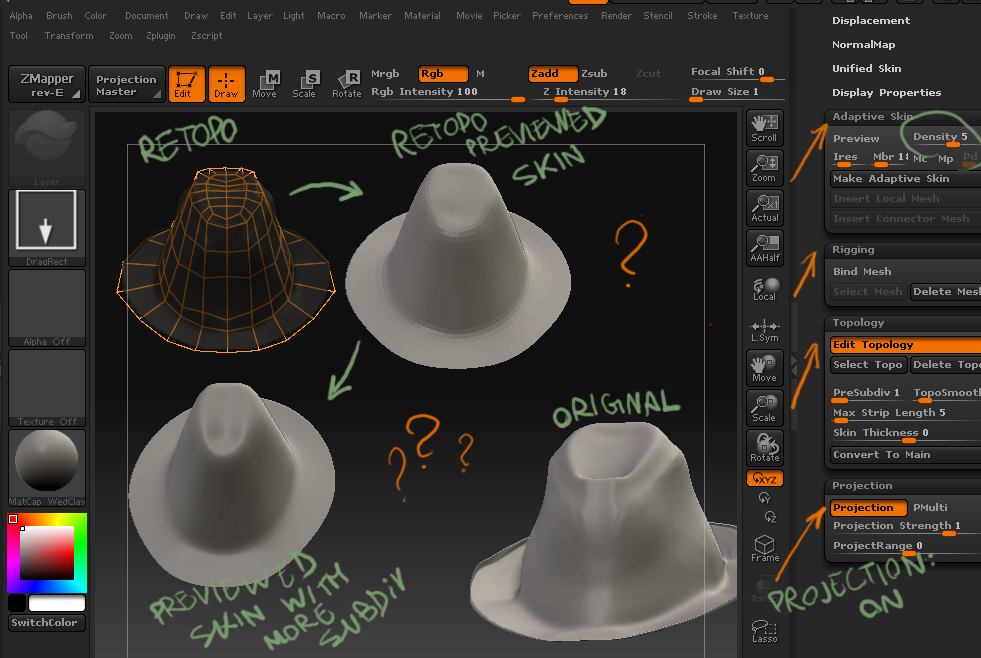
I was trying to retopologize this hat. That process when well, but for some reason, I can’t bring in the detail back.
I’ve done a few projections using the same method that here, and they’ve work just fine.

The process I’ve used for retopo:
1-Select a Zsphere
2-In Rigging selected the hi-res mesh
3-In topology>Edit topology.

The process I’ve used for projecting:
1-In projection, hit project
2-In Adaptive Skin get a good density level.

I’ve also tried to mess with the presubdiv in the topology tab, and some other features, but nothing goes on.

Please Help!

Attachments
RETOPO_issue.jpg

from the image of your “original” the normals look flipped, unless you happen to have a major upward edge coming from the hat edge.

Also, if projecting inside the Zsphere isn’t working, you can always create an adaptive skin of the object at level 1.

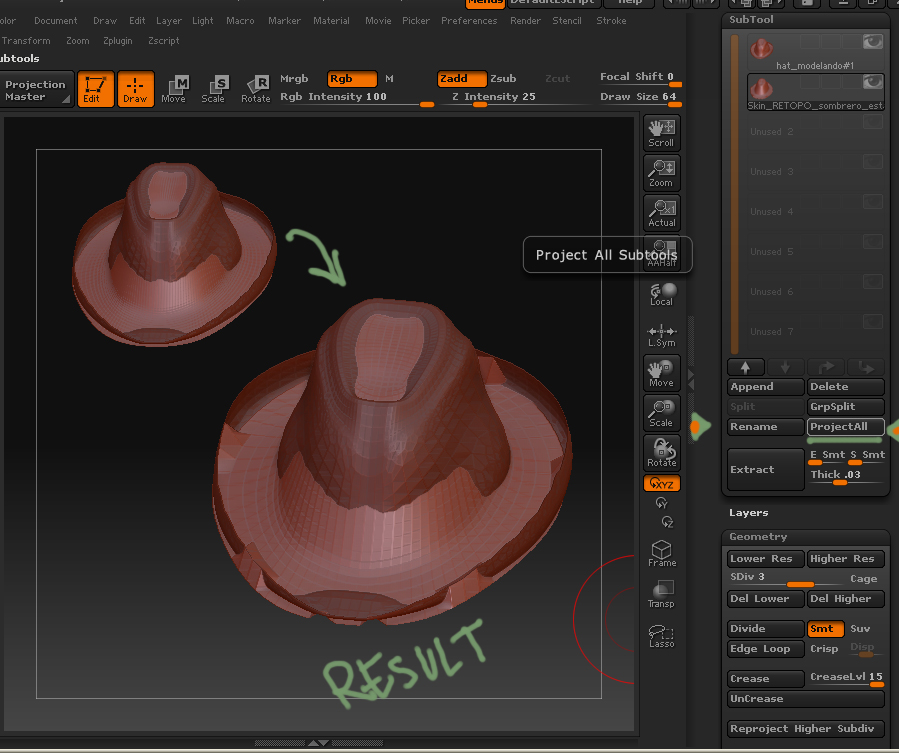
take that mesh and append it as a subtool into the “original” hat. Subdivide the “new” mesh to a similar mesh density. Show both meshes, have the “new” mesh selected, and hit “project all” in the Geometry panel. That will project the mesh as well, I find it usually has better success rate than using project inside of a Zsphere.

But either way, if your meshes normals are flipped there will be problems, so check that first.

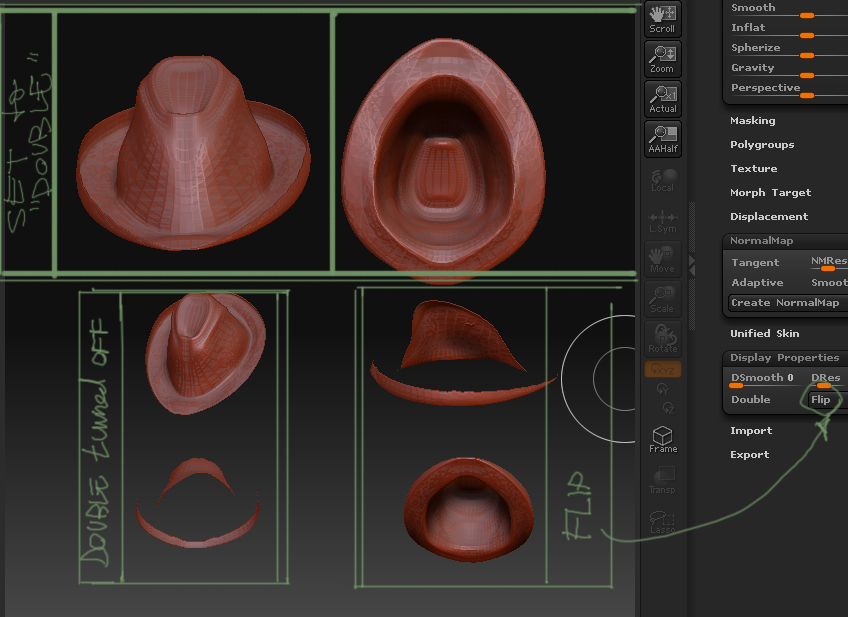
tool>display options>double…if that makes it look funny when it is either on or off, there is a problem with the normals

THANKS A LOT FOR THE REPLY.
It could be a problem with the normals, but the hat edge do happen to have a major upward edge coming from it (I mean, it’s deliverated). Also, I already have the display set to “double”. If I turn it off, I can only see this outer part of the hat, but I can’t see the inside of it (the place that touches your head when you put it on). There appear no artifacts when changing any of the display options, except for the desapearence of the faces that are inside. That surley means that those normals are facing inward, but shouldn’t they? I thought that it was right, but now that you mention it I’m not so sure, so I’ve attached a picture showing how the ztl is dispalyed

I’ve tried your method for alternative projections, but I don’t see a “project all” feature in the Geometry panel; Insted, there’s one in th Subtool tab, so I tried with that one. Didn’t work though. I made both visibles in the subtool palette, but leave selected the skin one. Only a few vertex moved, and they did in a weird fashion. I’ve also attached a picture showing the result.

If it’s the normals, could you advice me what sort of tool should I look for in maya?

I really appreciate it.

Attachments

normals.jpg

project_all_problem.jpg

goast, thatnks so much that’s a problem that’s come up many times and my solution was not very satisfactory before.

@ OP - sounds like maybe your hat’s got its edges joined together around the rim. Not sure there is any way to easily solve this issue.

well, you’re right about the normals, they are correct. and the lip on the hat is deliberate, one problem may be the difference in the “projecting” mesh onto the “original”.

I know, I know…i’m gonna ask you to post up new images again, or the .ztl with both hats in it. I am guessing that the projection distance needs to be increased in order to capture the mesh better, as they are so different from the looks of it. Granted, doing that means that verts are probably going to choose the wrong faces to move to…so you might end up with a jumbled mess.

Anyway, if you post up more images, post up the retopo as it stands, as well as the original mesh, both low sub and the highest for both. do one set individually, and then another with both tools visible and on top of one another.

A hat should be the easiest thing in the world to project…so I hope the more images, or trying to get your mesh to project will hlep us help you…or something like that anyway.

neurogenesis - np

Hello

I noticed in the very first images you had in this post under the project menu your projectrange was set to 0. Was that the case. If so, you need set this slider up. A better way to check your normals is with ZMapper. Go into that and turn normals on and you will see what direction your normals are facing.

It looked like your new topology was not following the rim. I would take a look at editing that to fit better for the projection. There is no reason for the projection not work from the looks of your images.

Let me know.

Paul