I’m having a problem with projection not completing. I have areas that are lower then the topology should be and also some Islands above. It’s rather odd. Does anyone have any advice?
Attachments
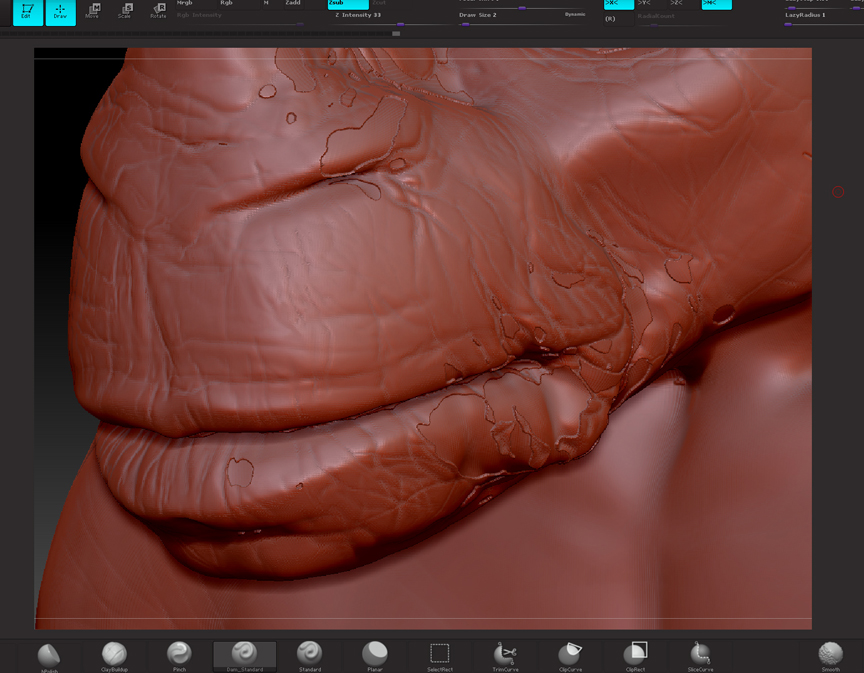
I’m having a problem with projection not completing. I have areas that are lower then the topology should be and also some Islands above. It’s rather odd. Does anyone have any advice?
Have you tried to modify the default settings of project all, for example the distance? From the image it seem that the distance is too short to reach those areas. Setting an excessive distance can also cause problems but it is question of trying some numbers or even masking when needed to achieve specific results in specific area. For example running over your current status another project all but with the areas free of problem masked. I say that because higher projection distances probably will start to create problems with the mouth.
Thank you so much Altea. It really helped to mask out the areas that needed the re-projection. It cut the time down dramatically to something more manageable. I tried a few different settings and you were right. Having it at 1 was causing trouble. I backed it of and ran it a couple of times. I found smoothing in between to get rid of the stalactites helped. I’m wondering is there a method or approach that is most successful? Should i start at the lowest setting and work up?
I personally start with a low setting and start to see the problems, in some areas won’t reach and in other will overlap. Areas sharply concave will have the tendency to overlap even with low settings and it is a good idea even to mask then in early stages. The areas that don’t reach depends of how well matches your models and typically are easy to solve in a second pass having masked the rest.
A good technique is to do the projections step by step starting in the first subdivision level and to move to the next level. Going to the higher subdivision from start can be very slow because it needs to do more calculations and problems will be more difficult to solve. When increasing the subdivisions don’t pass to the next one without solving the possible problems first (overlapping or under reaching). Specially overlapping can be a nightmare if it is not solved as soon as it appears. With each subdivision the problem is harder to remove and in early stages is easy.
Use polygroups to isolate both sides of the mouth after a projection and check problems. Or sometimes, if the mouth is creating lots of problems isolate the top or bottom part of the mouth in both models before to project. Really project all has problems to notice two different topologies touching.