I am having problems with one specific tool when I use Projection Master. It is only with this tool. I’ve checked my UV’s and use the same settings when working with other tools which do not distort like this:
Attachments
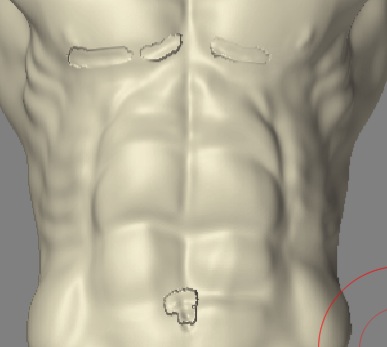
I am having problems with one specific tool when I use Projection Master. It is only with this tool. I’ve checked my UV’s and use the same settings when working with other tools which do not distort like this:
What were you doing in Projection Master? Texture? Deformation? Both? What were your settings? What tools were you using?
Aurick, I was using deformation to do detail work. I used the simple brush, the single layer brush and smooth, which all produced a similar distortion when the model was picked up. It appears to be working normally when dropped to the canvas. Fade and Normalized were deactivated.
When I said the effects were specific to a tool, I meant the model itself. Not the tools you use within ZBrush. Other models do not seem to distort, only the figure in the thumbnail I attached. Poly count is around 2.5 million.
Thanks.
Well, since the problem is only happening with one model we know that the problem isn’t with ZBrush. It’s with that one model. These are the possibilities:
Thanks Aurick. I’ll check those possibilities out.