ZBrushCentral

Projection Master Pickup Lighting or Material problem...

Hey everyone,

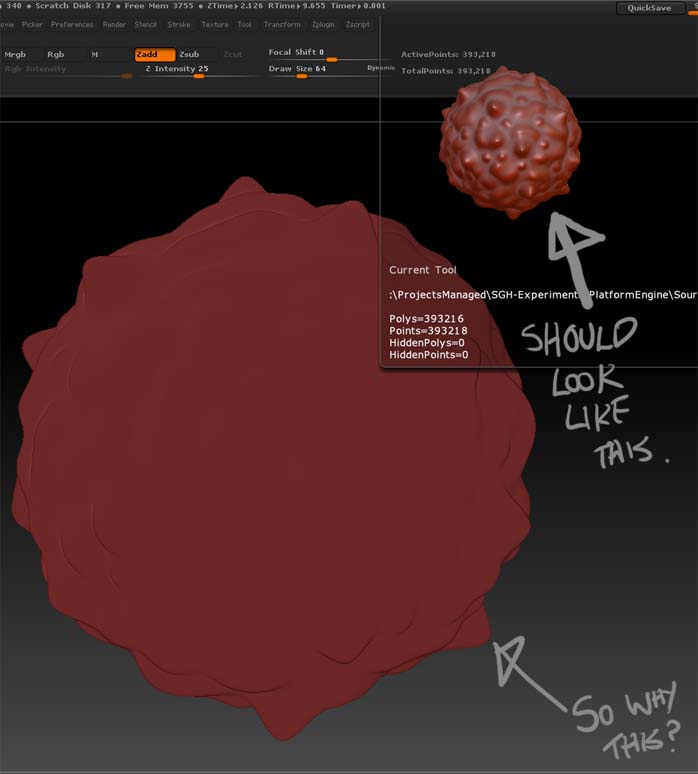
Every now and again, after I pickup from projection master, my tool appears washed out as in the attached image… Can anyone recognize what’s happened here?

Every material I select has this same washed out look… I haven’t really been able to find how to fix it, either - restarting zbrush, loading other tools, they all have the same washed out look… I’ve found that it eventually fixes itself after a bunch of random reloading/restarting/resetting…

Projection master will then work as expected a few times until it happens again.

Thanks for any insight. :slight_smile:

Attachments

zbrushproblem.jpg

I don’t know what causes this to happen but you should be able to fix it like this:

  1. After picking up from Projection Master, turn OFF Edit mode.
  2. Set RGB Intensity and Z Intensity to 100.
  3. Turn ON Edit mode.

Change your material?

G is close to V, have you tried to press V?

Thanks Marcus_Civis - that’s the fix I needed!
Still not sure what’s causing this - I don’t think it’s accidentally pressing a shortcut as I mostly stick to pen input.

In anycase, that’s good enough for now - thanks for the responses guys.