ZBrushCentral

Projecting high to low bump maps

So this is a question to the experts, so I’m trying to figure out the best method of getting the best normal maps from a high poly to a low. here are the methods I know, and issues I had with them. Just tell me which way you guys think I can get the best quality or you guys think is the fastest?
options

  1. zbrush projection method: Projecting details from the high poly to the low in zbrush. This includes subdividing the low and projecting in details from the high. Then bringing the low to the lowest subdivision level and creating a bump map.a. the problem I find with this is that reprojecting is time consuming since you have to weak the mesh so its geometry flows well as its being projected. Also when zbrush makes a bump map, certain edges get smoothed out

  2. xnormal: this includes projecting details in zbrush as explained above, then getting the bump from the high to the low using Xnormalsa. I find that xnormals does hard edges allot better and creates really sharp edges when needed.

  3. crazy bump: getting the bump map from the diffuse using crazy bump, you can upload a low poly mesh as an OBJ in to crazy bump and adjust it in real time in crazy bump.a. unfortunately the preview is not very accurate to how the bump maps show up in a game engine or modeling program.

  4. render to texture: taking the high poly and decimating it then exporting it to a 3ds max, then using render to texture to get the detail from the high poly to the low.a. This way I get fairly good details on the large aspects but a lot of the small details won’t show up since the decimated version won’t keep them, and this method gives me some really bad seams on the model.

So what do you guys think is best from my list, and does anyone else have a method of doing this?
Xnormal is my favorite method. I think its important because it allows you to control the vertex normals used during the calculation, use a cage or blocker mesh to eliminate any projection errors, and finally lets to specify a custom tangent basis to ensure the resulting map is synched to your rendering engine.

Cryrid, thank you for the feedback but I’m sorry to say you are speaking a few levels above mine, so I have a few fallow up questions.


  1. define vertex normal’s I haven’t ever heard that term before, and how does controlling that make for better quality. Is it like rendering where you have to tweak a few setting and create a few different maps before one gives the best results.
  2. I think I understand how a cage works, but in the projection process when chronologically should I turn on the cage, is it before I create the high poly or at the point of projection and I’m assuming I should turn it on the high poly, but then that won’t make sense because if the high poly is a dynamesh, it won’t have the correct topology anyways.
  3. I’m not sure what tangent bases is, I mean I know how to turn it on but I don’t know how to adjust it in programs such as zbrush, 3ds max, or crazy bump. I’m assuming that these tangents are the unit of measure used to create the normal’s, and for best results you want all your programs to be under the same unit.

If you answer my questions I will very much appreciate it and it will help me become a better artist.

Something on normals>> http://docs.pixologic.com/user-guide/3d-modeling/exporting-your-model/normal-maps/

define vertex normal’s I haven’t ever heard that term before[quote]
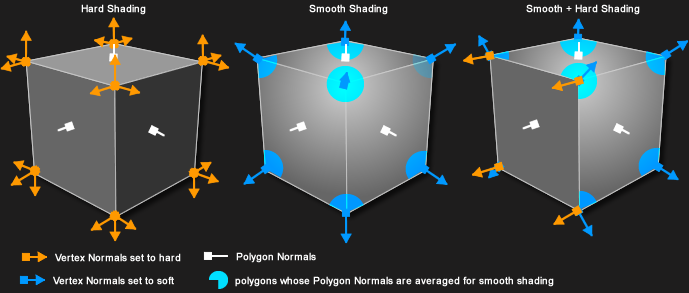
Every vertex has it’s own normal (basically, which direction it is pointing). This is what gets used to control the shading/smoothing groups. This page should explain it a bit more technically, and this image especially might make it easier to understand how the vertex normal changes between averaged and hard edges.

They can be important as they help control how the normal map is created (they can influence the direction that the rays fire from when baking, and are likely an important piece of data that tangent-based normal maps need in order to get the correct shading out of them). Basically those kind of maps are created with specific data and formulas, and work perfectly only when rendered with the same data and math.

[quote]I think I understand how a cage works, but in the projection process when chronologically should I turn on the cage, is it before I create the high poly or at the point of projection and I’m assuming I should turn it on the high poly, but then that won’t make sense because if the high poly is a dynamesh, it won’t have the correct topology anyways.

If you use a cage, then you only need it at the end of the process, when baking. It’s topology needs to match the final low resolution model’s topology.

I’m not sure what tangent bases is, I mean I know how to turn it on but I don’t know how to adjust it in programs such as zbrush, 3ds max, or crazy bump. I’m assuming that these tangents are the unit of measure used to create the normal’s, and for best results you want all your programs to be under the same unit.

http://www.opengl-tutorial.org/intermediate-tutorials/tutorial-13-normal-mapping/ might explain some of what it is.

It’s generally not something you can easily control in other programs (although I think certain shaders and viewport modes in Max might let you do this; the 3point shader originally helped 3dsmax sync its viewport rendering to the tangent basis used when baking a normalmap in Max, as until 2012 even those used different formulas for calculating the tangent basis). They are all programmed to render things a certain way. ZBrush used to have a normal map previewer in older versions, but one of the reasons it was removed was because of all the mismatching (a map might look wrong when displayed in zbrush as a result even though it might look right in another program, or vice versa).

There are programs like http://www.handplane3d.com/ which can also attempt to specify the tangent space used, and in xnormal’s case there are plugins which can control the basis it uses when baking.

thank you so much this was a great help

So I finally got a good method going for making normal maps with xnormals, but I don’t think x normals creates displacement maps, any suggestions here

http://eat3d.com/forum/questions-and-feedback/height-map-xnormal-what-we-call-displacement-map