ZBrushCentral

Projecting Details. Model not loading up. (update- fixed!)

Hi ! Writing again with more questions regarding retopology and projecting details from a high res model to a retopologised mesh. Followed the steps mentioned in this nice tutorial
http://www.veoh.com/videos/v1107274r38q3GFB?searchId=3428757899982687232&rank=7
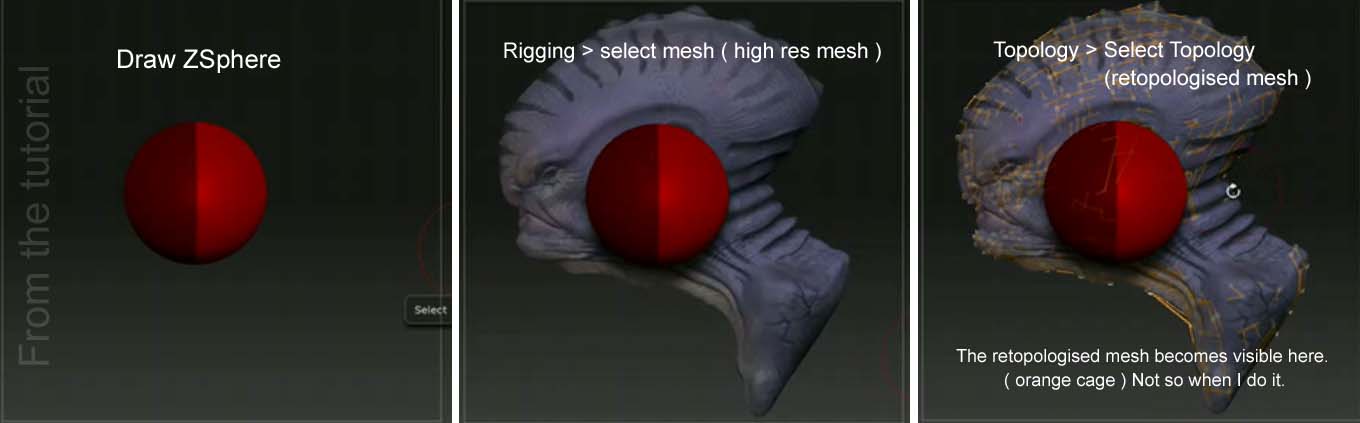
but can’t get the mesh to project at all. Please tell me if I am missing something.see the attached jpg.
steps:

  1. load a Zsphere.

  2. Go to tools > rigging > select mesh> select the high res sculpt.
    the model loads up and is visible behind the ZSphere.

  3. Go to Topology > select topology > select the retopologised model.
    Nothing happens. In the tutorial a lit wireframe is visible after selecting
    the retopologised model. When I attempt this, the retopologised mesh doesn’t load up.

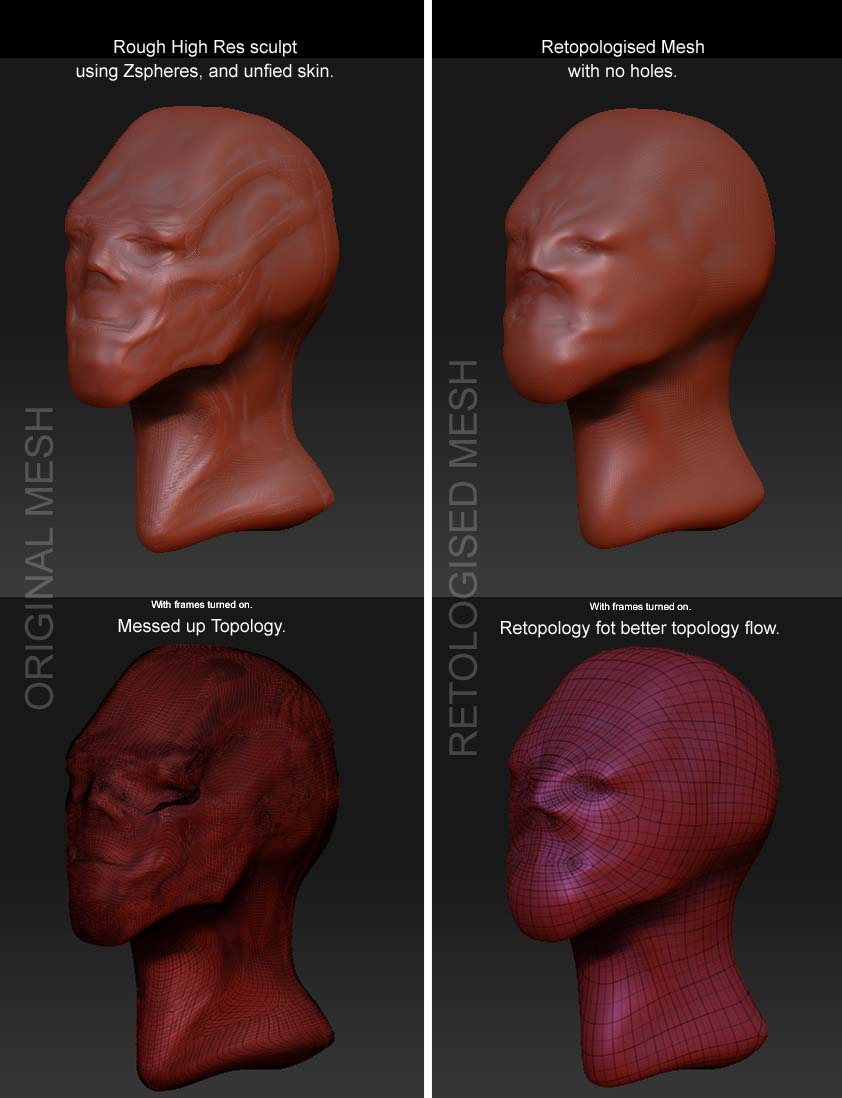
Are there any specific things to keep in mind before projecting details from high res models to retopologised meshes. I mean things like same sub div levels etc.My retopologised mesh is a close match to the original sculpt.

Please help.

Attachments
projecting details copy.jpg

You need a step 4: Turn on Tool>Topology>Edit Topology

http://pixologic.com/docs/index.php/Topology:_Mesh_Editing

Thanks for the reply Aurick, but following what was mentioned in the tutorial ( url posted earlier )I did press on edit topology ( not sure why but anyways ), after which I was supposed to press on Projection, which I did.

Basically, the mesh I retopologised doesn’t load up when I press on select Topology. I have the high res mesh with the Zsphere ( pressing A or preview only toggles between the high res mesh and the Zsphere ) , but not the retopologised mesh. So pressing on the projection button ( after pressing edit topology )does nothing ( the usual orange progress bar near the top doesn’t show up ), and I am left with the same high res mesh with no transfer.

I am clueless now. I tried to do this on another model, but no luck yet. What am I missing here?!

was reading through a thread started by Rastaman http://www.zbrushcentral.com/zbc/showthread.php?t=48689&page=3&pp=15&highlight=Projection , where he mentioned towards the end
“but under 3.1 you will no more see your retopoed low-poly-cage in the final setup for transfering the details.”

Is that why i can’t see my retopologised mesh. Even then I can’t get the projection to work. Anybody?

just on the off chance that this might be whats happening, recently i tried importing a mesh into the topology menu myself and got nothing, just the first parent zsphere orange topology dot, after much trial and error, i came to realize that zbrush has a limit on the amount of polys/zspheres the topology mesh can have when you try to import it, somewhere around 15,000. i don’t really know if you’re trying to import a the mesh or not.
alternatively now that you have your orignal model and your new toplogy you can use the Projectall feature in the subtool menu to project your details.

Hi Spaceboy. Thanks for replying. Both the models I use , that is , the high res sculpt with uneven topology and the retopologised mesh are ztools, saved out after converting them into polymeshes. Both are therefore the same size and there are no scaling issues.

However, and I am repeating myself here, after drawing a Zsphere,loading the high res sculpt with rigging > select mesh, when I press on Topology > select Topology to select the retopologised mesh, I am still seeing only the high res sculpt, ( unlike what I see in the video tutorial where a orange cage of the retopologised mesh loads up and is visible along with the high res mesh). Also, Like Rastaman mentioned, the high res sculpt gets darkened ( after hitting on edit topology ). Now pressing on projection does nothing ( there are a lot of other settings like sub div level, adaptive skin preview, and density level etc too , to make things a little more complex ). . So no transfer is happening , and i suspect it can’t because the retopologised mesh isn’t loading up at all.pheww… it takes considerable effort to write this

I did try the project all feature through sub tools, and it works like a charm. But i want projection to work too, and I wanna know if there are any specific advantages in using projection.I don’t want to miss out on a great feature which might help me considerably in making some stunning models…yay.

So why isn’t projection working?

i wasn’t talking about scale, i was talking about polycount, or in the terms of retoplogy, zspheres.
tell me this:
load your retoped mesh by itself as a normal tool and tell me the polycount, if its somewhere over 15,000 polys i’m pretty sure thats the problem, otherwise i’m not sure.

Spaceboy, will post the polycount for both in a while. please stay tuned…

Hi Spaceboy.
the polycount for both meshes is as follows:
High res mesh : 129848 polys
Retopologised mesh : 81536 polys

Spaceboy, it worked !!! I reduced the polycount of the retopologised mesh and it did load up. I then increased the density value in the adaptive skin menu to get a more high res mesh. Thank you so much.

I think it needs to be mentioned in tutorials related to the topic, that the polycount of the retopologised mesh needs to be kept low for the mesh to load up. I committed the mistake of increasing the polycount of the retopo mesh just so that I could get a better transfer. but that is something that can be controlled during projection itself. Thanks again.:smiley:

glad to be of help, i too wish they’d update the wiki with the actual amount that zbrush doesn’t like because i’ve seen a few people run into the same problem but never really knowing why.

There’s a 25,000 poly limit on imported topology. It mentions this on the wiki page here:
http://www.zbrush.info/docs/index.php/Importing_Topology

DOH! thanks marcus, in all honesty i don’t think i’ve ever seen that page on the wiki, must’ve been looking at something else.