ZBrushCentral

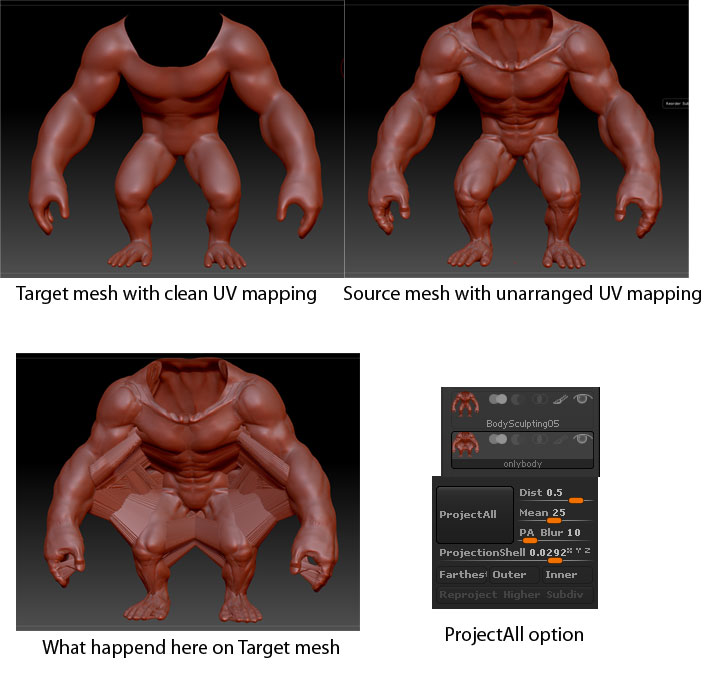
ProjectAll issue (Target mesh massed up)

Here is my question.

When I used simple mesh like a sphere, there was no problems on projectAll.
When I tried to ProjectAll, most time I faced this result.

Here is my process.

  1. first subtool layer - sculpted mesh like muscle detail with un-arranged uv map.

  2. second subtool layer - base mesh with no detail and clean UV map.

  3. subdivided 4-5 times on second subtool mesh.

  4. store morph target second subtool mesh.

  5. push projectAll btn.

  6. result is like that.

I tried a test version with simple sphere and brief sculpting bumps. and applied same process. It transfer the perfect same detail from source to target. but the muscle body doesn’t…

What happend here? what am I missing? Thanks in advance for your any advice.
and is this the only way to transfer the sculpting detail from a mesh that without uv mapping?

Attachments
question.jpg

what size is your mesh?
does it fit within tool.preview window? Is it overly big, or small?

It is pretty huge. On preview window, the mesh is shown a part.
Before I import this mesh to Zbrush, I sized up this mesh to 200cm height in Maya. (Original mesh was a quarter size)

Let me try on original size.

(And I check UV flips and bulged up target mesh little bit.)


I tried it with size downed mesh.
The problem is same…

Append in new mesh.
zplugins
transpose master
tpose (top left button)
Tool.deformations.unify
tpose again (top right button) I don’t remember exact names…
now try projection.

When I size downed the mesh… the highest subdiv on the mesh is messed up…

But I learned that size can be matter and new feature on zbrush from your advice.

Thanks a lot! I appreciate it!