ZBrushCentral

Project All Working as intended?

So here are a few primitives with Remesh All. I then chose the new polymesh and hit the “Project all” and this is what I get.

I’ve read the tutorial with the Vampire chic, regarding masking by polygroups,Remesh and Project all and see how he is getting a really clean mesh.

But mine always are garbage. What am I doing wrong? Project all.jpg

try setting PABLUR to a factor of 8, ala 8,16,32 etc

thanks spaceboy.

I still get similar results. Do you do multiple projections at increasing blur values?

For best results all subtools must be polymeshes. I would guess that the ring is not a polymesh (did you start with that?). Also try turning off Tool>SubTool>Maximum, and don’t set the PA Distance too high. Something like 0.03 might give better results.

Project all in Zbrush 3.5 has just never worked properly as it did in 3.1. has this been recognized as a bug?

here’s something I’m trying to do. The plane is placed slightly below the middle of the tile. project all settings at maximum, pa blur at 10, all tools are polymeshes, this is the result…
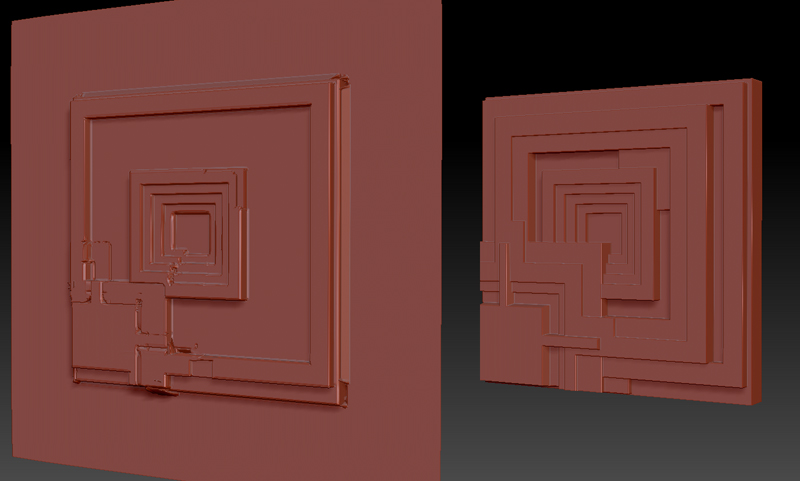
projectall.jpg

not only can it not project the entire height of what seems a fairly thin object, but there are many distortions (holes etc) on the surface, never gives a clean result.

I seem to recall in older versions you could project heads through planes! I’ve messed around with every setting and get the same problems.

can someone verify this as a bug? Project All in 3.1 always gave a clean result at the click of a button.

EDIT ok setting the PA blur higher eliminates the distortions/holes, though on a detailed head I can imagine this would blur out the detail. It still cannot project the higher placed details of the source mesh though.

EDIT2 ok I think I’ve gotten round the problem. I think the PA mesh has to cover the source entirely. I extruded out the middle portion of the plane to match the height of the source slightly over. seems to project the full height fine after that. So if anybody has problems try adjusting the PA mesh to fit slightly over the source.

in this instance i would make a alpha and use that as a mask to pull out the shape.
for projecting as i said a factor of 8 helps.
i agree that it was easier in 3.1 but sometimes it was problematic as well, its not perfected yet i think.
also ennis house or deckards apartment?

thats the one :wink:

I did try converting it to alpha, though for some reason the alpha would appear on the plane too stretched/rectangular and not squared. Also it was difficult to match the exact heights of all the pieces with the deformation>offset as it would just give one height for all.