ZBrushCentral

'Project All' in R3 artifacts...

Perhaps there has been a thread addressing this already, but I can’t seem to find it…I’m using ‘Project All’ in Zbrush 3.5 R3…It seems that in areas of cavity, or perhap abrupt angle changes, I get artifacts when I use ‘Project All’…it does not seem to make a difference when I adjust the dis slider, Maximum button, or PA Blur,…sometimes there is a change of some kind, but nothing significant or desirable…I recall this function working more reliably in 3.1, so obviously there is something I’m doing wrong…if anyone has suggestions, I’d greatly appreciate it,

thanks,

-j
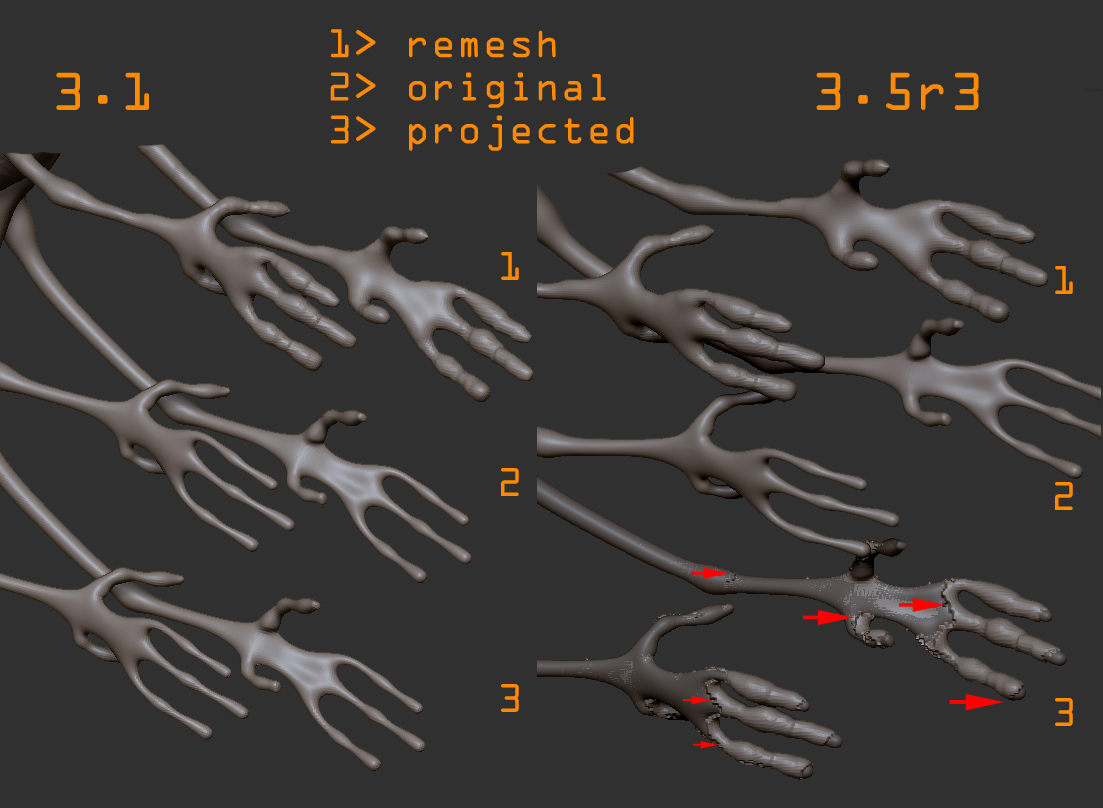
Can we see some images and is there a tool you have we can test with?

Paul

been having these problems too, it seems with anything I’m trying to project anymore. Hopefully there is a solution out there.

okay so i’ve finally encountered this. as first post says no matter what settings (and i tried brotha) can fix this.
i made the model in 3.5r3 got the errors, took it back into 3.1 and it was fine.
so far that makes lazymouse, projectall and unifed skin(i made a thread but no official response, even supplied a model) all screwed in this release, yay!

[test175.jpg]

Spaceboy412,

Yes, this is the same results I get,…Also, I have posted a thread related to the broken Unified skin, http://www.zbrushcentral.com/showthread.php?t=77982

I’ve been a little busy, so I haven’t gotten around to doing my own screen grabs of the project-all error,…but ye, I get this sort of ‘incomplete’ effect, similar to what you have posted,…and in the next couple days I’ll be posting some examples to clarify,…but it happens with every model I try without fail, so I assumed perhaps there was some setting I was not aware of, or perhaps my version of R3 was faulty in some way…in any case, I really hope there is a way around it or a fix coming soon…

-j

Hello Josh

It is just your PA Dist. Can I have the model to test with and then show you?

Paul

gabo maybe that is josh’s problem with the PA, however we both have said we’ve adjusted the PA slider, i’ve done it from one end to the other, multiple settings, multiple blurs, maximum on and off.
anyway here is my model.
http://www.sendspace.com/file/gpezpe

josh here is my thread about the unified skin problems:
http://www.zbrushcentral.com/showthread.php?t=78240

Same boat as Spaceboy here. It happens to all my models I attempt to project, and I’ve tried it with a plethora of different settings and moving the PA distance slider back and forth. I don’t remember this being a problem, or at least as noticeable in r2.

It’s making retopographing my work impossible right now.

Here Spaceboy

I am going to look more into this but I just moved the mesh a little and kept the PADist lower then .2 with PABlur off. Need to look closer at this though. Do you have an email address that I can send this to you?

Paul

you can just post it somewhere like i did and put a link here, that way others can test it too, they’re just simple hands anyway.

about what you are saying, moving the mesh and keeping it under .2 with blur off. i don’t see why moving the mesh is a viable fix, this is not needed under 3.1, also what about all the other parts of the model/models that will need this, isn’t that the whole point of having those adjusting sliders now? the distance between the two tools is so minimal this should not occur, and as i said in 3.1 its not an issue and works fine.

bump

Any solutions to this yet?

I had this exact problem as well, and no matter what settings I chose it was not projecting correctly. This is only on the latest zbrush. 3.1 works fine.

spaceboy412: Thanks for uploading your test mesh.
Some projection-normalization code is only activated when PA Blur value is a factor of 8. This will change in the next ZBrush update but for now, simply set the PA Blur to a factor of 8 (i.e. 8,16,24,32,40…80,88,96 ) in order to get proper projection.
Hope this helps:)
-Support

whoa! that is some craziness but it WORKS! at least on the mesh i provided, will have to test later.
thanks for this, never would have figured that one out.:+1:small_orange_diamond:+1:
please check out the unified skinning problems i posted about (mesh provided there too) http://www.zbrushcentral.com/showthread.php?t=78240

thanks again.