ZBrushCentral

Problems with zBrush normal maps in other 3D apps

I generated simple displacement on a polysphere with GUVtiles UV unwrapping and generated normal maps using different presets. The normal map is reversing itself on the seams of my UV borders… Not reversing itself on the red/green channels… but actually “inverting” itself it seems…

I have been trying multiple methods of displaying normal maps properly in 3DS max, Unreal 3, and Maya. All my normal maps have been generated using tangent space from zbrush using various tangent space presets… I have tried seem overpainting etc… the closest I could understand the problem so far is the the vertix tangent space of the highres model and normal map don’t translate into the UV space of the lowres geometry model… but I thought that was the whole point of using normal maps? I am well aware of flipping the textures vertically when exporting etc… Is there a technique that I am missing? I have attached a jpg to show the simple pipeline that I used to generate my problem.

Attachments
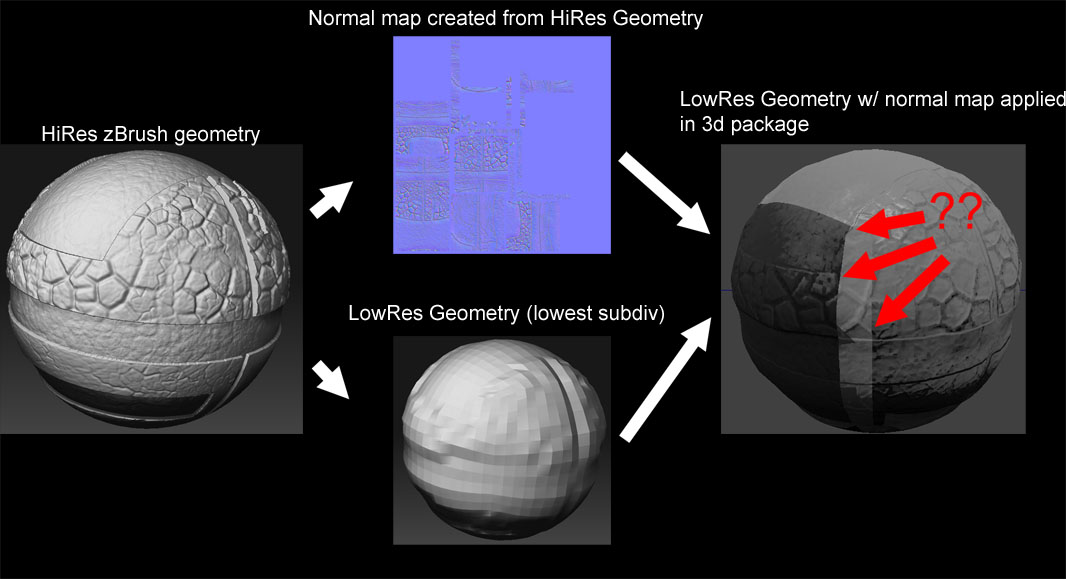
Normal_Mapping_Pipeline.jpg

i have no idea, but pulling my hair for the very same problem… with xsi in my case. Im not even sure that the problem is ZB related, what makes me sick is the fact that ZB is able to display the normal map in Zmapper GPU preview without any problem… but then if i generate the same map in xnormal instead of zmapper, it shows the very same problem… wanted to try ultimapper too but that one crashes…

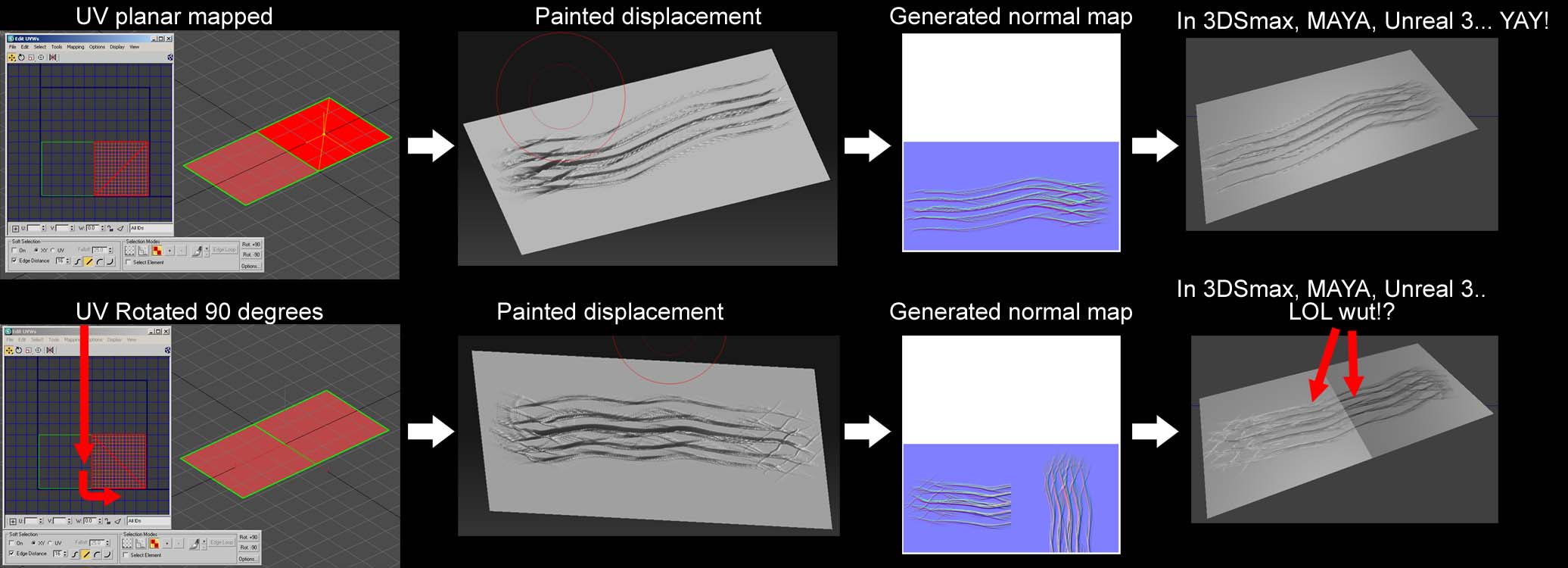
I hear you son, I know it’s definitly not a zMapper only problem. I have auto unwrapped and generated normal maps in maya/3dsmax as well with the same problem, I am certain has has to do with the vertex tangets and UV space. But I don’t know enough about it to fix the problem. Oh and by the way the same exact problem happens with object space normal maps as well. I have done another experient by creating two planes, and welding them together side by side so they are parralel, then unwrapping them. In the UV space they would be side by side just like the geometry and the normal maps work fine, only when I rotate one of the planes in UV space will the seams start to show again using normal maps with that inverted artifact. I am going to take some screen shots now to show I am am referring to…

Here’s a very simple example of the exact problem I’m having… er… we’re having.

Attachments

Simple_Example.jpg

I as well have no idea. Sorry my good man :frowning:

There’s a very technical reason for this, which ultimately boils down to just what tangent space normal maps are, and how they’re calculated. AUVTiles and GUVTiles mapping are not appropriate for tangent space maps because that type of map always results in visible seams. You need to use mapping that hides those seams as much as possible.

Object space maps normally do not have this problem. Sometimes the map may look like there’s a problem when you view it on the model, but when you actually render it the finished results are fine.

i dont think that tangent space GUV tile maps are unusable per se. Mainly two points lead me to believe that:

  1. the problem appears not on all seams, but just on some few(in the render that is). Colors in the map can show flips across seams, however the render shouldnt.

  2. Zmapper does a correct GPU preview

BTW Object space works fine here

Hey I think i figured out how to do it finaly. auv maps
ok, after you got poly paint and sculpt done.

click eye to not show other sub tools. just the one you want to export.

  1. make texture to desired size and create new one, go lowest sub level, apply auv map to tool.

  2. click zmapper, use #3 normals, after creation flip v and export the normal map.
    3 then make a new texture, should still be on lowest level, auv tile then go to highest level. click col > texture, go lowest again, flip v and export object. dont export the texture because its on the obj.

  3. ok now import the obj to max and it already has the texture but you have to make a normal bump in the bump map channel. the settings for it are

  4. swap red an dgreen

  5. local xyz
    3.normal bump amout -1 not 1.
    I got to work with no seems, I probubly did this the hard way but now that I got it to work i will do it like this until further educated/advised on the matter.
    let me know if you can get it to work.

Edit:-1 or -100 not much difference there on the normal bump.

I’m having the same problem in XSI and I don’t understand why Zmapper can show a perfect GPU preview with the “seamy” created UVs and XSI can’t make it correctly.
Anybody knows a way to use a “seamy” tangent map in XSI without those artifacts? just like in the Zmapper GPU preview. :rolleyes:
Thanks.

Try this tutorial: http://www.zbrushcentral.com/zbc/showthread.php?t=56882

[04-04-08 UPDATED With better zmapper settings]

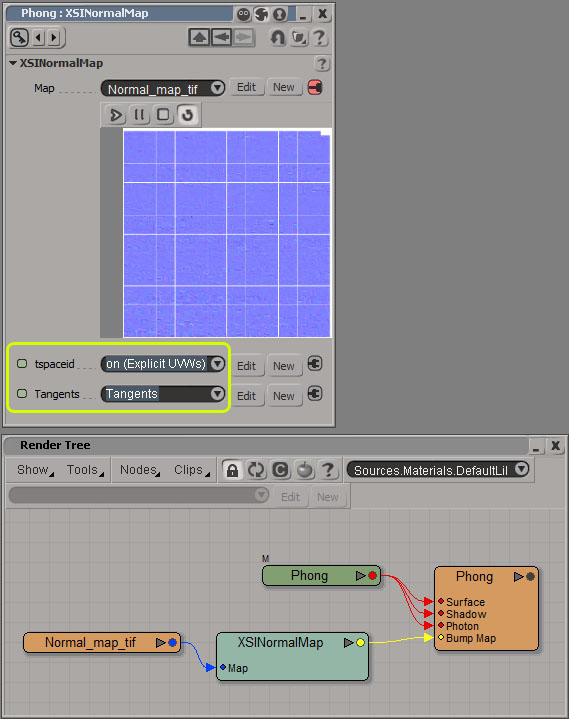
Thanks! but after hours of pulling my hair, I found the way to use normal maps with visible seams in XSI. It’s very easy: Assign a Tangent property to the mesh. That’s all, it works perfectly with the XSINormalMap node and Zmapper.

I found the solution in the Ultimapper tool of XSI. When I used it to generate a normal map, I saw that the map had visible seams as well, but it was working well on XSI, so I opened the explorer and compared a Ultimapped mesh with a non-Ultimapped one and I found the tangent map property :lol: So here is the Tangent Normal map workflow between Zbrush 3.1 and XSI 6.5: 1) Create Adaptive UVTiles or Group UVTiles if you don't have created UVs yet 2) Create a new texture with the wanted resolution 3) Select a low resolution subdivision
  1. Open Zmapper and use this configuration file I made after trying diferent expert pass settings, I think this is the best for XSI:
    http://www.ciclopez.com/XSI65_TangentSpace_HighQuality.zmp

    1. Create the Normal Map
    2. Export the texture and the low res OBJ from Zbrush
    3. Import the OBJ in XSI and assign Tangent property (Get>Property>Tangent)
    4. Assign a new material to the mesh
    5. Go to the render tree and use a XSINormalMap Node (Nodes>Bump>NormalMap):
      [XSINormalTree.jpg]
  2. Select tspaceid and Tangents in the XSINormalMap properties

  3. Try a render

That’s it. ^^

Pretty good man. Good job.

Today I tried with another object, and the settings I used in Zmapper (the settings of my previous post) didn’t work as yesterday :o
I don’t know if I didn’t realise the seams but now I see some seams following my own “tutorial”, so I tried changing some parameters of Expert pass 1 & 2 and now is working (as I thought it was working yesterday)
I’m a bit confused :confused:

Someone has tried my settings?
If there is any problem, I will update the post.

Finally updated with (I think) better settings, I hope it will be useful to someone. Sorry for my english :stuck_out_tongue: