ZBrushCentral

Problems Retopologying

I’m retopoyng a Dog mesh to minimice poly count in order to use in a videogame.

Retopoying the tail, trying to get the left side result but I get the right side mesh.

[retopo.gif]
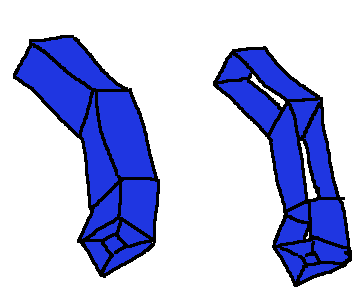
I delete the points and retry it in many other orders but allways the same result. Anyone knows how to fix it?

I exported it to another 3d app and fixed it manualy (deleting those sides and refilling it) and when I import it again to Zbrush it imports another time the wrong way. Can I adjust some IMPORT option to avoid this to happend?

thanks

There are a few specific situations Zbrush sometimes has problems retopologising. Simple appendages made up of 4-polygon /vertice loops, like fingers are the most common. In that situation, it doesnt seem to have enough geometric clues to make good guesses about. I’ve never found any combination of settings in the Adaptive skin palette that fixes it.

Sometimes you can solve the problems by laying out the geometry in a different order, or slightly different shape. More often, the simplest solution is to simply add a little more geometry into the appendage…another line of verts splitting the length of the appendage should do it. Then you can tie off that line of verts somewhere convenient, generate the mesh, and take a few seconds to delete the excess geo in an external modeler, reimport, and Zbrush will respect the imported geo.

Also,I recommend always retopo-ing with the “Max Strip Length” in the topology palette set to 4. Set any higher, and Zbrush will sometimes do undesired things when trying to fill in quads.

Ok, i’ll try more polys.

thanks

The other method to “retopo” a 4 sided appendage inside of Zbrush is to actually ignore the fingers when doing the retopo (for cases where a 4 sided finger is needed) You create the base geo and leave a single quad face for each finger. After you create your adaptive skin for the rest of the body you can take each finger base and create an edge loop and then move the resulting face out into the finger (an extrusion basically). With the move brush you can then place the “finger” where it needs to go.

A little bit of a work around and a lot more work that it should be (I actually just take it into another app to make the extrusion). but it can be done in Zbrush.

Attached is an image to help illustrate the idea.
handTopo_01.jpg

Ah, that’s good idea…never thought of that. A little fidgety, but it has the benefit of not needing an outside application to touch up.