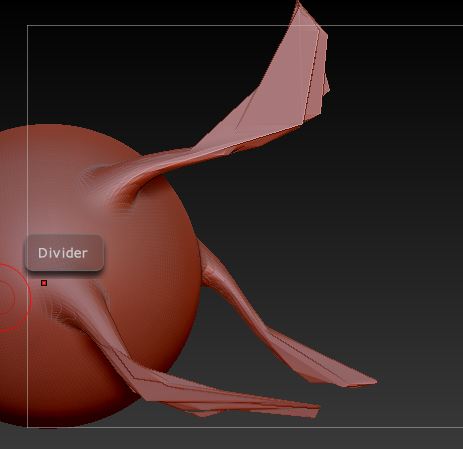
Hi, I just received ZBrush as an early Xmas present and I’ve been playing with it for a few days. I’ve been playing around with the brushes and watching all the tutorial videos I can find, but one thing I’ve noticed is that my snakehook brush doesn’t act like it should. Instead of pulling the pixels smoothly where you can manipulate them it “shatters” them. Like this:
It renders the brush almost useless. Any attempt at smoothing only makes the problem worse and creates holes in the mesh. I can’t figure out what the problem is. Anyone know what’s causing this? I’m running Windows 7 64bit, 3 GB ram, Intel® G41 express chipset. Zbrush 3.5R3 (I know I need more RAM)
The program itself runs fine, even when doing tasks that require higher cpu usage, models look fine, it’s only when using the snake hook brush that I have this issue. Do I need a better graphics card? (Hope not X_X) or is this just a matter of settings that I’m overlooking?
Attachments