ZBrushCentral

Problem with subdivision

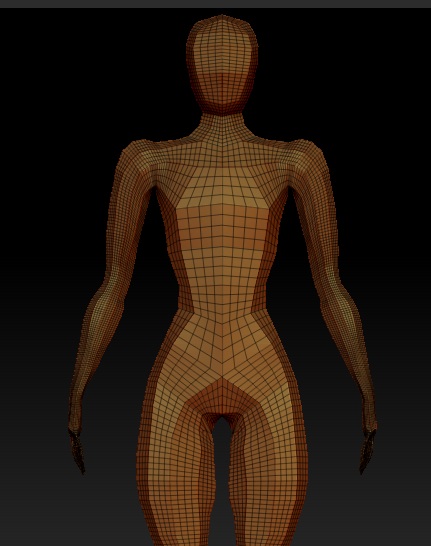
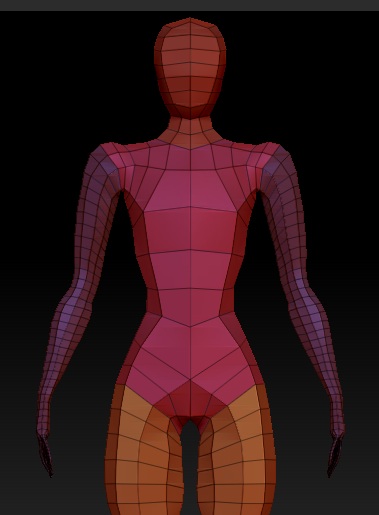
Basically, i’m a newcomer who’s trying to learn, i’ve created a basemesh using zspheres, split it into groups (4 groups, legs, arms, torso, head), and formed it the way I want it. Now I go to divide it, and that’s where I hit my problem. The mesh subdivides but doesn’t create any sub-levels (can’t move from level 1 to 2 etc), and it doesn’t smooth. The SMT (subdivide smooth) option is on, but it doesn’t make any difference…

What am I missing?

(Images attached: before subdivision - after subdivision.

Attachments
1.jpg

2.jpg

Did you skin the model or can you still press A to return to the ZSpheres view?

If it’s still connected to the ZSpheres, dividing will only add resolution rather than subdivision levels. To get normal behavior you need to skin the model with the Tool >> Adaptive Skin >> Make Adaptive Skin button.

http://www.pixologic.com/docs/index.php/ZSpheres:_Adaptive_Skin

No, I already made it an adaptive skin. =/
I could just start back at the exported zsphere tool i saved but I wouldn’t get to find out whats gone wrong, and that would be helpful with learning the program :stuck_out_tongue:

Edit - Well, I found a work around.
In a new workspace I created a new zsphere, then used the topology rollout, select topo, chose my model tool, clicked edit topo twice to rebuild the mesh, set adaptive to 1, make adaptive (didn’t seem to do anything), so I previewed with A and then pressed Make PolyMesh.

It works, but the problem is I don’t know WHY it works. I don’t like not understanding a situation. =/

You could get this exact behavior if you have a small portion of the model masked. The rest of the model will be subdivided with no smoothing, and no subdivision levels will be added since the masked portion remains unchanged.