Hi,
I recently changed my monitor, and now I have a 22" LCD at 1680*1050. The problem is that at this resolution the standard font of ZB interface is way too small for me :(.
I searched in Preferences, and also in past discussions on ZBC, but did not find any real solutions. Do you have any suggestion? How do you people work with that microscopic fonts on large monitors?
Thanks in advance.
Ciao
Lower your resolution.
Thanks for the advice. Anyway, I find a bit strange that ZB forces the users to lower the resolution of modern monitors, instead than allowing a simple change of font size :rolleyes:.
Considering that at present large monitors, also bigger than mine, are very common, I would ask if the next versions of ZB (3.5 and 4) will address this issue.
Thanks.
I TOTALLY agree!! My old eyes, my large monitor, there should be larger font options in ZBrush!! Now where did I put that magnifying glass of mine?? 
I just installed ZB 3.5, and gave a quick look at the Preferences. It seems that still there are no possiblity to increase the size of the interface font. I find this really strange, I can’t believe that people able to use this marvellous software still work at low resolutions. If I am the only one with this problem ignore me, otherwise please Pixologic, in the version 4 put that damn option to change the font size 
I agree. With version 4 around the corner lets have some font size options for the UI please!!
Thanks!
RAMWolff, from the (lack of) answers concerning this problem, I am starting to think that we are the only two ZB users without eagle eyes 
laughs
I live in a building with some noisy neighbors, I’m the only one that has a mouth on him here that actually gets folks motivated to get things settled down when stuff hits the fan rather than just putting up with the bothersome noise some folks make.
Seems to be the same thing on line at times. Some call us complainers, I call us wise for bringing an issue to Pixologics attention since I HIGHLY doubt we are the only ones with vision issues!!
More likely, you run your interface at higher resolution than the majority of the user base, so most people aren’t being faced with the same issue.
Not that theres anything wrong with that, and it seems reasonable that Z should feature some controls for scaling the UI better.
I have a 30" monitor. It’s set at it’s native resolution. One shouldn’t have to have a lower resolution to get bigger fonts. it’s a PITA to resize icons and interface objects just for that. Font’s sizes should be an option in EVERY application out there. We all get older and so do our eyes!!
I too am with you on this. I found that the most important feature for me to customize is the only one I can’t. Honestly…I don’t like the font they use
either…but I would be much happier if I could bump up the size a few point.
I ain’t that old either–so it ain’t just the cantankerous grumpy types with the problem…
Definitely need the option for larger font size without lowering monitor resolution, a nice and quick keyboard shortcut like with FireFox and Acrobat hit “CTRL+” would be nice.
I found a WONDERFUL extension for Firefox called “No Squint” You can set it globally for Zoom Text or Zoom Page (which is my choice so all the boxes and graphics come up with the text) I set mine at 120% and it’s MUCH better!!
If you run Firefox then you can find that extension here:
https://addons.mozilla.org/en-US/firefox/addon/2592
I don’t run IE or any other browser so can’t help with those!
Hi,
I’m in this thread again because, as worried, also in the new 3.5 R3 the font remains microscopic :rolleyes:
Concerning Firefox (and many other browsers and programs), my life changed time ago, when I discovered the CTRL+mouse wheel method to instantly change the zoom level
Oddly enough, there are a similar problem also in the very new Blender 2.5: suddenly the section where choosing different font and size disappeared (in that case is anyway possible to reduce the problem by increasing the interface DPI).
It is strange that the two most promising 3D software of our times have interfaces that require a supersight;).
Hoping for upcoming ZB 4…
Hi:)
ZBrush has a ‘zoom’ window which you may find helpful.
I am including two UI configurations with the Zoom window incorporated into the UI.
One UI with large zoom…
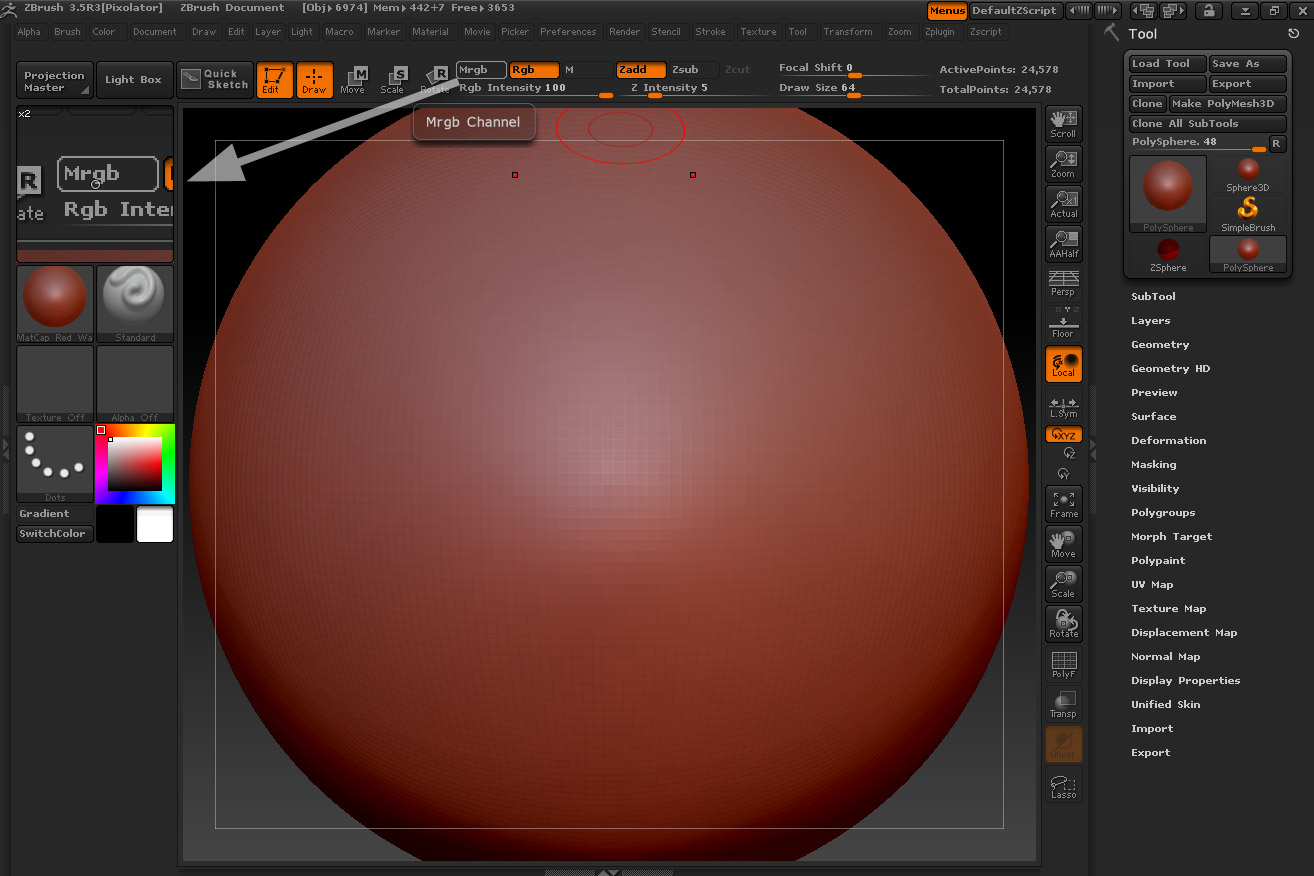
If interested, you may download the attached zip file and install one of the included UI (Installation instructions are included within the zip file).
-Pixolator
Attachments
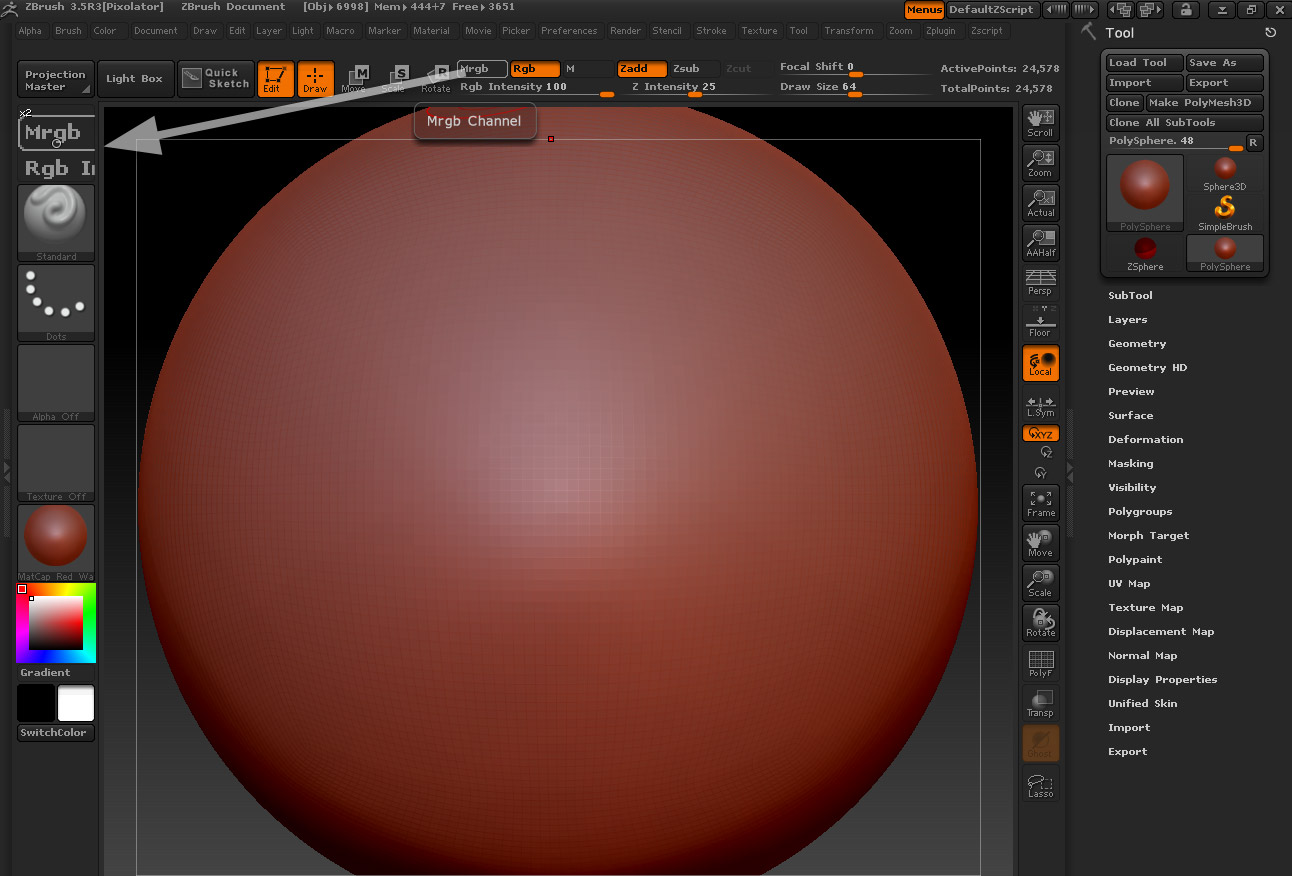
UIWithZoom.zip (314 KB)
Hi Pixolator:)
Thank you very much for the answer and for providing the configuration files. I tried them. Surely they can help, but sincerely I think that the best solution would be, in the future, to allow a choice of the font size (also considering that high resolution monitors are very common nowadays).
By the way, what is the small circle at the center of the zoom window, that interfere a bit with the underlying enlarged text? Is it possible to eliminate it? (please don’t kill me, I really like ZB ;)).
I also want to express my strong interest in a font size option. This was the very first thing that I wanted to customize in ZBrush, but I just couldn´t find an option for that.
I have a 24" screen running at 1920x1200 and the text is just too small in ZBrush.
I too am very frustrated with the whole font issue. It is a necessity for me to have readable fonts and in the past has kept me from buying software that I would have loved to own. Please incorporate this in the next version of ZB!!!