Hi aurick,
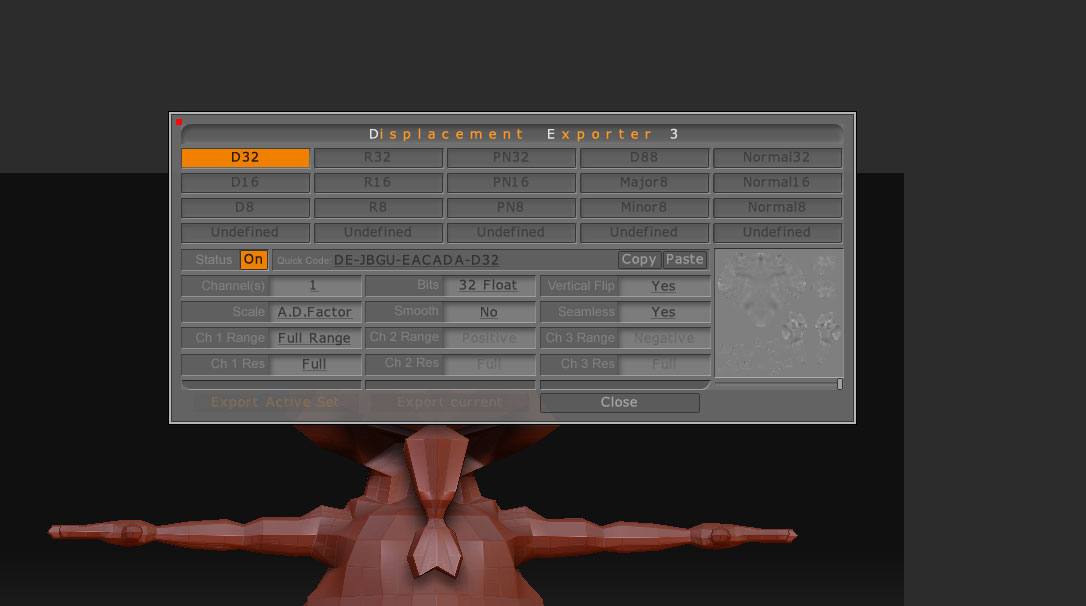
was wondering if you could help me, i have jst finished my zbrush model and exported my dismap through the multi displacment 3 option in zbrush, it was a 16bit tiff. for some reason maya has decided not to reconise tiff files when trying to add the dismap to the file node in maya, this is what i got in the output window.
TIFFReadDirectory: Warning, C:/Documents and Settings/Bretapotamus/Desktop/Monster/monster_displace1001+d32.tif: invalid TIFF directory; tags are not sorted in ascending order.
TIFFReadDirectory: Warning, C:/Documents and Settings/Bretapotamus/Desktop/Monster/monster_displace1001+d32.tif: wrong data type 1 for “Software”; tag ignored.
TIFFReadDirectory: Warning, C:/Documents and Settings/Bretapotamus/Desktop/Monster/monster_displace1001+d32.tif: invalid TIFF directory; tags are not sorted in ascending order.
TIFFReadDirectory: Warning, C:/Documents and Settings/Bretapotamus/Desktop/Monster/monster_displace1001+d32.tif: wrong data type 1 for “Software”; tag ignored.
TIFFReadDirectory: Warning, C:/Documents and Settings/Bretapotamus/Desktop/Monster/monster_displace1001+d32.tif: invalid TIFF directory; tags are not sorted in ascending order.
TIFFReadDirectory: Warning, C:/Documents and Settings/Bretapotamus/Desktop/Monster/monster_displace1001+d32.tif: wrong data type 1 for “Software”; tag ignored.
TIFFReadDirectory: Warning, C:/Documents and Settings/Bretapotamus/Desktop/Monster/monster_displace1001+d32.tif: invalid TIFF directory; tags are not sorted in ascending order.
TIFFReadDirectory: Warning, C:/Documents and Settings/Bretapotamus/Desktop/Monster/monster_displace1001+d32.tif: wrong data type 1 for “Software”; tag ignored.
TIFFReadDirectory: Warning, C:/Documents and Settings/Bretapotamus/Desktop/Monster/monster_displace1001+d32.tif: invalid TIFF directory; tags are not sorted in ascending order.
TIFFReadDirectory: Warning, C:/Documents and Settings/Bretapotamus/Desktop/Monster/monster_displace1001+d32.tif: wrong data type 1 for “Software”; tag ignored.
TIFFReadDirectory: Warning, C:/Documents and Settings/Bretapotamus/Desktop/Monster/monster_displace1001+d32.tif: invalid TIFF directory; tags are not sorted in ascending order.
TIFFReadDirectory: Warning, C:/Documents and Settings/Bretapotamus/Desktop/Monster/monster_displace1001+d32.tif: wrong data type 1 for “Software”; tag ignored.
TIFFReadDirectory: Warning, C:/Documents and Settings/Bretapotamus/Desktop/Monster/monster_displace1001+d32.tif: invalid TIFF directory; tags are not sorted in ascending order.
TIFFReadDirectory: Warning, C:/Documents and Settings/Bretapotamus/Desktop/Monster/monster_displace1001+d32.tif: wrong data type 1 for “Software”; tag ignored.
TIFFReadDirectory: Warning, C:/Documents and Settings/Bretapotamus/Desktop/Monster/monster_displace1001+d32.tif: invalid TIFF directory; tags are not sorted in ascending order.
TIFFReadDirectory: Warning, C:/Documents and Settings/Bretapotamus/Desktop/Monster/monster_displace1001+d32.tif: wrong data type 1 for “Software”; tag ignored.
mental ray for Maya 9.0
mental ray: version 3.6.1.6, 17 Jul 2007, revision 21668
mental ray: got 8 satellite CPUs.
TIFFReadDirectory: Warning, C:/Documents and Settings/Bretapotamus/Desktop/Monster/monster_displace1001+d32.tif: invalid TIFF directory; tags are not sorted in ascending order.
TIFFReadDirectory: Warning, C:/Documents and Settings/Bretapotamus/Desktop/Monster/monster_displace1001+d32.tif: wrong data type 1 for “Software”; tag ignored.
TIFFReadDirectory: Warning, C:/Documents and Settings/Bretapotamus/Desktop/Monster/monster_displace1001+d32.tif: invalid TIFF directory; tags are not sorted in ascending order.
TIFFReadDirectory: Warning, C:/Documents and Settings/Bretapotamus/Desktop/Monster/monster_displace1001+d32.tif: wrong data type 1 for “Software”; tag ignored.
TIFFReadDirectory: Warning, C:/Documents and Settings/Bretapotamus/Desktop/Monster/monster_displace1001+d32.tif: invalid TIFF directory; tags are not sorted in ascending order.
TIFFReadDirectory: Warning, C:/Documents and Settings/Bretapotamus/Desktop/Monster/monster_displace1001+d32.tif: wrong data type 1 for “Software”; tag ignored.
TIFFReadDirectory: Warning, C:/Documents and Settings/Bretapotamus/Desktop/Monster/monster_displace1001+d32.tif: invalid TIFF directory; tags are not sorted in ascending order.
TIFFReadDirectory: Warning, C:/Documents and Settings/Bretapotamus/Desktop/Monster/monster_displace1001+d32.tif: wrong data type 1 for “Software”; tag ignored.
ive been through windows>settings and prefferences> plugin manager, and the tiff option is on, iam clueless.
sorry for all the waffling, i hope you can help me.
Thanks