ZBrushCentral

problem of detail ,please help me :)

hi to everyone.
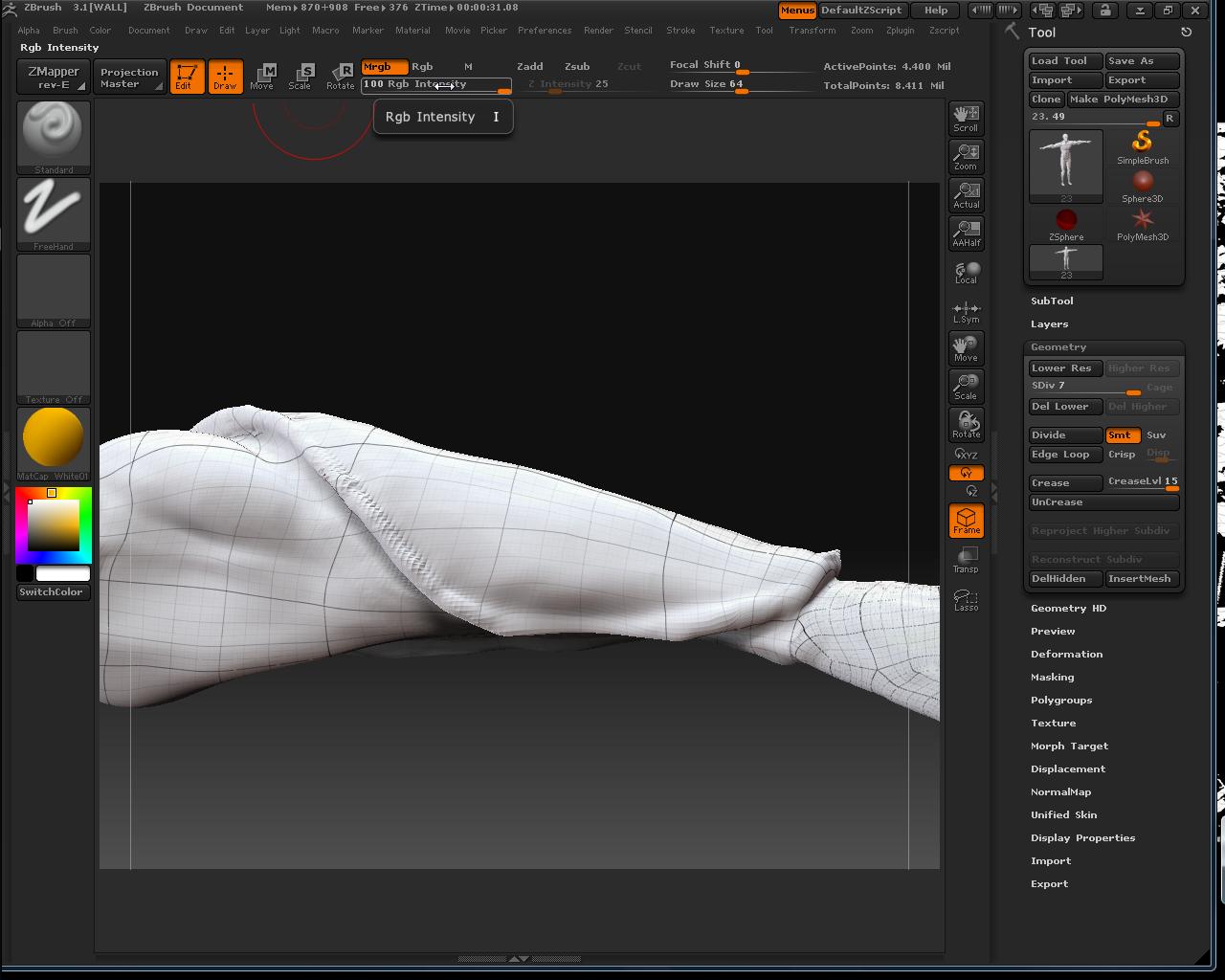
my problem is this : i’ve begain model my human body in low poly ,now i have to make some more detail in the arm. i’ve to do an armor detail but i have (i think) less edge loop that i need.

so this is the result … so i think i can : insert edge loop tool in zb , but i don’t know if i can do it.

or : redo all the work :’(

i try to do another division but my pc do go over the 7 lvl

Attachments
ScreenShot048.jpg

Try making the armor using subtools rather than creating it all out of one mesh.

If you use the topology tools to create the subtool (instead of mesh extract) you will have control over the edge loops.

This will make editing/changing the armour easier, and also any texturing, etc.

_K

thanks fore reply.
i need to have an only model to not have too much poly in canvas.
for this i’m modeling on .
this because i need to print in 3d this object

Looking at your screenshot you should really retopologize the mesh. The flow and directions of your edgeloops are very counterproductive for the forms you are trying to create.
Adding extra detail (either via subdividing or adding edgeloops) to your current topology will be rather expensive on your polygon count.

thank you,i think that i have to retopologize the mesh. you know if i can do it in the only area that i need to have this detail or if i have to rebuilt all the structure ( is the first time that i 'll try to retopologize ) . thank u

You can do it either way.


  1. Tool>Rigging>Select Mesh
  2. Tool>Topology>Edit Topology
This lets you retopologize the whole mesh.

  1. Tool>Rigging>Select Mesh
  2. Tool>Topology>Select Topo (select the same mesh again)
  3. Tool>Topology>Edit Topology
This lets you selectively edit the existing topology.

More info about both of these methods is found in the documentation linked to in my signature.

However, if the part of the mesh that you show has topology problems that are not good for your project, it’s highly likely that the rest of your model faces similar problems. In that case you’ll really want to redo the whole mesh. (And in case you hadn’t noticed, the advice you got came from a guy at Weta Digital. He knows what he’s talking about!)

really thanks for helped me, in these days i 'll try to solve these problem .
fortunately the rest of the body haven’t the same problem :slight_smile:

next time i’ll post the complete work

that 4 all to everyone