ZBrushCentral

Problem merging SubTools as DynaMesh

Okay, this one is driving me nuts, but it’s so basic that I almost feel embarrassed asking for help. All I want to do is subtract a merged mesh from a sphere using an oval such that the true sphere becomes a “moon”. The result I get is the opposite, whereby the oval gets a sphere-shaped “bite” taken out. I followed this tutorial to the letter, but still can’t get the result I want:

http://docs.pixologic.com/user-guide/3d-modeling/modeling-basics/creating-meshes/dynamesh/with-subtools/

I guess I really need to know if this is a bug in 4R6?

Attachments
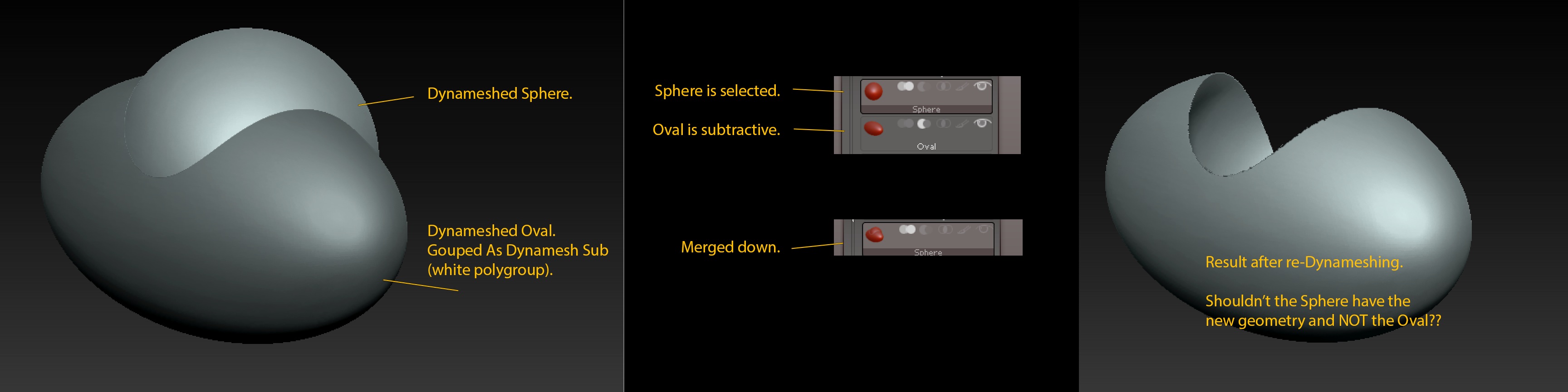
spheres.jpg

I remember reading somewhere that you had to turn on Groups under Dynamesh once merged then Subtract using Ctrl drag on Canvas.

I found this… http://www.zbrushcentral.com/showthread.php?181530-Dynamesh-Subtaction-Problems&highlight=dynamesh+subtract

I hope it helps

I think I found the problem: the white polygroup mesh shouldn’t be a Dynamesh. At least that’s what worked for me. I could’ve sworn I saw the video tutorial on the Pixology website on how to do this, and it was mentioned that both SubTools should be a Dynamesh.

Anyway, I got it to work.

Thanks.

Thanks for the tip Wyattfox :slight_smile: I was tearing my hair out with the wrong subtool being subtracted, but enabling the Groups button before merging down sorted it

The Groups Button!!! I was having the same problem-- top subtool was a dynamesh, lower subtool was not, icons correctly selected, but when I merged and dynameshed, the wrong mesh was subtracted-- until I found this thread. Thank you, Wyattfox!