Hi! I’ve been trying to fix this since … I’ve lost the count. I have this model I made on Modo and then brought to ZBrush. I textured it on Zbrush and added some small sculping details. BUT, when I finished the texture, I find that instead of looking nice (like this), it looks all pixeled… like this.
The texture map is 1024 x 1024. I modelled and unwarpped its UVs in Modo… and I plan to animate it in Maya… I took it to Maya already and it looks like the “baaad” pic. I’ve got another model (made it on a different computer actually) that has the very same problem :S
I thought that it might be because the texture map that I unwarped in Modo has the UVs too close to each other… so it’s like the final texture mixes up some UVs or something. However, I took the texture UV by UV, and separated them manually (the “relax” tool didn’t work very good)… but nothing went better… the texture keeps getting pixeled the same exact way.
I also tried to make it a bigger resolution, I even textured it all over again 2 or 3 times, but for some reason, even if I set the resolution to max, the final map is 1024x1024. What’s going on??? does anybody have an idea!!! than you guys!!
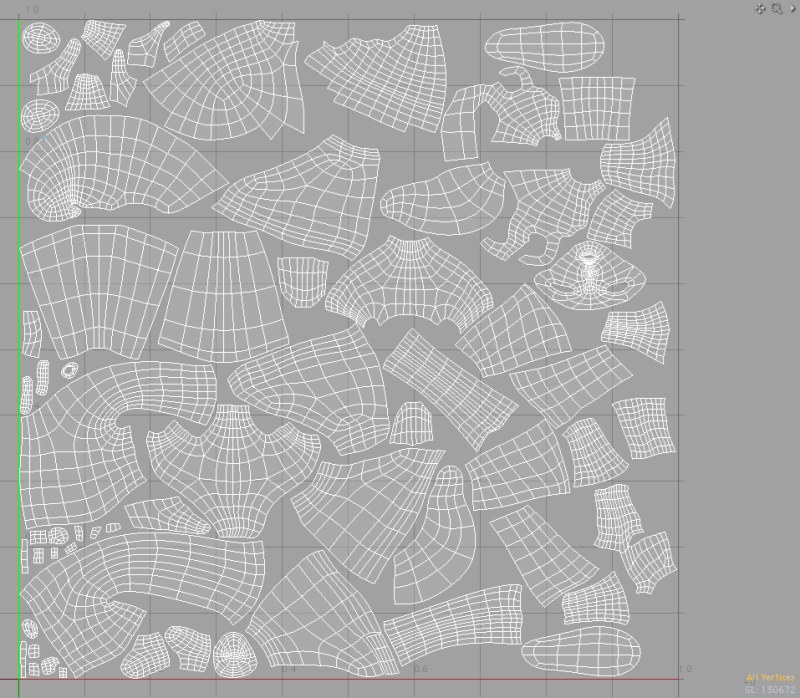

 Can it be because of ZBrush’s default settings ?? do you guys know how to change those? (I’m not an expert as you may have noticed
  ).
).


