ZBrushCentral

Problem Creating Uniform Cube

Hi all,

In ZBrush 3.5R3, I am trying to make a uniform cube from the Cube3D polyprimitive. I did the following:

(1) Selected Cube3D from the Toolbox;
(2) Hit T to go into Edit mode, and clicked the PolyFrame button, in order to see the polygon edges;
(3) Expanded out the Unified Skin sub-palette;
(4) Bumped the Resolution down to 8, and the Smoothness down to 0, and then clicked Make Unified Skin; and
(5) Clicked the new “Skin Cube” from the Tool palette.

Did not quite get the results that I expected (as per attached image). The polygons along the outer edge on both sides are missing.

(BTW, I used to be able to do this successfully in older versions of zBrush)

So, what am I doing wrong ?

thanks,
Andrew

Attachments
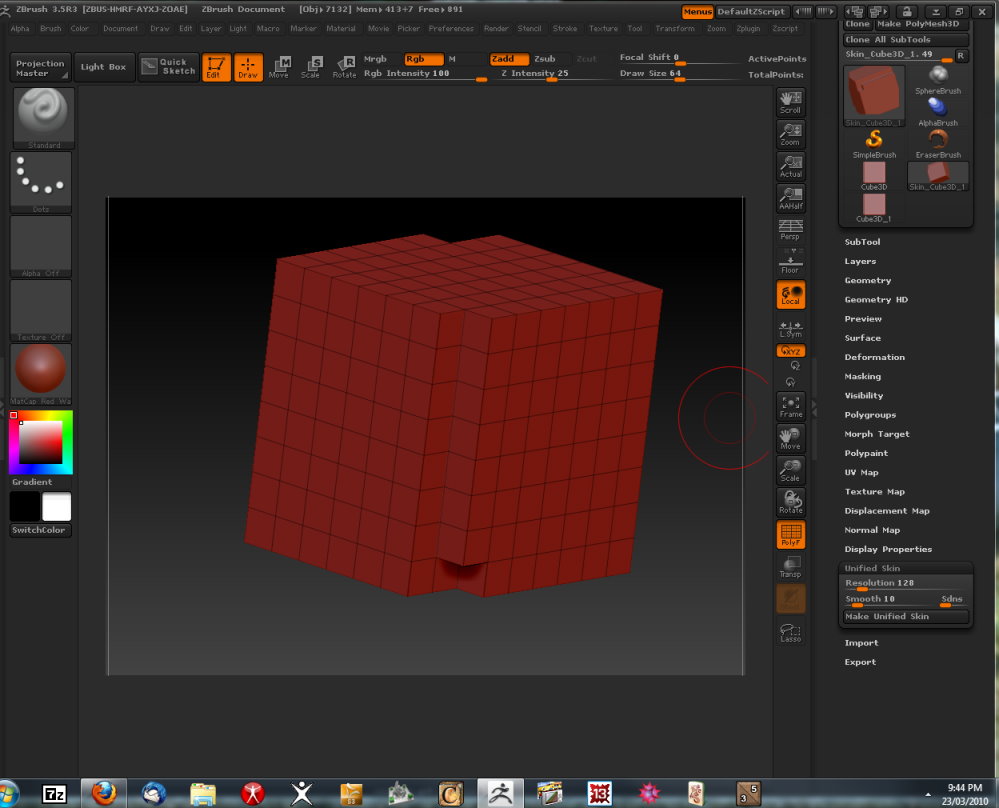
Unified_Cube.jpg

Set Tool>Unified Skin>Resolution to 8. This will give you a perfect cube. You’ll then be able to get one Reconstruct Subdiv out of it if you want a lower polygon count.

Aurick,

I did set Tool>Unified Skin>Resolution to 8, as per step (4), above.

regards,
Andrew.

there’s a bug in 3.5r3 with unified skin, (see various threads)
anyway set it to 16 and you should be fine

Thanks, Spaceboy, that has worked.

Only problem now is, how do I get to the very basic cube with one polygon per face.In the past, you would simply click Reconstruct Subdiv Surface from the Geometry sub-palette, and you would get the desired result.

When I did this, I ended up with a cube with 7x7 (!) polygons per face. I was not able to proceed further from there. So, if you are able to help me attain my goal of the basic one-poly-per-face cube, I would be very grateful.

BTW, I looked up a couple of other threads on this problem, I noted that there were others who had come across the identical problem, but no solution seemed to have been offered.

regards,
Andrew

if you only want a one poly per side just reconstruct the normal polysphere_1 that opens at startup

You could also select a polyshere, make it a polymesh 3d then reconstruct subdiv all the way back to a cube.

Richard

Thanks that has worked.

There’s also a PolyCube in the ZTools/Image Plane folder which will save you all the bother.

Thanks, marcus, found it.