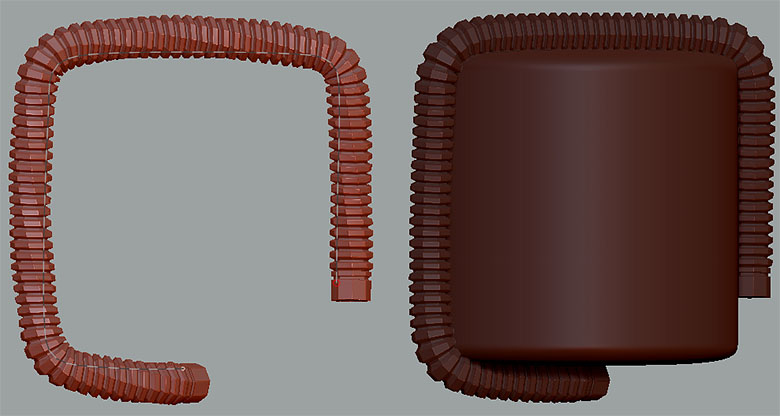
I want to move a duplicated curve/mesh. Since transpose doesn’t allow this, you have to instead turn off bend and snap. The problem I’m having with this is that every time I try to move my curve/mesh to another location, the mesh twists along the entire length of the curve. How do I keep this from happening? I tried masking as well as locking the end points, but none of that helped.
Here is a quick example I slapped together:
It’s a shame the transpose tools don’t work with curves since twisting doesn’t happen using that method. Sadly it’s only the mesh that moves which will jump back to the curves location the instant you click anywhere on said curve.
I’m probably interpreting what you want to do wrong, but if you draw the initial curve out (and are happy with it and wish to duplicate / move it without it snapping to the surface), you could activate transpose while it still has the rest of the mesh masked off, hold control and click on the middle white circle. That will duplicate the unmasked area and allow you to move it with transpose.
Holding the control key while dragging the center circle of the transpose line works to duplicate and move the geometry without any distortions happening (I.e. twisting), but the curve doesn’t move with the new geometry that was duplicated. It stays behind which is what I don’t want. The only way to move the curve along with the duplicated geometry (using hotkey 5) is to turn off bend and snap in the stroke menu, then click the end of the curve to drag it.
There is an example of how this works in one of the new ZClassroom videos (start watching at 11:13 of the video titled “Curve Insert Mesh Triparts Weld Part 1 of 2”). Nothing happens to his duplicated curve+mesh so I’m thinking it has something to do with the fact that I used curve mode on a simple primitive with snap turned on. This is a quick and easy way to draw out a tri-imm so that it conforms to a particular shape. Then I’d simply move the whole thing, the curve and it’s geometry, to where it’s needed, then duplicate it and make minor adjustments to both the curve and mesh (for example scale using transpose) so that each duplication isn’t exactly identical to the previous iteration it came from.
Using the regular method of duplicating geometry via the control key plus dragging the center circle of the transpose line will still allow me to achieve the results I want of course. It’s just a lot more difficult that way because it requires a ton of repetitive masking and switching back and forth between transpose modes, plus you often get distortions this way which you have to be careful to avoid if possible. Adjusting a curve is a lot easier now in Z4R4 and doesn’t introduce distortion, so it makes more sense to do it that way. Basically all that’s needed is a minor change to ZBrush. Allow transpose to operate on curves the same way it operates on geometry. By extension, the Tool > Deformation menu doesn’t work on curves and the geometry they create either, so it would be useful to change that as well. Mind you not all of the deformation functions would work very well with a curve, but the basic ones would (offset, rotate, size, bend, etc). If not that, then at least Pix should give us a way to freeze the duplicated curve and it’s geometry while it’s being moved so that it can’t change on you, like the twisting I’m seeing.
Hopefully all of that made sense. Just create something similar to what I did (hexagonal hose on cylinder, the one in the IMM Army Curve brush works good) then try to move it by following the curve duplication instructions in the ZClassroom video I mentioned. You should end up with twisting too when you go to move the duplicated hose geometry.
Edit: I just tried it with a pm_cube instead of a cylinder. My duplicated curve and accompanying geometry still twist when moved with bend/snap turned off. Interestingly this distortion I’m getting doesn’t happen at all if I draw out my curve snapped to a 2d plane. Only drawing it snapped to 3d geometry seems to cause issues.