I’ve been working on a multi subtool sculpt of Nefertiti over the last few months and thought I had come to the end of the basic sculpt process in readiness for trying out a test render in Modo. I’ve had to learn the process of creating UVs and displacement maps, minimum mesh subdivision levels, etc - it’s been time consuming but I seem to have it figured out, and have successfully transferred most of the elements to Modo. However, I’ve found one subtool that doesn’t follow the process…
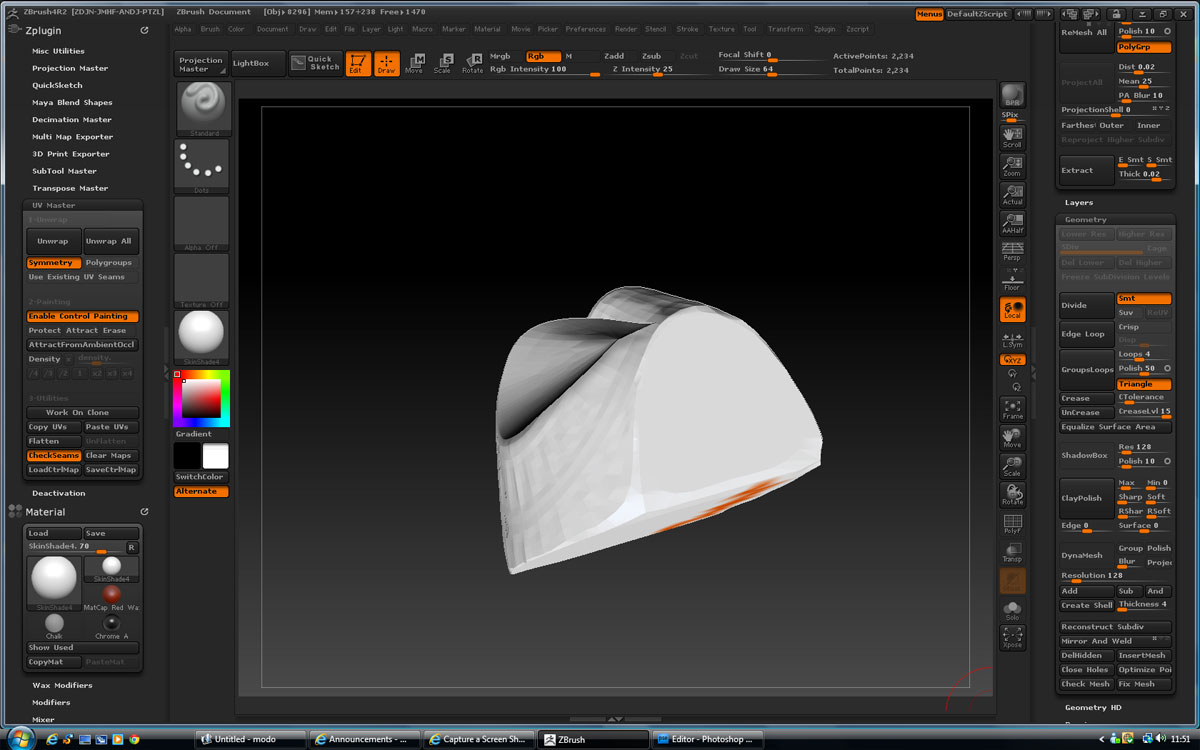
Annoyingly, it’s the single most complex sculpted element, containing the detail of her decorative collar. I have subdivision levels from just 127 points through to 571,000 at full detail, and it works perfectly within ZBrush until I try to use UV Master. It seems to work okay, as I can make a clone and perform an initial unwrap to see what it comes up with, but when I view the result with Check Seams activated and start to add some Control Painting, I begin to see some anomolies on screen - the model becomes partially transparent so that I see some of the far edges as though they are to the front. If I ignore this as a visual glitch and process my UVs and displacement maps, then I find the displacement is being reversed so that the detail of the collar appears impressed when it should be raised detail. This map then wont work in Modo. I can’t change the displacement value to a negative, as the information relating to the bulk of the model will also be reversed.
I’ve checked the integrity of the mesh within ZBrush, and it thinks it’s okay. The only idea I have is that I have inadvertently added some faulty retopology information as I worked on the flow of the mesh (maybe a floating point or something), but nothing I can detect.
I’ve tried doing a Remesh and Project All to recapture the detail, but while the remesh works, Project All doesn’t function (it works perfectly with my other subtool meshes).
This again suggests to me that the collar mesh is somehow broken, as if it’s not sure what is in or out.
I really don’t want to have to resculpt this from scratch, and worry that any retopology work I do on a new version might just recreate the problem anyway. If anyone has any suggestions to resolve this problem, I’d be very pleased to hear them.
Steve
this image shows the problem within UV Master - the right side shoulder is in fact closest!
I’m running Release 4R2 on 32 bit Vista, Intel Core 2 Quad, 2.33 GHz, 4 Gb RAM
Attachments