ZBrushCentral

posable symmetry how??

Hey guys, after reading all the posts about the issue I haven’t managed yet to use the posable symmetry, i just get a 0% posable sym in a 100 % symmetrical model, doesn’t make any sense to me…works fine in mudbox and the tangent mirror…
any ideas what that could be?

cheers

Could you describe the steps that you’re following? Provide info regarding the model? (For example, does it have any non-standard polys? Is it partially masked or hidden?)

is just a simple geometry, nothing is hidden, doesn’t have any levels of division yet, is all quads…
basically i took a cube in maya, added an edgeloop in the middle to have a center of symmetry, exported to OBJ into zbrush, and 0% sym found…?

Have you made sure that the selected axis of symmetry in ZBrush matches the model’s axis of symmetry?

yes :slight_smile:

I take it that your turning on symetry (x) or y or z, and that the mesh is built with themiddle along an azis in maya?

aurick what do u mean?

Gordon Robb yes thats correct

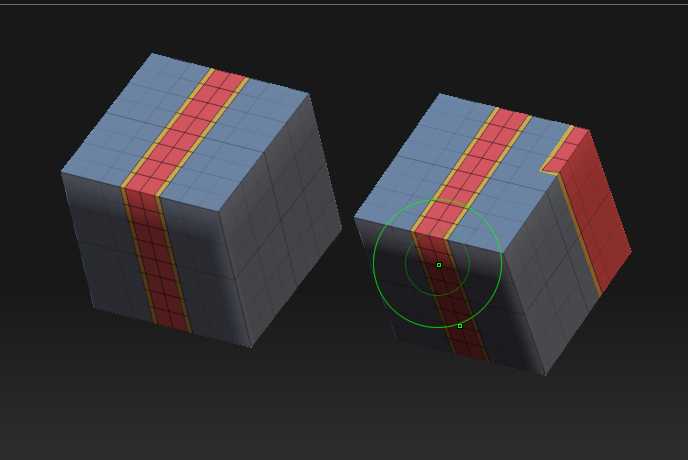
I don’t think ZBrush likes more than one plane of symmetry for posable symmetry. I think your cube will have three planes. (This is symmetry in terms of the topology.)

Take a look at the image. The cube on the left won’t work and the one on the right will.

Attachments

poseable.jpg