ZBrushCentral

Polypainting w/ Photos results in poor quality maps =/

Hello again…

This has been a thorn in my side w/ regards to ZBrush, and now I’m at the point where I “really” need to figure this out, I am totally at wits end =/

I have my model, and it is already uvmapped. I bring it into ZBrush, and polypaint w/ photos simultaneously as I sculpt. I subdivide, I apply HD geometry, and then I paint/sculpt. The problem is that the textures come out looking rather low res, pixelated and what have you, and I end up NOT being able to use the newly sculpted model or the texture maps produced… Even worse, at times seams will show =/

What I want to know is why does this happen, and what can I do to prevent it.

When working in ZBrush does the scale (for viewing) of the object matter?!? Does brush size have any impact on how the texture paints onto the mesh? Is it better to paint w/ zoom/scale high or low? Do smaller or bigger brushes work better? Is it better to paint close or from far?!?

The textures I use all ALL high res, 2048x2048 or 3000x3000. The model I am currently having this problem w/ is mapped, and I believe has “enough” resolution to handle the photo polypainting, but the result was horrible…

Any tips, ideas, clues or help that anyone could offer would be awesome…

Attachments

moon1.jpg

I wanted to show the wireframes of the models. The original, and the sculpted/morphed/zbrushed version…

Attachments

wire1.jpg

wire2.jpg

Hey!..Another Hexagon user.:+1:

The only thing that makes the polypinting look bad is the mesh resolution. The more that you can subdivide your mesh, the better the polypainting will look. If you can’t subdivide enough then you would break the mesh up into smaller parts so you could subdivide more.

Personally, what I would do if I had all my UV’s already layed out and I was going to render it in another app, other than ZBrush, is take the diffuse map that I exported out of ZBrush into my 2D app and fix it there. It’s already layed out where everything goes and you should be able to recognize by your polypainted map as to the placement of everything. As to the seams, you could try resizing your map a couple of pixels larger in each dimension and see if that fixes it.

How does your polypainted model look in ZBrush? If it looks good then your texture map is too small when you convert the polypaint to a texture. It’s essential that your map is big enough - the default of 1024 x 1024 won’t suit all situations.

I saw this, and think it directly explains my problem and offers a solution…
Using a Texture Map to Paint with in ZBrush

To PolyPaint with a texture map you must delete your UVs by pressing Tool: Texture: Disable UVs. If you have UVs ZBrush will display the texture map on your model instead of letting you use it to PolyPaint with.

You can create new uvs when you are done PolyPainting by pressing Tool: Texture: Auv. Make sure you are at the lowest subdivision level when you do this.

You can import your UVs again after you have finished painting by following these simple steps:


  1. Press Tool: Morph Target: Store MT to store a Morph Target
  2. Press Tool: Import to Import your OBJ with your Uvs made from outside of ZBrush
  3. Press Tool: Morph Target: Switch to switch back to the previous geometry state. ZBrush will keep the changes you made to the UV but reverse any change the imported OBJ made to you model’s geometry.

Ok, so I tried deleting the uv’s and it makes a HUGE difference visually in how I am seeing my polypainting w/ textures…

(To answer your question Marcus, they looked crappy in ZBrush, even as I paint. There isn’t much difference between what I paint and the rendered image =/)

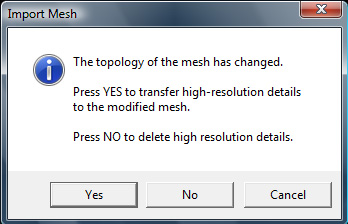
So after deleting the uv’s it looks REAL good w/ my geometry and hd geometry cranked up, but in following the directions when I import the object I get the prompt asking if I want to transfer hi res details…

Either way, yes or no, when you go back to the Morph Target, the switch option is greyed out, so then, how would one load their saved uv’s from the original object?!? For all sakes and purposes, I am using the very same model imported and painted on, in deleting the uv’s in ZBrush I dont need “another” model w/ separate uv’s…

Also, after the prompt window closes, the mesh loses the polypainting, how would one get that back as well?!?

This seems like it would work for me, but I can’t get it to work =P

And thanks for the responses, it is greatly appreciated.

Attachments

prompt.jpg

And this is what it looked like in ZBrush, map size set at 4096…

Attachments

preview.jpg

The tutorial you quote is for an earlier version of ZBrush and no longer applies.

If the polypaint looks poor then you don’t have enough polygon resolution. You need to subdivide further. As a rough guide a texture map of 4096 x 4096 has approximately 16 million pixels. It depends on your UV mapping how many of those pixels are used in a texture map; for ‘pelt’ type mapping perhaps only 50% will be used, for ZBrush PUV tiles it will be closer to 90%. So your model will need the same number of polygons (at least 8 million for ‘pelt’ mapping) so that there is no loss of detail. It will also need those polygons evenly distributed if parts of the map are not going to show less detail.

I will try to increase density and see how it goes. Keep your fingers crossed…

Thanks for the help =)

Yes, increasing the density did wonders… I guess I’ve been afraid of cranking it up that much, before it was around 250,000 polys and 3,000,000 hd geometry, now I have it at 8,000,000 polys and 530,000,000 hd…

My pc isn’t going to explode will it?!?

Again, much thanks =)

There’s no point in overdoing it! A texture map of 8096 x 8096 has only 65 million pixels and with the UV mapping the maximum detail it can hold will be much less.

Also, if you are using HD Geometry, ZBrush will be more responsive if you only subdivide to 500,000 to 2 million polys in ordinary geometry before switching to HD.

Sorry to come back to this Marcus, but somethings been bugging me =/

Fear not, increasing density DOES work, and very well…

I’m just curious and was thinking that isn’t it far better to delete the uv’s and polypaint w/o the restriction of polys?!?

It seemed to be something like Voxel sculpting, where we model w/o the restrictions of polygons… I’d very much like to paint the same way, so that my painting isn’t limited to the polygons of the model. I am “assuming” that this method would yield superior results, there shouldn’t be any pixel/paint stretching…

So, if I do delete the uv’s and polypaint, how can I reload the uv’s to apply the paint/texture to?!?

Sure the method/tutorial is old, but is there another way to perfom the action of re-importing my saved uv’s after having deleted them to paint with?!?

Or am I beating a dead horse?!?!?!?

Thanks in advance =)

UVs aren’t anything to do with polypainting. The point of UVs is to give a way of wrapping a 2D texture onto a 3D object. UVs are only relevant to how a texture map displays on a model and deleting UVs has no effect on polypaint. That old tutorial refers to an earlier version of ZBrush when a texture selected in the Texture palette was automatically wrapped on to a model if it had UVs, hence deleting the UVs was necessary if you wanted to use a texture in some other way (such as painting with it). But that doesn’t apply in recent versions.

Polypaint is really the same as vertex coloring. In other words, each point of you mesh is given a color. When the points are far apart, as with a mesh that has a low number of polygons, then ZBrush interpolates between the colors so that the display is smooth. But you can’t get very much detail when there aren’t very many polygons because there aren’t enough points.

There’s no way to dynamically increase the detail of polypainting without increasing the mesh density. For low spec machines the best way to do this is by using HD Geometry.

Again, thank you for a quick response… I think/hope I understand a bit better =)

,:lol:,referring to post #3