You can texture everything! There are a lot of tutorials on this, you can see what people do with polypainting. The forum is full with wonderful works of people using polypaint.
You need a lot of polys to get nice polypainting results.
Subdivide your model and see if the polypainting is ok.
You dont need to retopology your model for polypaint. You just need decent topology so when you subdivide your model you get even detail everywhere.
For hardsurface models you need to keep something in mind. Its something that i aways do before polypaint my models in ZB.
After adding detail to the edges, that you need to stay sharp, subdivide your other mesh to even the poly density. You need to do this because when you subdivide, the high poly count goes to the edges detail (that you dont need), and the rest of the mesh needs more subdivision so you get fine details there to polypaint.
That also counts for modelling.
Here i made a little example just to illustrate what i mean, because my english is not so good.
I hope this makes it clear to understand!
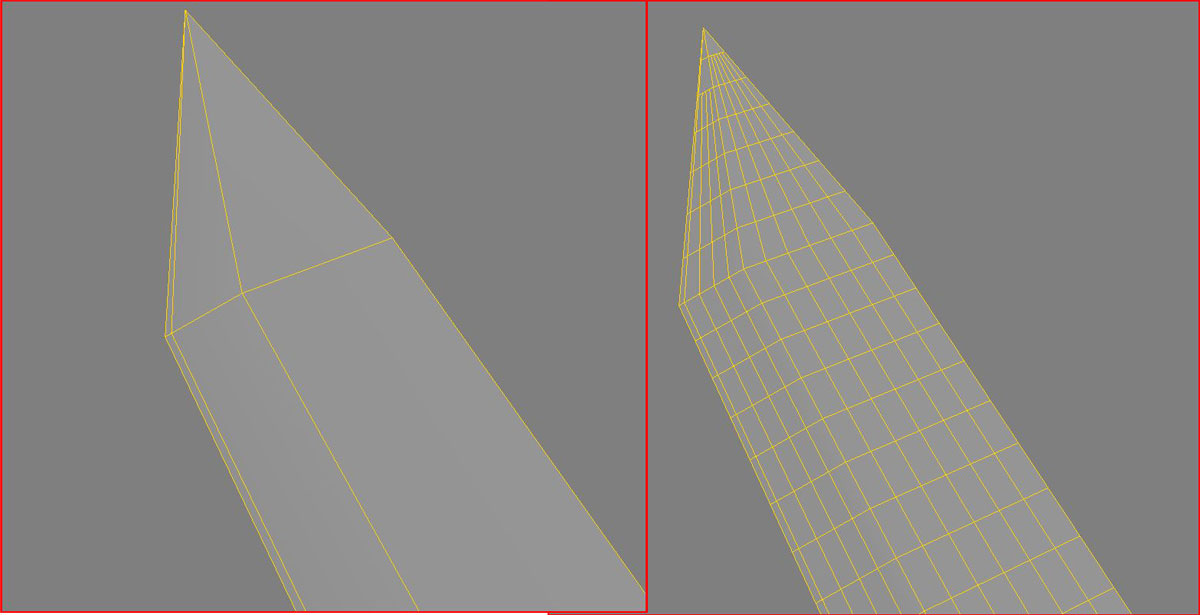
P.s. dont mind the N-sided polys at the tip of the “blade”, im at work so i dont spend time to make it “perfect” 
ps.s i also want to add something that can optimize your work a lot!
Depending on your system you set the max polys per tool, in preferences. So, take that numbers and divide it down by 4, so youll get some number that you can stick to when creating low poly basemeshes in your 3d app.
You need this to use the maximum of your memory capacity, because it happens pretty often when you start working on a basemesh and start subdividing you end up with a 5mil polys (for example), and in your memory you have 16milion limit. You need more detail but you cant subdivide because of the limit, and if you work on a 20mil obj. it will lag your system and etc…
So those pre-production steps come to be very important part of your workflow with ZB (mainly because its 32bit software). Keep those in mind and go Zbrushing 


