ZBrushCentral

Polypainting problem

Hi there, this is the first time I’ve encountered this issue with Zbrush.

You see, whenever I paint say in my example a red paint on the texture and and click Create>New from Polypaint the red disappears and always ends up with the old texture (below)

I really wanna bang my head to the wall right now since I’ve been trying to solve this problem by going through google to no avail. After hours and hours and hours of repeatedly trying to texture my model I still end up with the same thing. I tried texturing the tools such as Nickz, Dog and Demo Soldier. everytime I click New From Polypaint it still does the same problem :angry:

Attachments

prob-4_zps102b325c.jpg

I’m not sure I’ve got the right answer but I think you need to bake your texture into the polypaint, paint your red thing, and create texture from polypaint.

hi there! Well that’s the thing, whenever I paint whatever I want to put say the red thing when I click new from polypaint it doesn’t include the red color.

Hi there, what do you mean by bake? I usually just click Polypaint>Colorize and whenever I need to get the texture I just go to Texture Map>Create>New from polypaint. But now whenever i do that it just reverts back to the unedited texture.

Sorry, I didn’t understand you at first. So to be clear, before you start painting with the red stuff, the texture you have is only in the polypaint? Basically, the texture is off? I tried all I could on my side to get the same problem but no luck…

What I would try if I were you is to export the old texture, export the highres. After that, re-import the highres in a new zbrush scene, reconstruct subdiv, import the old texture, do a “polypaint from texture” and retry the red paint again. The idea is just that if there’s a real bug in your scene, retrying from a new scene might fix it. I hope.

Good luck!

that is correct :slight_smile: sorry if I was unclear, I wasn’t able to type out the problem out of frustration:rolleyes: I tried painting the Dog tool and Nickz in zbrush and whenever I click New from Polypaint it just gives me this blank white texture, but whenever I paint a simple sphere I have no problem clicking new from polypaint. the texture always updates. Which is really weird.
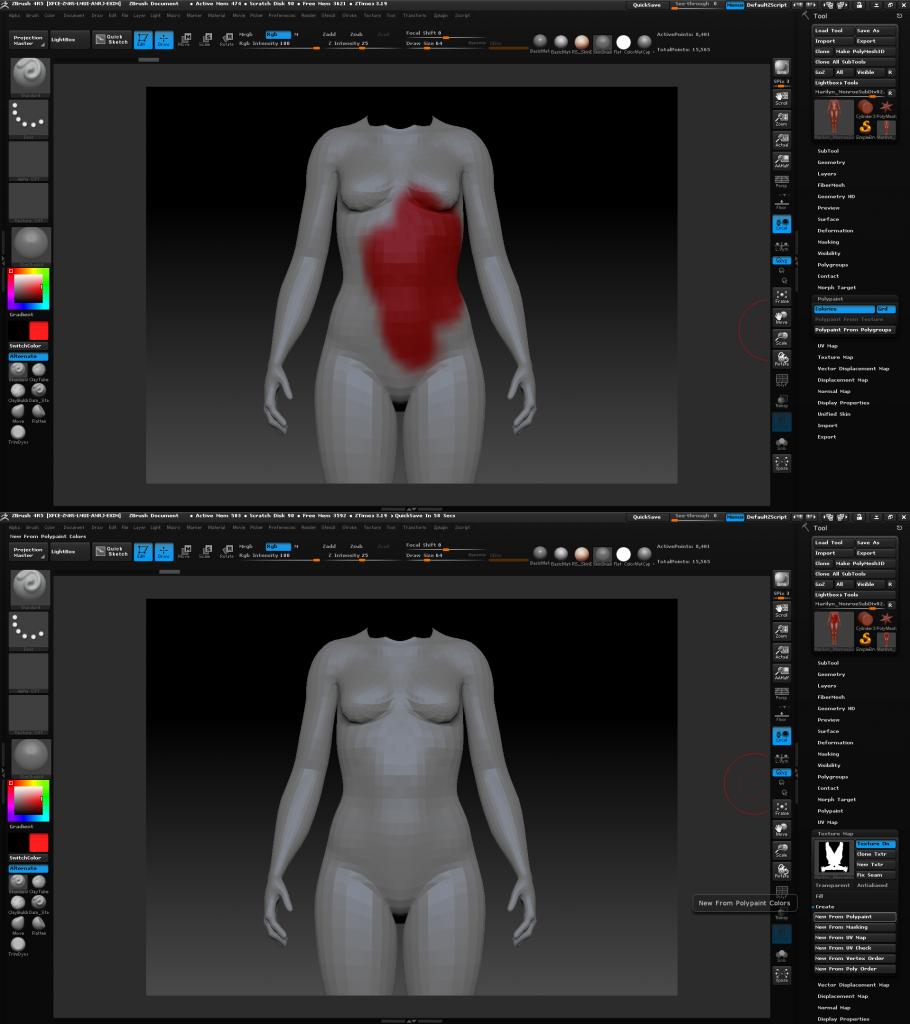
I’ll give that a try. Thanks! :slight_smile:

Well here’s a quick test that I did,

So before i applied the red color it was just a flat grey color. Now after applying the red color and clicking new from polypaint, it will end up like how it orginally looked like. a flat grey color (below) as you can see in the texture map, there’s no red color.

prob02-2_zps25a5068e.jpg

I tried doing the same thing with a simple sphere. It started off as white and I added a grey color but when i click new from polypaint it saves out the texture. and when i add a maroon color and click new from polypaint again, it updates. Which is reallllyyy weird

prob03_zps723010a5.jpg

Well, It looks like whenever I use the Multi Map Exporter every update I do on the texture gets baked. But whenever I use Texture Map>Create from Polypaint that’s when this weird problem occurs. :expressionless: Looks like I’ll stick to Multi Map Exporter for now but I’d sure like to know what’s causing this problem.

At least you have a work around. I know that frustrating feeling and I wouldn’t wich it upon my worst enemy!