ZBrushCentral

Polypainting Problem (Resolved)

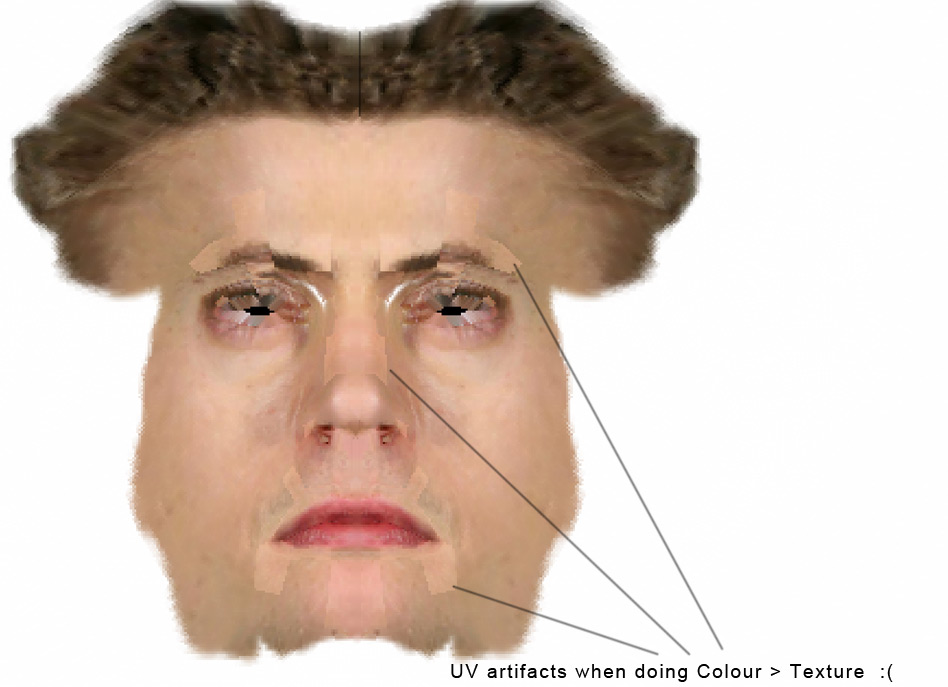
Hi there. I imported a head mesh having proper UVS from 3dsmax9 into zbrush. Subdivided it 5 times and projected an image onto 3d model using polypainting. Now when i click color>texture its generating the texture with some uvs/normals artifacts. Tried to search through the forums and cant really find the solution of this problem, or proper answers. Feels like what’s the use of puuting Polypainting in ZB3 is it gives these problems. I’m kinda loosing my patience of using ZB3 in our pipeline here, as projection painting is such a cool feature , IF IT WORKS!

 Any solutions please??

here’s another thread having the same problem…

http://www.zbrushcentral.com/zbc/showthread.php?t=47405

Attachments

ZTexture01.jpg

I use max 9 and polypaint works great.

There are two things that I can think of that you can test, because it’s definitely a UV problem:

1.) Export your high res mesh, open it up in max and check the UV’s to see if the verts are welded. This could potentially be the problem. If they are unwelded, or triangulated, or just look totally wrong, it could be because of #2:
2.) Make sure you reset your xform before you export a mesh from max for use in ZBrush. XForm related issues always end up being discovered when texturing. ie) here, here, and here

Also, I’m sure you already know this, but make sure you’ve got plenty of geometry to paint on, since Polypaint is just that: Polygon Paint. each polygon can only hold one color, so the more you have the more detailed your texture can be. Ignoring the seams completely, the texture itself almost looks like a high resolution polypaint that was dumped on top of a lower resolution mesh and the texture got averaged out in the process.

i imported highres version in max…and NO UVS are not broken. So this is some other problem. Don’t know what though. And YES my mesh is subdivided enough to accomodate good resolution.

Any other suggestions?? Thanks

is that a poser model?
Andreseloy

No why??

What subdivision level were you at when you transferred the color to texture? I’m trying to figure out if the blurriness is due to too small of a texture, or if it’s due to not enough points. The cause of the faceting could be related.

Could you provide a zip file with the original model, or part of it?

I was at subdivision 5 when i did polypainting from a highres texture image(1590x1500), so both the mesh and the textures are highres.

Sorry i cant really share the mesh here as its from ongoing project im working on, that’s why i can’t even post the full size render. Do you want me to just give you a part of the mesh though, like lower jaw or something? if that works for you.
Any more pointers?

Thanks
Harsh.

How many polygons does the model have when it’s at subdivision level 5?

the polycount for the highest subdivision(level5) of Complete head mesh is 368,640 polys.
I’ve included a part pf the ZTL file with polypainted texture on top. Hope this is helpful.
here’s the link to ztl file

http://www.harshcg.com/stuff/head_part01.zip

thanks a lot for your efforts Aurick.

I have been waiting for Pixologic’s assistence for almost a week now and no replys. Its not helping me to use Polypainting in our production pipeline which is a shame. As it looked awesome in the videos.

Harsh.

i have the same problem with maya automatic-uv’s. also adaptive uv’s in zbrush didn’t work for my 6 million polygons mesh. to reduce the artifacts i made a 8k map, made col>txr and reduced the imagesize later in photoshop. but that is not really a satisfying solution.

I’m not saying this will work…but do try at least going up to 1 million polygons and THEN paint. Remember you need a polygon for every pixel! I’ve found if I switch to lower leves while painting it can screw things up a bit sometimes. Also- as you know- ALWAYS export the color info from the highest resolution mesh (I know you’re doing that already but I just had to state it).

I’ve put out 1k textures with little problems and no errors so far- but I’m sure there are problems out there.

Just for shiz and gigglz try to re-assign the UVs using one of the AUV or GUV tabs in ZB- I know youi can’t use these for your work but it will help you problem solve it. From there go back up to at least 1mill polygons on your model and paint. Export that and the model to Max and see what it looks like.

I haven’t had any problems yet going from XSI-ZB-XSI with this.

harshdezine: Your UV’s are incorrectly assigned. To see this UV problem, simply assign a continuous texture to it.

FaultyUV.jpg

At the top of the image, is your mesh with the faulty UVs. Do you see the seams between polygons? If you applied continuous UVs these seams will not be there.

At the bottom of the image, you’ll see how this mesh would look like when continuous UVs are properly assigned.

To remedy this you may use ZBrush-generated UVs (such as AUVTiles) or redo your UVs in external application then test it in ZBrush by applying Txtr40 and look for seams.

Ok according to your solution, it works when i generate UVS inside zbrush, i.e. auto UV or AUV tiles and such. But using that option, doesnt gives me much freedom to alter the texture in photoshop later, once generated. As its near impossible to work on the patchy texture generated from zbrush.

I want to import the mesh with properly laid UVs in other program like 3dmax or maya, and then do projection texturing based on those UVS. And the problem is as soon as i import the mesh from other program, it breaks that UVS and hence when i do color>texture, it gives me UV artifacts.

I tried same thing on other character’s head with proper generated UVS, and zbrush3 is giving me same artifacts. Blocky broken up textures!!! It seems like as soon as i import any mesh with uvs, zb3 is breaking them.

Is there a solution to this, when i dont want to generate automatic UV iunside of zbrush but import UVs done in some other app.???
Quick response would be highly appreciated.

[color=DarkRed]again: I DON’T WANT TO GENERATE AUTOMATIC UVS INSIDE ZB3!

Attachments

zb3_uvproblem2.jpg

Your mesh has unwelded UVs in it, which is why you are getting the artifacts at the seams. Make sure that they are properly welded in MAX before you export the OBJ. You can just load the UVs from the OBJ into your painted tool in zb.

Hmm had this happened to me more than once. I ended up using maya to export the obj back out I believe. Max has some strange issues dealing with obj’s on export.
It’s no fault of Zbrush or polypainting for certain, since you can polypaint with disabled Uv’s (which is recommended for speed), it’s a max issue. Try using Maya and let us know the result. And if you’re still having probs with the exported max>maya>zbrush .obj file. Export using .fbx to maya. I know I know, crappy process, but max drove me nuts with it’s poor .obj export implementation.

~t

If that turns out to be the problem I’m gonna scream… I recommended that solution over a month ago, and he said the UV’s were fine :lol:

This is a max problem… This happens with almost every obj file I export from max… The way to fix it is to attach your head to a mesh object…then convert back to poly… Usually what I do is create two boxes, one poly and one mesh, and I attach the head to each and delete the boxes.(attach the head to the boxes one by one, not the other way around… meaning, select box and attach head ) :wink: