ZBrushCentral

Polypainting 3dlayers is ???

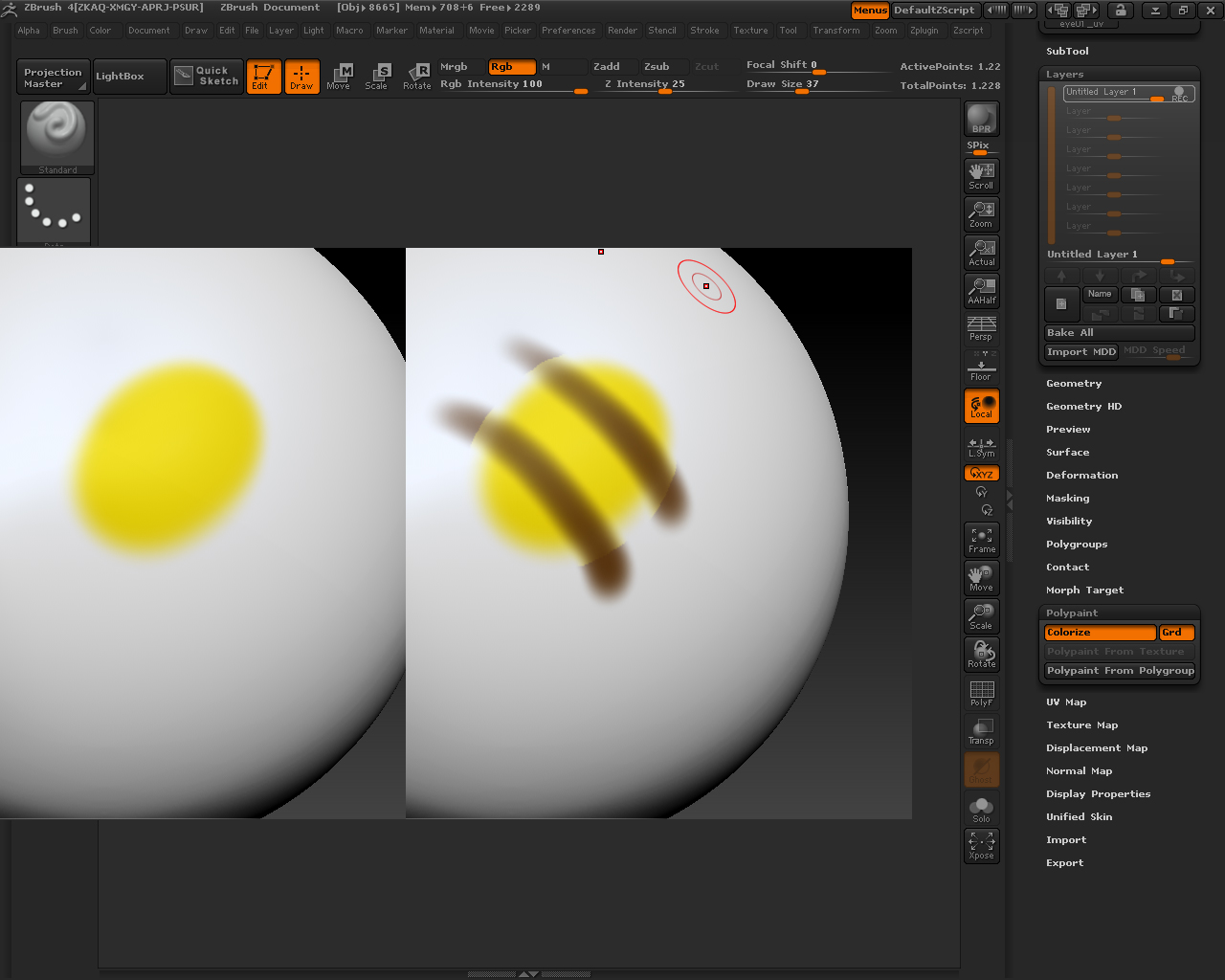
I’ve been testing this on several objects and polypainting on 3d layers is …

  1. fill object with color RGB doesn’t do anything at all on a layer.
  2. strange ring like artifacts appear from nowhere.
  3. Painting with softstrokes reveal hardedged stain like forms (see pic).

and the worst thing is that you actually can’t use polypaint like before, before removing all your sculpting layers

whatsup dudes ? Please tell me I’m wrong ?

[001_polypaint.jpg]
PC, XP sp3

I have seen the can’t fill on a layer problem mentioned before and can confirm it. ( stupid thing)
however the other problems you describe, I can’t replicate. painting on a layer while having other paint and sculpt layers happily active and present is no problem.
I also don’t get those strange hard edges. are you sure you don’t accidentally have any masking on? which brush exactly did you use?

I’m having those hardedged issues with all brushes. uv’d and without uv’s.
They’re gone if I have no layers at all.

  1. fill object on a layer works, but only fills areas that you’ve already painted. Imagine that each layer contains a full transparency mask on it – when you paint, you reduce the transparency mask by the RGB value. When you paint more, as more color is placed down, the transparency mask is reduced further. This transparency mask then applies to the fill object button. So, if you paint an X shape over your model layer at RGB 10, then change color and set RGB back to 100, the color is changed to the new color, with the same blending percentage (note the brighter spot in the center of the x where your previous strokes crossed). Fill object with a lower RGB value of course shifts the color in smaller amounts.
    you’re unable to fill a new layer with color because the whole thing is 100% transparent, so the color change is zeroed out.
    While not being able to quickly flood a layer with a solid color is possibly annoying, I can see great application for using fill object as a ‘hue shift’ function

  2. ring artifacts don’t usually show up for me, although there is periodically an edge coloration weirdness when I create a new layer, paint one color, and then paint another color over the previous one’s edge. I THINK this is due to a preservation of colors that is then used when holding shift to blend. using alt to clean a painted edge before painting over it seems to prevent this from happening. Overall, though I haven’t been able to see halos like the ones you’re showing. (a halo DOES show up when you 1) switch to non white color so the whole model changes, 2) create your first layer, 3) paint any color into the layer. However, those halos dissappear when you change the orientation of the model – its just a refresh bug)

  3. again, no rings like you’ve shown. What you’ve got there looks like what happens when you have a model covered with material #0 (the auto-change material, or flat color depending on who you ask), and then paint a spot of color using MRGB. when you change the material, you get that ugly border between the auto material and the painted material. (Specifically this looks similar to a transition between skinshade4 and White materials.) Note, I don’t think you can paint multiple materials on an object once you start using polypaint layers unless you hide all of them.

You can definitely have sculpting layers and continue to do poly paint. You can even have sculpting layers and then polypaint (RGB mode without zadd) on the base model. You can also have polypaint layers and have all your sculpting done to the non-layered base of the model. However, once you poly paint on a layer, you can from then on only poly paint on layers (you’ll get an error if there’s no layer in record mode) while any polypaint layer is visible. Similarly, once you sculpt on a layer, you can then only sculpt when a layer is in record mode as long as any scultping layer is visible. If you want to change the shape or color of the model beneath your layers, you’ll need to disable ALL layers (turn the eyes off). Note if you turn only polypaint layers off while polypainting, (or likewise for sculpting), the changes will NOT be saved when you toggle layers on/off

The only thing I’ve seen fail miserably in the polypaint is the bake button. If you press it while one of the layers is in record mode, it makes a huge mess. But fortunately that seems to be undo-able.

I just noticed that too. never(!) press bake all when record is on. same goes for sculpting layers. my mesh went all black and made my heart stop until I pressed undo :wink:

Yep, definitely a bug there. also if you create a layer at the highest subdiv, paint some color (But not the whole model!), then drop to a lower subdivision without turning record off, paint some more, then go back to the higher subdiv, you’ll see some artifacting around where the edges of the original color splotch was. If the whole layer had paint originally, this doesn’t happen. Another transparency mask thing.

thanks guys,
but this “halo - issue” happens with whatever material(the one used in the pic is skinshade4) I use and is not a refresh bug - it’s saved within the exported psd. I did’nt bother convert it to the a texture…

It makes you wonder why you don’t read anything (beta testers forum and tutorials pdf: nothing) on one of the most requested features for a long time.

anyway Lucky me…oh well

I had those strange stain like artifacts. Seems to me that there is something wrong with layers.
I have this non stop subdividing when do something on the layer :rolleyes:

Also, switching between Sub-D levels is slow… dunno why.

Btw, what is the point of this REC button ? :rolleyes:
Cant we just work on the selected layer ? Why recording ?

yup big problems.
Importing a new base mesh can purge all your layers too.

I have been saving often. 0.o

I have seen your other errors too. And blurring etc causes that discoloration for me.

Also confirm, huge delays on sub-d shifts.

The beast is sick. Layers is all I wanted, sigh, well that and Connexion drivers, but they didnt have time for that either.

Fingers crossed for a hotfix.

Also, the Layer Brush seems not to work in RGB-mode anymore. If Zadd ist turned off, Polypainting with it will prdouce weird strokes and a drag dot like behaviour??? If Zadd is on and Zintensity at 1, it works fine? Anyone else experiencing this?
I am working with the standard brush and focal shift at -100 for now.

Regards

Your second problem is addressed in this thread:
http://www.zbrushcentral.com/showthread.php?t=92911
It’s been happening to me too.
It only happens when you try to paint more than one color on a single layer. Of course that’s pretty much all the time. Paint Problems.JPG