ZBrushCentral

Polypaint, weird issue...

Hi Guys,

I’m experimenting with some polypaint today and am having a weird issue…
When I start painting, the only thing I can paint with is a solid black.
Also, if I do a object fill paint (any color), it just gets filled to black…
What am I doing wrong?

Thanks!
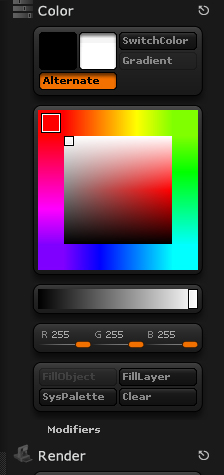
Can you post a screen shot of your colour settings?

This work?

Attachments

Screen shot .jpg

Screenshot isn’t too much help. Have you looked at http://www.pixologic.com/docs/index.php/Palette_Reference ?

Which version of ZBrush are you using? Also, could you show a screenshot of the entire interface while you’re having the trouble?

It might sound very stupid but I remember having the same issue some time ago and the solution was an odd one… I kept pushing the “switch” button and eventually it worked… Ofc, I had a different colour selected on the second slot. Try it… might work… :slight_smile: Otherwise, yea, as the guys said above me, post a pix with the interface
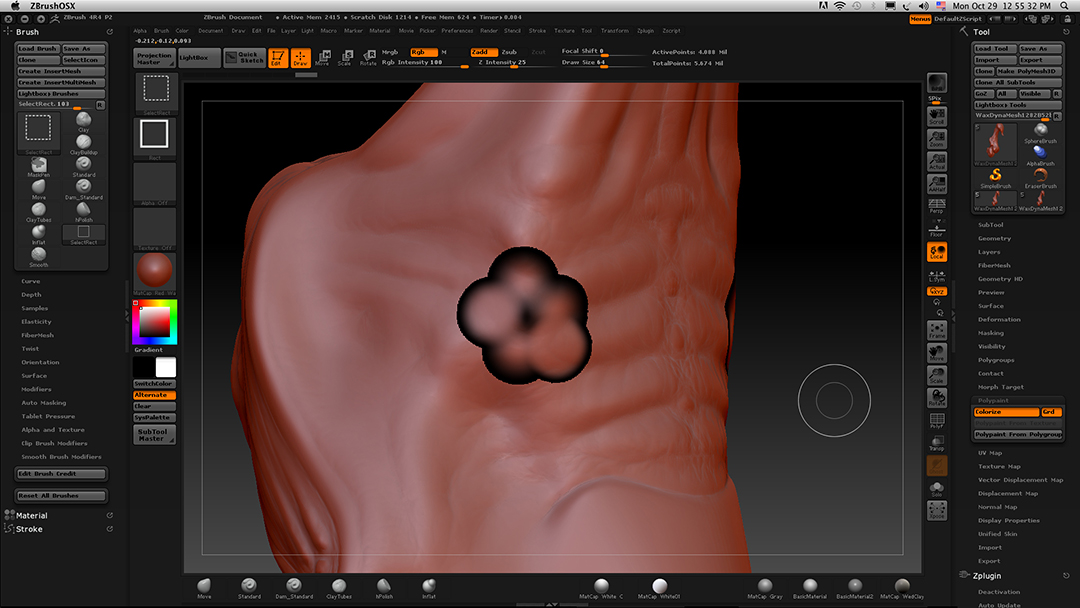
Hi!

The “switch” button merely turns it black…

Thx!

Attachments

Screen shot 2A.jpg

It doesn’t appear that you have a brush to paint with.
http://www.pixologic.com/docs/index.php/Brush_Palette

It appears that way because it’s a screen grab from a Mac. (command, shift, 3)

You have select rectangle brush selected rather than the standard brush. That’s about all that I can tell from your screengrab.

Like I said, it appears that way because it’s a screen grab from a Mac. (command, shift, 3)
(command, shift, 3) changes the screen grab image from the standard brush…

OK, Document>Export Screen Grab. There is another thread with a similar issue, I’ve run into this here before.
More information is better than less.