ZBrushCentral

polypaint to texture produces smearing

Hi, I am running into a problem where converting polypaint to texture produces a texture with smeared edges, like in the image below. I am guessing it’s something to do with UV smoothing, and I was building the model with that option turned off…Does anyone know of an easy fix?
[attach=250825]PolypaintToTexture.jpg[/attach]

Attachments
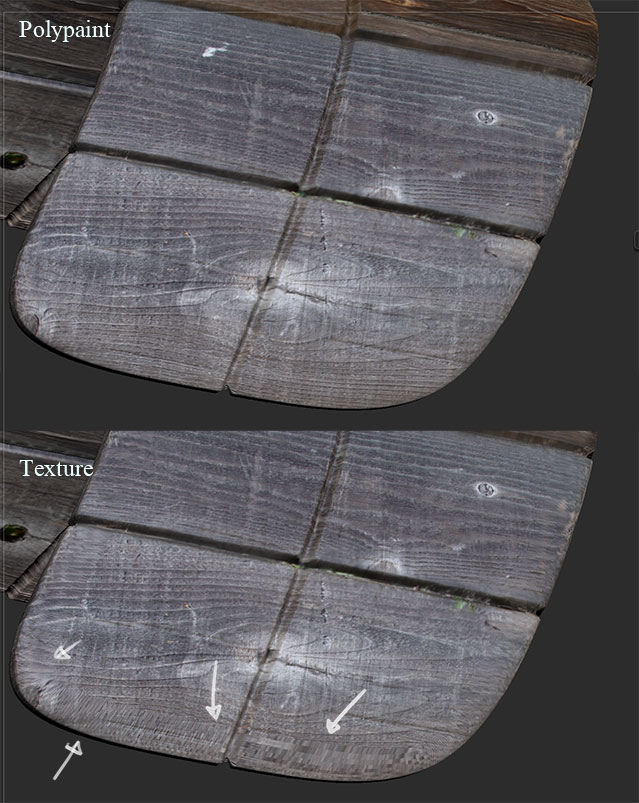
PolypaintToTexture.jpg

The problem is with either the UV mapping or the polygons themselves at that area. Which it is depends on the wireframe and particular mapping method that you used, so there’s no way to be sure from just the picture.

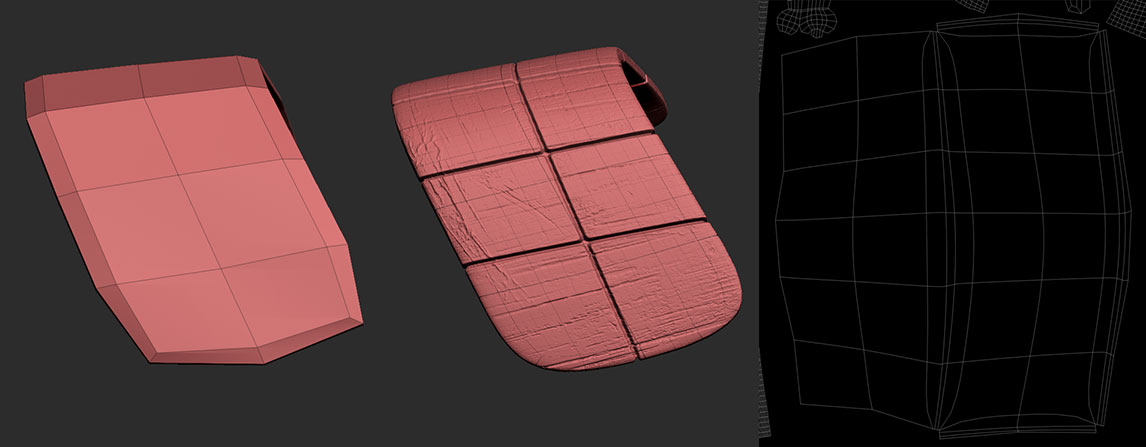
Hi Aurick, thanks for your reply. Here’s the topology and the UV unwrap for that part:
[attach=251107]TopologyExample.jpg[/attach]

Attachments

TopologyExample.jpg

What you could do to try and fix it is set up your subtool like you show in the images then load the texture into Tool > Texture Map then use ZAppLink to fix it in your 2d app.

Thanks, yeah, I was thinking that as a last resort. I’d like to find out a proper workflow/set up for this sort of thing so that I can potentially avoid it in the future. Plus, the smaller the pipeline and the number of tools that I have to use for the same job, the better (I mean, I’ve already textured it once, right?)