ZBrushCentral

Polypaint & material problem

right

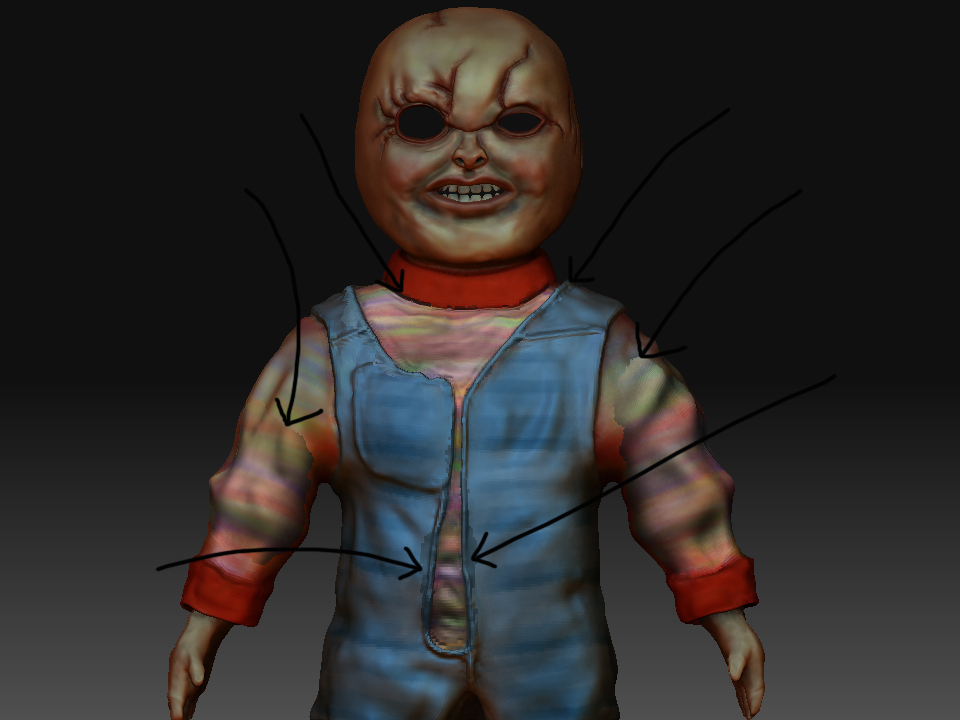
im currently polypainting a chucky model.

i started with a matcap white but it looks better when i switch to skin04, problem is when i swap to ANY other material type i get horrible seams as shown in the image (arrows)

help would be very grateful !

Attachments

chucky.jpg

It looks as though you have painted with material at some point when you didn’t mean to. The solution is:

  1. Select the skin 04 material.

  2. Make sure only the ‘M’ (material) button is switched on in the Draw palette (the same ‘M’ button is to the right of the Rgb button at the top center of the UI).

  3. Press the ‘Fill Object’ button in the Color palette.

guys

can anyone please help here? i have a texturing model ive polypainted and have a skin material 04 on it.

buttons have other material and shoes other material.

problem is now i have a sphere for an eyeball and ive mapped a texture onto it using uvp and it works fine BUT when i switch to toyplastic or any other material my other tools also do the same so i lose my polypainting! please help here if you can?

also what is the best material to select to stimulate fabric for clothing?

jimbo1001,

(I’m assuming you are using 3.5 R3.)

There’s currently a known issue where if you apply a texture map to a subtool it will always take on the currently selected material, even when a material has been embedded into the mesh. There is a workaround to embed the material in the texture map - see Svengali’s post here:

http://www.zbrushcentral.com/showthread.php?t=78792

Otherwise the simplest way is to convert any texture maps to polypaint, and embed the material of your choice into the mesh - if you do this after polypainting then be sure to just have the Draw:M [material] button active so you don’t wipe your polypaint. The SubTool Master plugin makes embedding materials in subtools easy.

HTH,
Marcus