ZBrushCentral

PolyPaint from Texture question

Hey All
I thought I had this work flow bagged but now Im stumped.

I have a sub tool with uvs
it has some polypainting (which I want to over write with a texture using the “PolyPaint from Texture” button in the Tool:Polypaint menu

  1. I load up my texture into the Texture menu (vertical bar on left)
  2. have Colorize “on” in the Polypaint menu
  3. I hit the “Polypaint from Texture” button

~nothing happens:td:

I tried it with a sphere as well to check if my geometry had some voodoo but and same result.
What am I doing wrong

thanks for any help
Go to Texture menu and Import your texture. Go to ‘Tool > Texture Map’ submenu and select your texture there by clicking on large icon.

Great!
thanks for the solution
I also discovered that if I load the texture and hit fill object in the color menu it applies it as well.
thanks for the help.

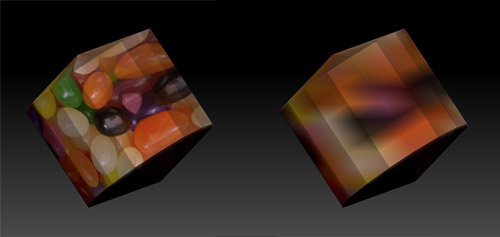
jinda, hitting “fill object” converts the texture to polypaint and the quality of your results is dependent upon your subdivision resolution. I think if you test this with a low subd object and compare your results using “fill object” vs. adding your texture via the texture map subpalette in the tools palette you’ll see a bit of a difference.

Here’s a snapshot of what I mean…

Attachments

comparison.jpg

Thanks Nancyan
yes- I am familar with that.
I do remember the work flow of exchanging polypaint to texture (back and forth) in 3.5 was simpler but I also understand the new texture map subtool affords more control.
thanks for the tip.