ZBrushCentral

Polypaint from texture not working?

Hello,
I’m trying to load a texture onto a level 7 sculpt using the Polypaint from Texture button. Here’s what I’m doing:

Load texture
set RGB to 100
select color
press New Txtr
press Polypaint from Texture

nothing happens. What am I missing? Thanks for any help…

-k

Attachments
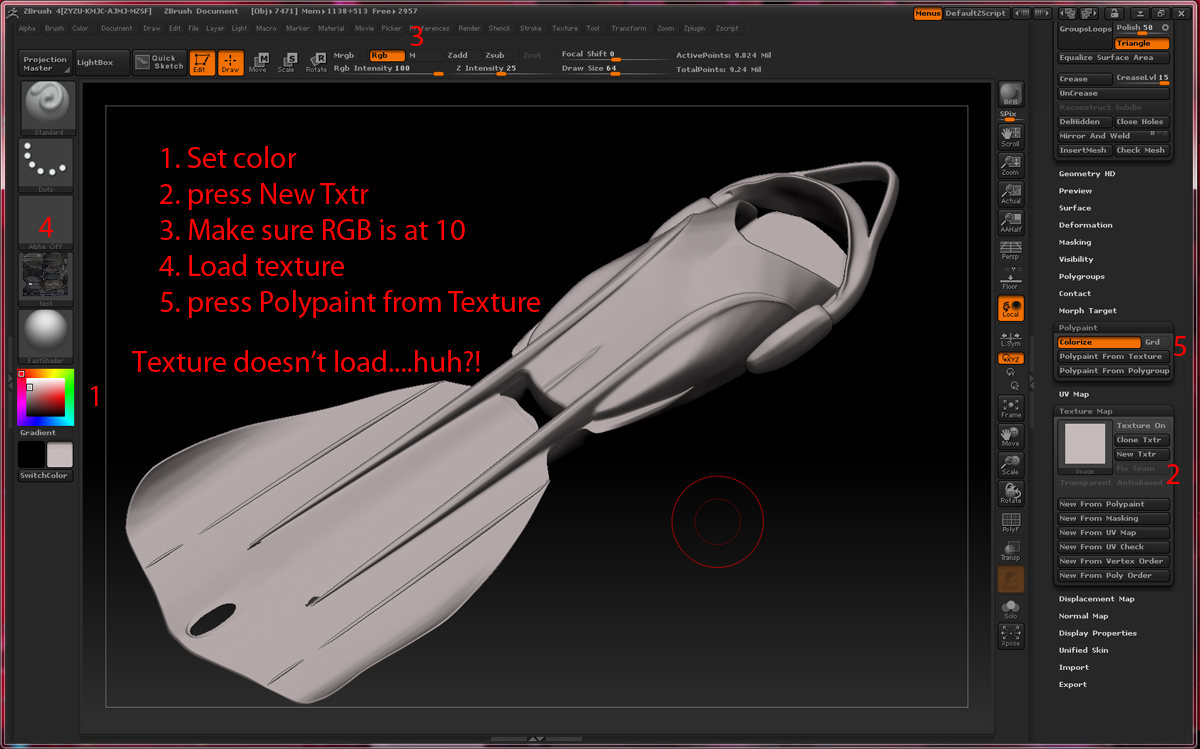
error.JPG

After you import your texture, click on the thumbnail in Tool > Texture Map and select your texture from there.

Thank you! I knew I was missing something stupid. Incidentally, when I restarted Zbrush, it worked…Your way makes a lot more sense (duh).

Don’t forget, in ZBrush 4, each subtool can have its own texture map.

Hey!

Im using Zbrush 4 and am having problems with this also. I’ve imported my texture from a psd-file, load it in the tool texture map, press rec on the layer I want my polypaint on, it processes for a sec or two the turns off my texture without doing anything :confused:

I’ve uploaded a images from zbrush if its any help.

Just thought that I should add that I want to have my texture as a polypaint-layer so I can redo my uv-map but so I dont have to redo my texture…

If anyone has the slightest bit of information on this please post is asap!
Thanks! :wink:

You have to press Tool>Polypaint>Polypaint from Texture

Thank you for the fast reply!

If you are referring to the button below “Colorize”, its the one I’ve been pressing. After I press it my texture turns off and nothing happens, also I can’t delete or add any more subdivisions to my tool if that may have anything to do with it…