ZBrushCentral

Polygroups & Sub Tools Tearing Mesh

I’m experimenting with polygroups & sub tools trying to increase productivity and improve work flow. However when I export my *.obj with UV tiles from Max I bring them through the route of Tool > Frame, Polygroups > Uv Groups, Sub Tools > Group Split. The UV’s split correctly according to how I wanted them too but when I start dividing my mesh to increase resolution My mesh starts to tear at the seams where my UV groups split. I assume that this is happening because on the sub tool level it is splitting my model apart into individual mesh objects.

Is there anyway that I can prevent this tear from happening?

Attachments
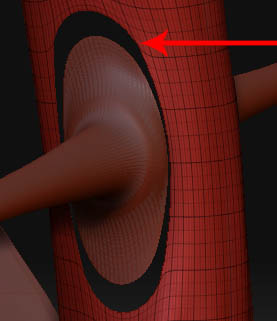
z-tear.jpg

From the looks of the jpg you will need to turn on crease BEFORE you start subdividing the model. Select the subtool, then go to Tool>Geometry>Crease. When you turn on the wireframe, you should see a small ring of dots around the edge that is being creased. When you divide the mesh after this, the crease will hold the geometry in place. Its important to crease BEFORE you divide the model as the model will be altered from the original shape after you divide. Also be sure to crease both of the tools on which this happens. Or any tool that you want to keep an opening on for that matter. Hope this helps.