just starting to learn zbrush and i want optimize my poly counts but dividing my depending on neccessity. ie i want to divide the hands, feet less than say the torso but when i either mask thos areas or edge loop a new poly group out and hide the part i dont want to divide yet, it keeps the hard eges of the previous level… i m sure this is a mickey mouse question but i cant seem to find an answer anywhere. thanks
Any time you partially subdivide a mesh, you force the creation of triangles. Triangles do not smooth the same as quads when subdivided. You’ll always encounter smoothing problems when you do this.
You’re better off retopologizing the mesh to have more polys in those areas from the start, rather than trying to partially subdivide it later.
i’ve noticed that local subdivisions ar iherihent to artifacts in smoothing but im mostly just trying to rough things out first before retopo and what i was trying to ask is why this happens… i could work around in maya but im just curious why it works this way
the image here shows the problem sorry im new to this forum stuff
Attachments
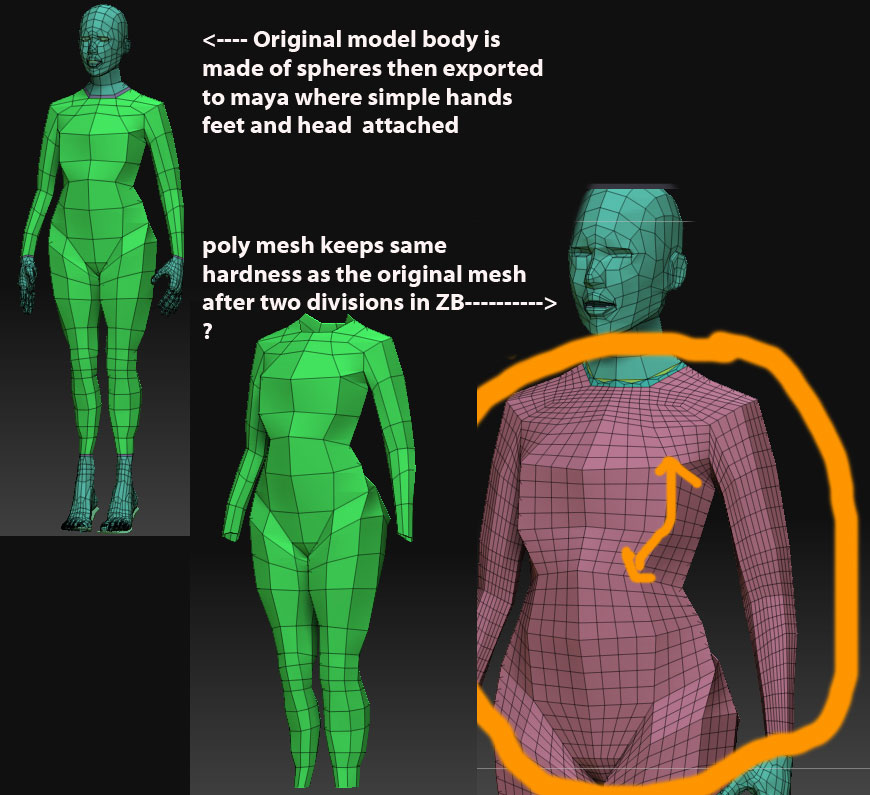
Thanks for the illustration.
First, have you checked to ensure that Tool>Geometry>Smt is turned on? If it’s not, the model will not be smoothed.
If it is on, then zoom in close to one of the poly edges. Is the edge creased? (The polyframe will display the creased edge with a dotted line along one or both sides.) If it’s creased, then it won’t smooth along the creased edges when you divide. In that case, export the model as an OBJ, select the PolyMesh3D object (the star) and import the model again. That should clear the creases and allow the model to smooth when it’s divided.