ZBrushCentral

Polygroup changes by itself?

Hi everyone.

I am trying to create a polygroup. After ctrl+shift selecting the area, I “Group Visible” and everything seems to work just fine.

Minutes later, when I view the Frame of the tool, the polygroup is different than what I made. Sometimes it includes parts of the mesh I hadn’t intended.

I try re-doing this several times, saving right after creating the group, verifying that ONLY the visible parts are what I want to group etc. Always the same results.

Am I doing something wrong? Seems like a bug, but probably “operator error”.

Thanks for the help.
What subdivision level are you at? When assigning polygroups you should always be level 1.

Also, make sure to turn on Tool>Display Properties>Double when you’re doing this. Otherwise, it’s very easy to have visible polygons that you can’t see because they happen to be turned the wrong way.

Thanks Aurick. I tried both of these, but it still doesn’t work,

For example: I have a mesh of a face with hair. I mask off the hair, then Tool.Masking.HidePT (which results in only the hair showing). I drop to Sublevel Division 1 (also making sure my Display is set correctly, as you suggested) and then Tool.Polygroups.Group Visible.

The resulting frame shows the polygroup incorrect, including parts of the ears, forehead etc., which were not even showing.

Weird.

Any ideas? Thanks for the help.

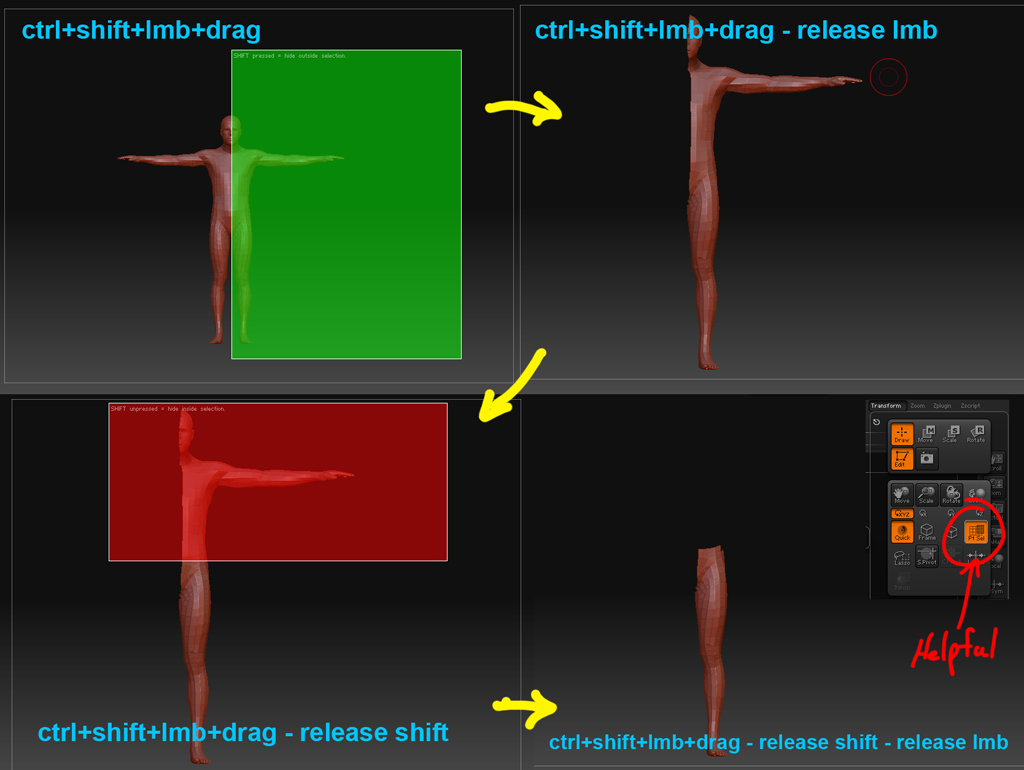
my guess is from the showPT…there is probably a hint those areas in the mask that you are hiding the mesh from.

Use ctrl+shift and see if that still does it.

goast666 - Thanks for the help, but I’m not sure what you mean (sorry). Could you explain please?

hope this helps
turning on the lasso (ctrl+shift+M) helps as well.

[hidegeo.jpg]

Thanks goast666. That’s what I thought you meant.

I tried all of that early on. No change.

I have narrowed it down to the mesh iteslf. Something strange about it I cannot figure out as creating polygroups works fine on every other mesh I have.

Very strange indeed.