ZBrushCentral

Polygon count question

Hey everyone

I have a 13.450 polygon project with each part of an armour in different subtools, I want to pose it, transpose master makes a copy of it for me to pose, but the resulting model to pose it’s too heavy polygon wise and takes forever to move the limbs, sometimes zbrush even freezes or crashes.
If I decimate or zremesh all subtools I loose all textures made with zapplink… someone told me to zremesh and use projection master, but I don’t want to do all textures again!

Is there a way to zremesh keeping the textures I already have on?

thanks!

Make a clone of the model and use ZRemesher on that. You can then project details from your original model to the clone.

it’s like aurick said.

but don’t confuse “projection master” with “project all” in the subtool palette. “project all” is what you want.
it will project the mesh detail as well as the polypaint details.

so apply your textures, convert them to paint, then project all.

your work flow should go something like this:

  1. apply textures to the original model, convert them to paint (polypaint menu>polypaint from texture)

  2. make a duplicate of the model.

  3. zremesh the duplicate until you have a low enough poly count.

  4. unwrap the duplicate mesh via UV Master.

  5. subdivide the duplicate mesh up until to have at least the same amount of polygons as the original.

  6. from the subtool palette click “project all”. adjust settings to get the best results.

  7. after projection, make a new texture via “new from polypiant”

you may have to do that for each part separately or not, it depends.

now you have a remeshed version with textures.

I was using project all on zremeshed duplicate straight up and some “holes” appeared on the texture.

Then I allmost go berserk copying uv maps and pasting them on the zremeshed or decimated version that had uvmaps completely different and there was no way to fix them (a headacke, literally)

so I’ll try this, thank you so much again!!!

you’re welcome, hope it proves useful.

Eeach of these subtools is a unified skin piece of topology for an armor that I dynameshed, so there are no subdivision levels. Textures were applied with zapplink from photoshop, I cannot turn them to polypaint from texture without unwrapping a clone first, copying that uv and pasting it, then creating a texture from polypaint.

I did the workflow step by step but after unwrapping the zremeshed and then subdivided copy I get a uv with a completely different shape and size. I tried rotating, modifying coordinates and even tried to make the original uv texture fit in the shape of the new one and it is not possible.

I tried projecting directly from the original without using uvs on the zremeshed subdivided and I get these awful spots all over the texture.

I tried masking the front polygroup, where the texture is, and zremeshing or decimating the rest, and the texture dissapears. I even tried keeping the texture polygroup in a separate subtool and zremeshing or decimating a copy of the subtool and it looks like hell.

Will I be able to make it work? should I use other way to texture the entire model all over again? should I use another ap instead of zapplink in the future for texturing?

thanks again.

i’m not entirely sure i follow what you’re trying to accomplish now.
this is the impression i’m under.
you have a model with multiple subtools that have UVs and textures that match those UVs.
you need to make a low res version of that model. to do that you are going to have to change the UVs, so that makes your current textures useless. so that means you have to find a way to transfer those textures to the new UVs so you don’t have to repaint the model.

with the work flow outlined, you end up with a new hi res mesh and low res mesh that has the same paint on them but laid out with new UVs.

if you have to absolutely keep the same UVs then you are stuck with cut and pasting.

well, there was this button on decimation master that I didn’t notice that says “keep uvs”, so I decimated instead and it worked.

basically, I’m unwrapping each subtool, and then decimating keeping uvs.

I’ve noticed also that If I select and “delete hidden” the back of each armor plate, I get a surface that when unwrapped, the resulting uv has the shape of the front of the model only, thus saving space and keeping the shape in case I decide to zremesh. I havent tried that yet, but I will, it’s just that decimation keeps sharp edges in the lowest polygon count way better than zremeshing.

Unwrapping the high poly subtools and decimating keeping the uvs has a drawback, though.
Each texture, when unwrapped and turned into an uv increases the file size between 2 and 20 megs, so now I’m reducing the polygon count but increasing the file size which forces me to work in ghost mode, otherwise my cpu freezes and it takes forever to turn the model around. (I have a 3gb ram)

I will implement the workflow you gave me when I get to the hard surface parts of the other models I’m working on.
But I’m curious, what is the recommendable polygon count to work with? all models I see that look awesome have such resolution that freezes zbrush? or those uv maps are made with another software? I still haven’t figured out a way to have the highest resolution in a close up view without sky high polycount and uvmaps.

I’m working on other models right now and trying to figure out a workflow and scale size that will allow me to have a mid resolution anatomy, a high resolution face with high res uvs, and mid resolution garments with good resolution textures keeping the whole thing in a manageable polycount.

I really appreciate the time you take to answer, read and put togheter suggestions and I’ll be posting some WIP images as soon as I can.

thanks again!

UPDATE:

Here’s a WIP image:
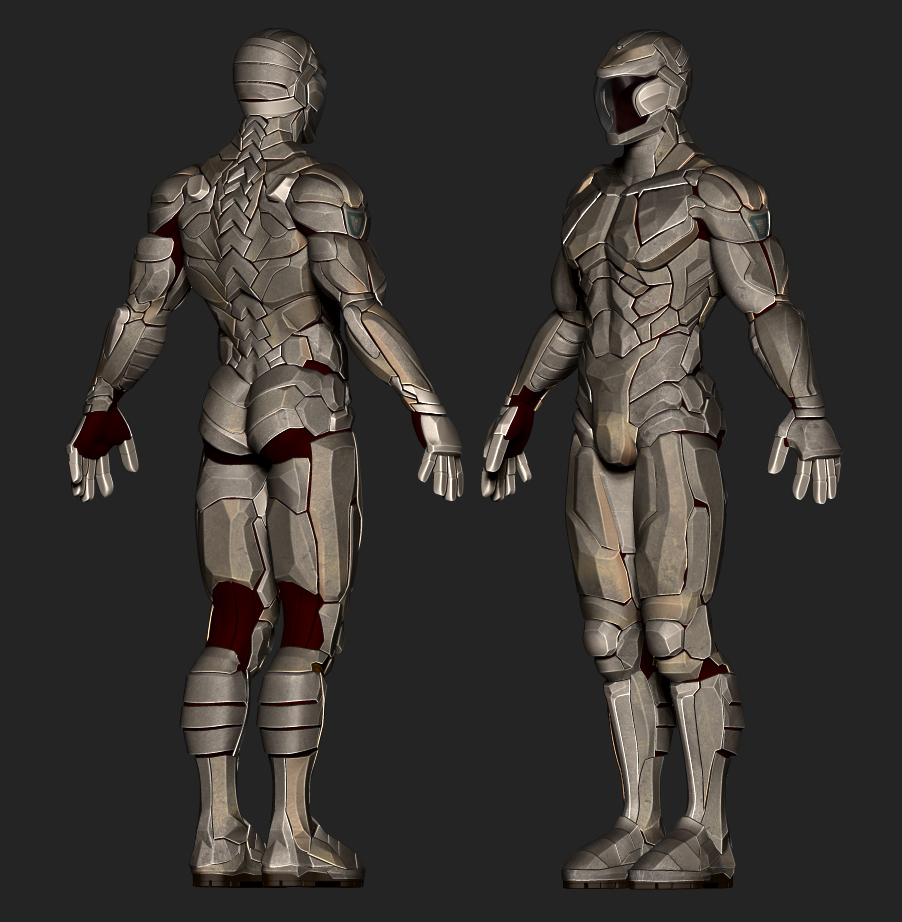
assault_armour_WIP__02.jpg