Hi Everyone
I have 3 different polypaint issues (see attach) and wondered if someone could shed some light. I am having trouble achieving clean poly painting when using layers.
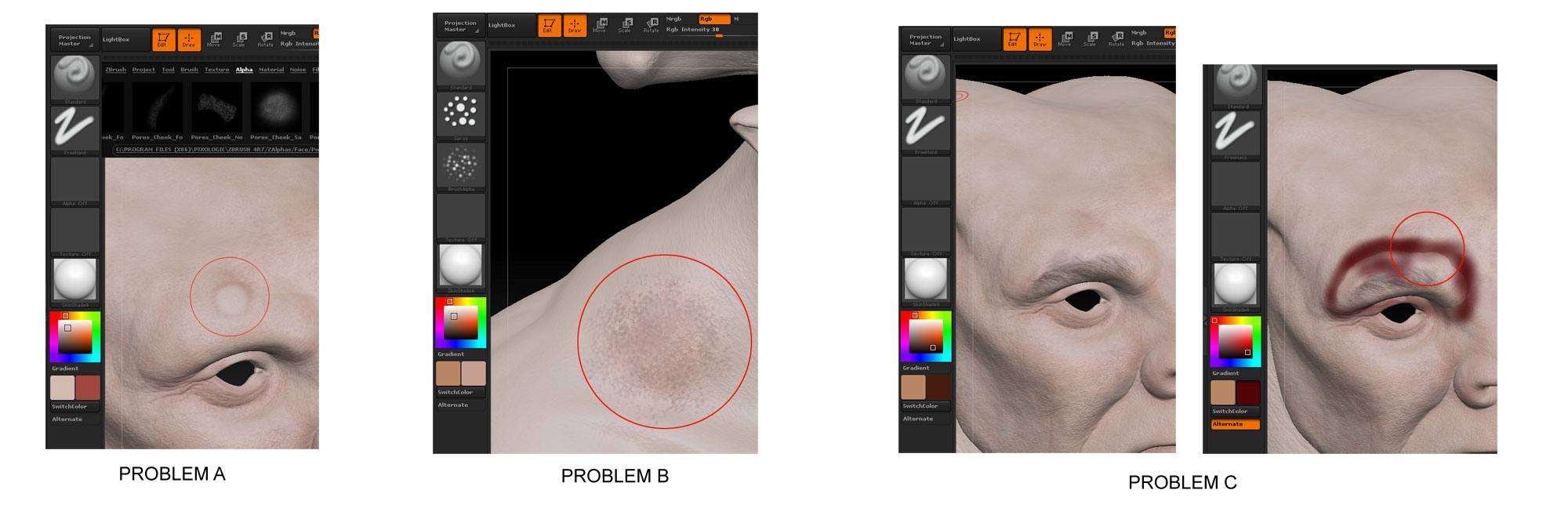
Problem A: I have painted on a layer but when I use erase with the Alt key and these colours/brush settings I do not get a clean erased edge but rather a feathered red border picking out that edge, almost as if a built in ‘stroked’ edge was present.
Whats going on?
Problem B: Again painting ON a separate layer using the colours and brushes shown I get a strange dirty colour that doesnt resemble the selected colour. If I dont use the speckled alpha the problem is not present. Is there a way to use the alpha and get a proper representation of the selected colour?
Problem C. If I use spotlight to project an image by ‘rubbing down’ onto a separate layer everything looks fine until I then try to paint over the top of that projected image. Although crudely shown here, you can see that the edges of my projection get picked out by the new colour as I paint over the projected image. However if I project the image onto a layer that already has some colour painted on it, I do not get the ‘edge’ issue, almost as if spotlight doesnt work properly unless it is projected onto a layer that already has content on it. Is there any way to project spotlight images onto a single clean layer so that they can be adjusted separately in Photoshop if need be?
Attachments