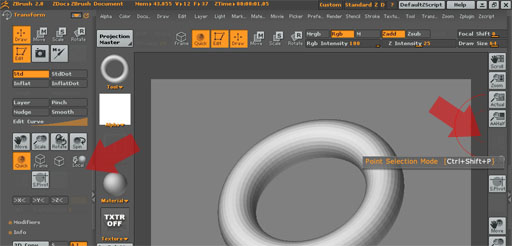
Why I can see my ‘point selection mode’ icon?
I did something wrong?.. I am in Edit mode
Attachments
Why I can see my ‘point selection mode’ icon?
I did something wrong?.. I am in Edit mode
The Point Selection mode is only available for Polymesh3D tools. So you need to turn a Zbrush Primitive (Sphere3D, Cone3D, etc) into a polymesh before you can use the point selection mode.
Polygons in a Zbrush Primitive each have 1 vertice/point that selects the polygon when coloring, masking and hiding/unhiding. This requires a slightly different approach to selecting polygons.
how can I do that?
To learn more about working with parametric objects, view the “Not So Primitive” chapter of the ZBrush 2 Practical Guide.
To convert a parametric model to a polymesh, press Tool>MakePolymesh3D and then select the new object that will be created in the Tool palette.
Well, I am doing the creases tut and even after having pushed the ‘Make PolyMesh3D’ button, the icon stays invisible???
Sorry for the trouble: I figured it out: after pushing the ‘Make PolyMesh3D’ button, I actually had to pick up the tool and I thought my current tool had been updated by pushing the button.