ZBrushCentral

Plz Help Me

HI,MY NAME IS SUNNY

MY PROBLEM IS WHEN I CLICK ON <TEXTURE TO COLOR> AFTER COLOR BUTTON THEN MY MODEL GET BLACK??? I DON’T KNOW Y??? PLZ ANY CAN HELP ME… BUT WHEN I PAINT A [DEFAULT SCRIPT] SPHERE PICK FROM START DEFAULT ZTOOL ] THEN THE TEXTURE TO COLOR BUTTON IS WORKING PROPERLY…PLZ PLZ PLZ PLZ PLZ PLZ PLZ PLZ HELP ME :cry:

MY EMAIL ID IS [email protected] plz mail me??? :cry:

Odds are your UV’s are disabled. Click Tool>Texture>Enable UVs. Next, assign UV’s by creating a blank texture of the desired size (it should be a power of 2 in dimensions such as 512x512, 1024x1024, 2048, or 4096. Then press Tool>Texture>GUVTiles.

If that is grayed out, then UV’s are enabled but not actually assigned. In that case, just do everything in the previous paragraph after where I say to enable UV’s.

:+1: THANK YOU MY FRND…IT WORKED…PLZ ALWAYS REPLY MY QUESTIONS…
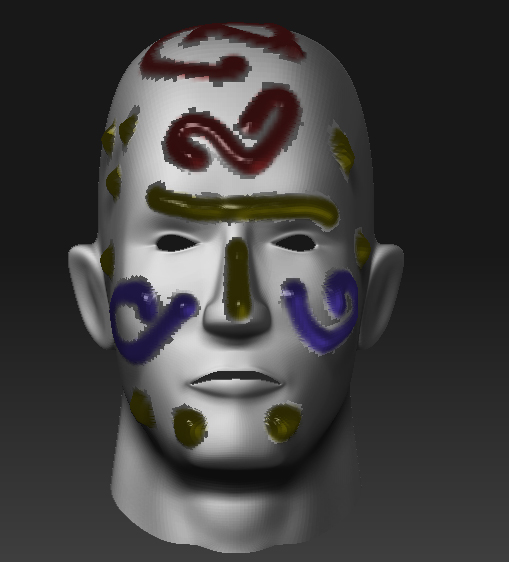
I want to export this glossy materials as a texture. if this possible then plz tell me i want to use this material in 3ds max 2009.

Attachments

Prob.jpg

Hi Sunny. Materials aren’t textures.

Textures apply base color to a model. Material then tells the rendering engine what to do with that color. That means that while textures can be transferred between apps, materials only work for a certain rendering engine.

Some things generated by materials – like noise patterns – can be baked into the texture and exported. But things like glossiness and gel shading aren’t like that.