ZBrushCentral

Please help with textures!! snapshot included!!

Hie:)
hey i just imported a shirt in zbrush.from 3ds max. now it has quite high polygons aroeund 2.2 mil…
the problem is everyime i try to polypaint on shirt the texture on chest applies Ok and crispt but when the postion on end like here i streched the shirt to make long size the texture gets blurred… now some guy told me to increase the polycount … how can i increase the polycount where its streched??? i mean only in that polygons???
please help!!
I see some streching on there too:)
how to fix the model so that textures are fit and perfect.
thanks

Here is the Pic of the problem
http://i44.tinypic.com/29xg80j.jpg

Attachments
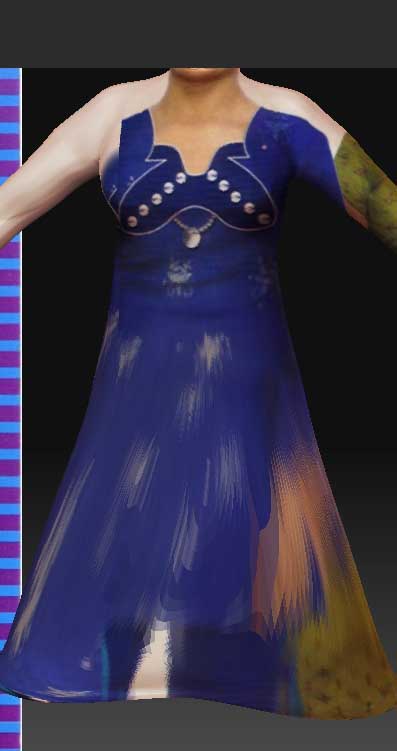
1.jpg

Mask those polygons, invert the mask, then subdivide a few times. Then go and clean them up, smooth etc.

Though you’d probably get better results by retopolizing it, projecting the details on it and making the polygon distribution more even before painting on it.

Failing that, paint on its texture from projection master and skip the poly painting stage. If your UV isn’t stretched too much on those polys you should be alright.

I’d go for remaking the topology though, cause if you plan on animating that at all, you’re going to run into problems with the polygons stretched so much.

Well, man You don’t have to much polygons in the base part, there is no resolution to have good polypainting.
Try to make a model you can subdivide whit the same size in all parts and You will do-it much better.

Hey how to do that??
i mean should i work on geometry in 3ds max and thn import???
thanks!

Let me be certain on this, your basemesh is more dense around the breast and have a large span along the rest right?

If thats the case, then you cant really continue with this.

Go back to 3DsMAX, retopologise your mesh, make sure that the mesh spread out evenly. When you subdivide that in ZBrush, there should be no problem.

Polypaint resolution is one per vertex, if the mesh`s not uniformed, the paint will stretched out along with it.


Another method is to masked out everything except the wanted part, then subdivide it. This will increase the resolution only on that part, but it will create triangles on the joins between non-masked and masked parts.