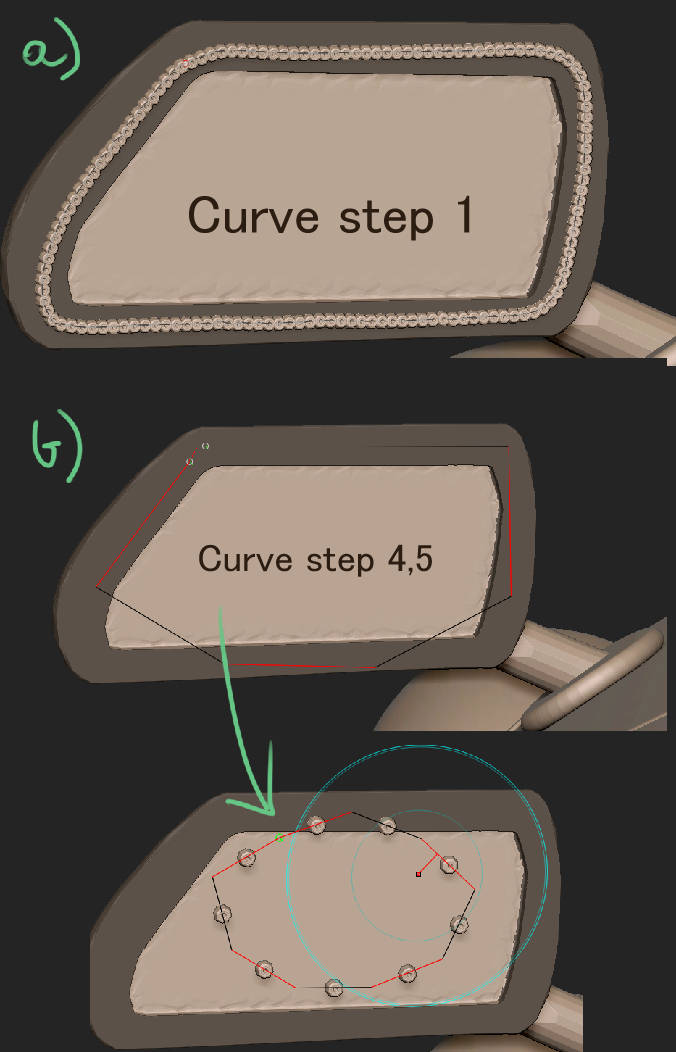
If you don’t have too many rivets to place then there’s a fairly easy way of placing them all by hand:
- Select the InsertMesh rivet brush you want to use. Curve mode should be OFF.
- In the Stroke palette, go to the Inventory section and turn on ‘Record’.
- Draw out a rivet on the mesh. It doesn’t matter where you draw it, just draw it out to the size you want.
- Turn off Stroke>Inventory>Record.
- Undo the rivet placement if you want it somewhere else, then position the cursor over where you want a rivet.
- Press SHIFT+2 on the keyboard. This will place a rivet.
Repeat 5 & 6 to place all the rivets. You can move the mesh around as necessary, just make sure your cursor is over the spot where you want a rivet.
You could use a Curve as a guide: before using the InsertMesh brush, select the Standard Brush and turn on Curve mode in the Stroke palette. Then draw out a curve with a suitable Curve Step set. When you draw out a rivet in the usual way the curve will disappear while you’re drawing but when using the SHIFT+2 replay the curve will remain visible, so you can use the divisions as a guide.