ZBrushCentral

**** Pixologic Release: UV Master (WIN & MAC)

THanks for the tips aberant, One question, when i import my Obj into 3dmax, why do i get this clipping when i zoom into the model? pic attached. The model/view port doesnt clip like this within 3dmax before exported to zbrush. strange. any ideas?

Attachments

clipping.jpg

It is a combination of scale and camera clip distance.

Your object is too small in 3DS max world. Since your camera has a clipping distance (lets say its set to 1 foot) and your model is only 1 inch high
 it must zoom in closer than a foot to fill the screen and you get this clipping.

Two ways to fix it, one is to adjust the camera settings and make your minimum clipping value close to zero.

OR

Simply scale up the object and this should be solved.

Thanks mate, i will give that ago, really appreciate your help!

I don’t often post but may I just say that UV Master is TOTALLY AWESOME! I was working on something and was trying to map it in UVLayout for something like 5 hours with kinda eh results. I decided to bite the bullet and use this and had EXCELLENT useable mapping in about 8 minutes and that was with reading the tutorial and then making the maps LOL Kinda made me mad about the 5 hours I wasted not using it ROFL Anyway incredible job on this! :slight_smile:

Hey, I tryed the Plugin, but even if I protect the face of one my model and attrack the backside, it through my protexted area, the face

I really a bit frustrated right now, is it possible that the plugin dont works with open edges?

di uvmaster is applicable to zbrush 3.5R2???:smiley:

i don’t think so, i tried on 3.1 but it didn’t show up, so i upgraded to 3.5r3.

UV Master is for ZBrush 3.5 R3 WIN and 3.2 GoZ Mac OSX. Both are free upgrades :slight_smile:

Sorry about this but im still get UVs verts not merging, i’ve enabled <img src=“http://www.zbrushcentral.com/pixo/atn.gif”>Mrg and untick Grp, but when ever I import into Max the UVs still arent fixed. Please help ive got deadline Friday!!! pulling my hair out ! Ive attached pic show my problem. Usually selecting Mrg fixes it but not this time, iv’e tried 20 times now still no joy. please help if u can?? many thanks!!!

Attachments

UVs.jpg

montana2008

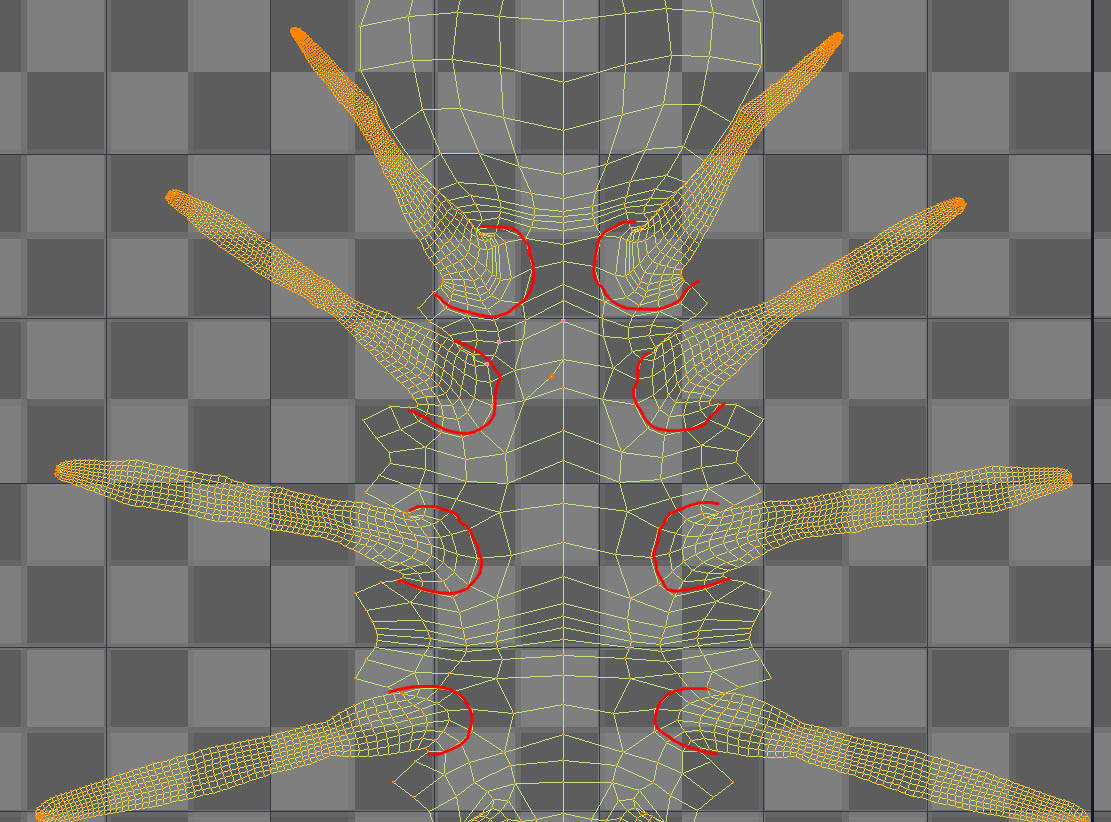
I would separate your uv shell following the image attached.
Layout/flatten the shells in zbrush then stitch the sheel together outside zbrush.

You can re-import the final geo back into your ztl.

Tripple your mesh by running a “clean” operation in Max (maya has one) or use the “check mesh integrity” in zbrush.

hope that helps

Attachments

UVsEdit.jpg

Thanks for your help Morph, i really really appreciate it, i will give it ago. Another question, how come some of my meshes when imported back into zbrush keep thier subdivisons, when other meshes don’t? Its strange sometimes i export from zbrush into max do some UV work and then export from max, reimport into zbrush and my sub division levels are gone, other times they are there.

Basically i have 6 level object in zbrush, export it at level one as obj (Mrg). import into max work on the UVs, then export back into zbrush. Sometimes zbrush sees the 6 levels of divisions sometimes it doesnt. I must be missing something.

Ive decided to make another high res model
bah! such a learning curve but im getting there i think. Polygroup UV seems the answer to me. Just one question anyone? Is there away of deleting edge loops withinzbrush, with x mirror sym?

regarding the loss of subdivisions when you re-import
I know Maya can (and will) re-order vertice IDs if the mesh was created first in zbrush and it is the first time export to maya
maybe also true for max.
Basically it (maya) is re-ordering to suits its own “logic”.

In order to retain your subdivision levels the vert ID must remain the same.

Aside from the software automatically re-ordering vert IDs you should avoid editing the mesh with operations such as spliting an edge or booleans or combining or exporting multiple objects in the same file.

Editing UVs or the position/translation of Verts will not affect the vert IDs

meaning you could scale or rotate or translate your mesh and edit UVs and it will still re-import into your ztl.

Note: there are import options in Maya which I turn off to ensure no re-order, check what you need to uncheck in max. Mind you in maya, even after unchecking the software will still re-order if it sees fit
solution make sure your mesh is clean before you go too far, usually this means establishing a connection between the two programs via import export.

Regarding deleting edgeloops

There is and there isn’t, if you know what I mean

You could remove edges using the retypo tools but for dense meshes or tricky typological edits I would say use the “GOMax” plugin found here at ZBC under the scripts utilities forum and edit your mesh in max.
Alternatively you could manually do this by exporting to max fix then import back to zb and append as a subtool to you orig model and use the project all feature, then use the zproject brush to clean up.
This way you can transfer the details and polypainting across to a new mesh (new typology).
Note: the new mesh must be relatively close in shape/volume to the source mesh (orig)
 basically tranfer from source to target.

as keanu would say “whoa”
Hi, I’ve got the same issue here. Also Mac OSX 10.5.8 and popup appears every time I click on ‘Unwrap’

Anyone knows how to solve this?

Thx

i was wondering if anyone has had a problem with decimated imported objs in Maya like in this thread http://www.zbrushcentral.com/showthread.php?t=85963&highlight=decimation+master

i cant connect to theserver to download it either, i get this error message
This server can only be accessed by the proper referring server. :frowning:
anyone have a wya to fix this? help
:frowning:

Has anyone else run across the problem where UV master takes forever and then crashes the program? Is there a limit on the number of active points?

I have decimated my model before attempting to unwrap to get the poly count down even lower but still have problems. Even other models with ~15,000 points can crash the program but usually just take 2min to unwrap. My current model is much larger but I want to keep some of the details.

Thank you and any help is appreciated!

Yup, I am having the same problem, exept that it states that the file was exported and then hangs Z

I would like to know the answer to this as well, does UV Master have a limit it can process before crashing?

UV Master have a limit of approximately 100-150k polys. You can find more information in its documentation. Also, when you have handles and tunnels in your geometry (like a mug handle), the computing can takes a lot more time. Then sometime, UV Master isn’t crash at all, but it is just trying to figure how to create seams to open these tunnels and handles.
If you have a lot of these specific geometry on a model with a lot of polygons. then it can really takes a long time.

Then to avoid such long process time, it’s advise to create various polygroups and use the corresponding mode in UV Master. It will create one island per polygroup and will also optimize the UV packing and the distortions.

Thank you for the response. I did find out about the 150k limit, but didn’t know about the rest.