ZBrushCentral

Paint directly to texture?

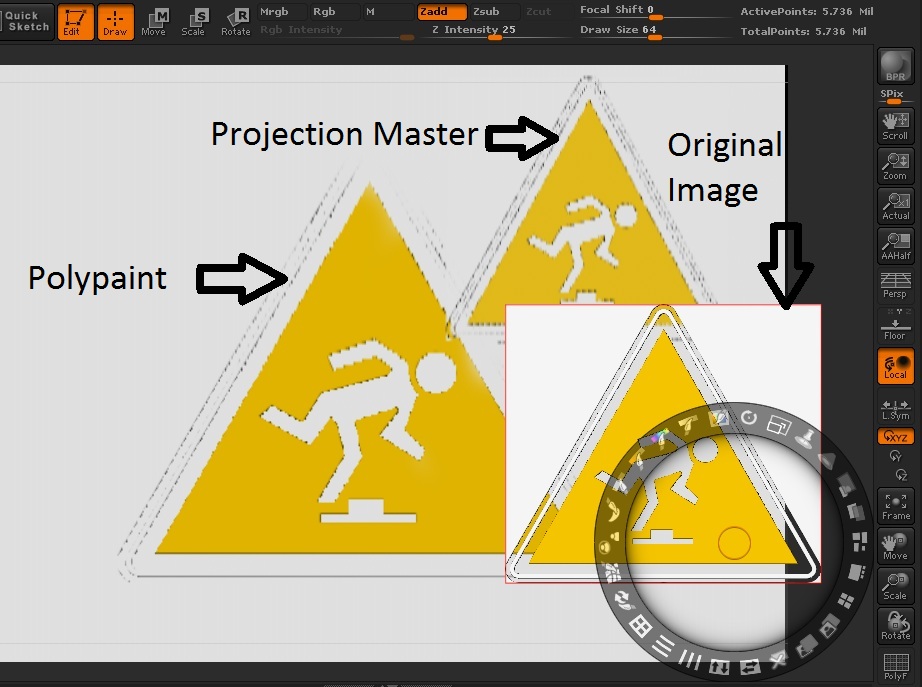
I’ve been trying to polypaint some but it doesn’t seem to be able to hold the quality. I subdivided this 16 polly model to 3.5 million polygons (it won’t let me go farther). The smaller edges on the side look better but this 2 polly back to the model gets even worse resluts (image attached, original on left in spotlight, projected on right). Is there any way to specify where you want more detail without adding tons ( 6 pollys for a 16 polly model is allot) of geometry to the original model (I’m building for games I can’t have scrap geometry).

or even better…

How can I paint directly to my texture?
I was aware you could do it with projection master in the past, but then they disabled image plane and texture dropping (as far as I can tell) while in projection master.

Attachments

polypin.jpg

Texture dropping from projection master works good enough. You can also use zapplink. Also you can create image plane yourself. Follow this link (old good lesson, still actual) http://www2.zbrushcentral.com/movies/zclassroom/kosta_texturing.mov.zip. And I heared that Image plane will be upgraded for zb 4 too.

I’ve gotten projection master working, but the quality still seems low. Is this how low the quality usually is? (image attached)

Attachments

pollypaint.jpg

The higher resolution of your mesh, the more detail you can capture in projection master. Subdivide it up a few times to get crisper projections.

Right, there its 5.7 million (in the screenshot). I tried HD geometry, apparently you can’t polypaint it.

Hmm. I’ve had similar issues recently. I was thinking perhaps the projection
quality depended on the document resolution used during the projection
master session, but I haven’t had a chance to test that theory.

G.

Hey,
what you have been doing is using ProjectionMaster to Polypaint a model which is essentially exactly the same as you have been doing before with Spotlight.
Go to your Tool/Polypaint Palette and turn off Colorize to disable Polypaint. Under “UV Map” Palette set a texture resolution and create a new blank texture and assign it to your subtool via the Tool/Texture Tab. Now if you use the likes of ProjectionMaster and Zapplink you will use actual per-pixel painting.

Unfortunately Spotlight only works with Polypainting. And yes: Both Spotlight and ProjectionMaster work in ScreenResolution