Hi,
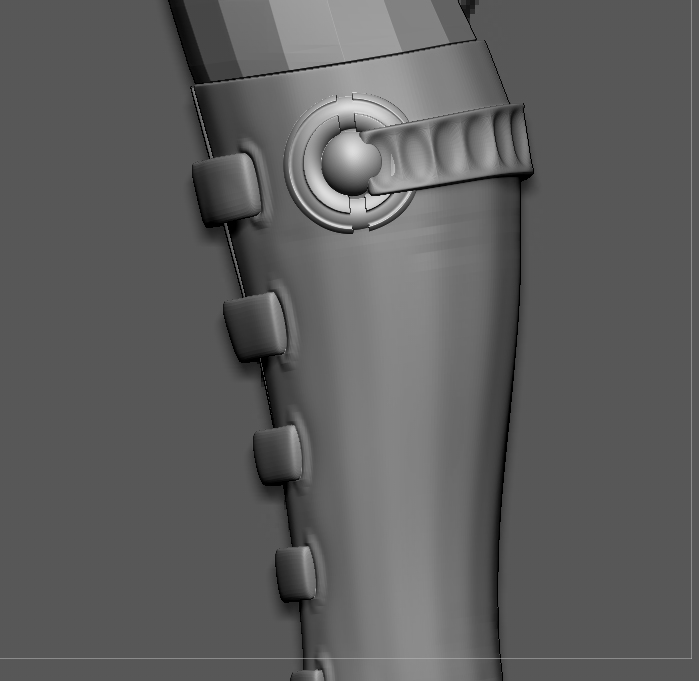
I was wondering how do I make the belt cut where the sphere starts instead of it over lappinng.
I dont want to mask or group and delete the part where the belt is overlapping. A tool similar like “Boolean” in maya.
Attachments
Hi,
I was wondering how do I make the belt cut where the sphere starts instead of it over lappinng.
I dont want to mask or group and delete the part where the belt is overlapping. A tool similar like “Boolean” in maya.
Sure thanks. I have learnt all the basic and advance stuff in Zbrush.
Can you please locate me the tool I’m looking for in the user guide?
are you looking for a procedural way to do it? like using one mesh to clip another?
maybe you can use the clipcurve brush. mask off everything except the belt, then draw the contour of the sphere over the belt.
the clipcurve brush doesn’t delete any geometry, it just flattens it.
i haven’t tested this myself. but you can make the sphere part an IMM brush. then with dynamesh turned on, you can insert a negative of the sphere on the belt, then dynamesh and the sphere part should get cut away.
but you said you don’t want to delete anything so perhaps dynameshing is not an option.
you’ll want to use the boolean function inside of Zbrush.