ZBrushCentral

? on possibly mirror or project

I am wondering if there is a better method than I have used to make a pattern on all four sides of a ring. I made the pattern on top and bottom and then to get the sides I had to append a copy in the subtool pallete and rotate it 90 degrees. The I used the Zproject brush to add it to the ring. Only this method I got it very close, I’m looking for another method that will work and that may be a little bit more accurate like some type of mirror rotate thing.

Any ideas. An image is attached to show I need the pattern on the blank areas.

[exaple.jpg]
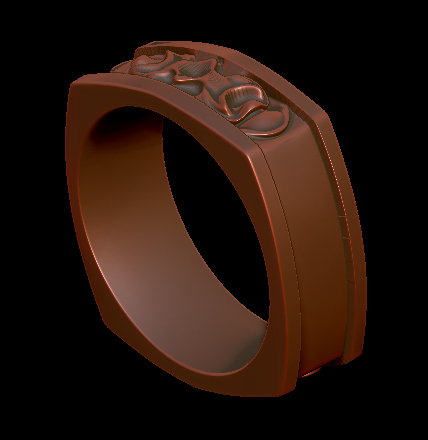
Hey there,

well there is more than one option you might use. You could separate one part of the band, do your sculpting on that and than use projection master to project it back onto the original piece.

Another idea would be using a morph target before you start sculpting. Once done press Morph target/create difference to create a separate ZTool from your sculpt and use projection master again.

In case you are not producing this for growing but milling you could also just place everything as subtools and merge it all together in the end.

It’s really a pity that the booleans in ZB 3.5 still don’t work with detailed meshes, because once all your subtools are in place you could just remesh it all together into one watertight piece of geometry … oh well ZB4 is around the corner … let’s just see what kind of surprises pixo has got for us :wink:

Anyways … hope that helps a bit.

Well, does projection master work well with undercuts or does it just project straight down? If it just projects straight down then I would have to clean up the undercut areas. I’ll have to test it and see since I haven’t used that method before.

As far as growing goes as long as the objects are solid it doesn’t matter if it’s one object or 10. Most people growing a file have Magics and it will boolean them together without too many problems.

Ok, I’m no pro with Pojection master, but from what I’ve tried it looks as if it projects straight onto the object so I don’t like that method since I would have a lot of cleanup with that. I may just stick to the method I started out with, although not perfect it is ok.

[PO25.jpg](javascript:zb_insimg(‘203258’,‘PO25.jpg’,1,0))

Too late for this ring model, but normally you could use radial symmetry before you start sculpting, assuming it’s aligned with an axis. After that, zproject will be your fastest method. You might also also be able to use 4x radial symmetry there too, just mask off the original area that you don’t want to change.

I do use radial sym with round rings, but since this one had four sides the radial sym would not hit all spots on those surfaces. Also using radial sym I can only go along one axis because if I try to use more than one it creates a sphere of points from the brush that end up hitting the surface in areas I don’t want it to. It would be nice to have the radial sym work in a circle and be able to add an extra row going in the same direction with of course a way to space the two or more rows apart.

I did use Symmetry for the top and bottom to do all at once. It was just the other two sides that would not work out in this way.