ZBrushCentral

Occasional problem with keyboard shortcuts; a pop up floater appears

Been working at relearning ZBrush after a long absence, and have had this occur to me with a fair bit of regularity. If I’m working on something and use one of the keyboard shortcuts (say for example x to turn on symmetry) I’ll instead got a pop up toolbar with the keystroke in the text entry portion of the pop up. Sometimes there will be extra Japanese/Chinese characters as well. I have to exit and restart the program to get it to stop. Here’s an image showing what I’m seeing; I have a standard Z4 installation with most (not all) of the plug ins added on a Win 7 Asus laptop. Any pointers to existing info appreciated if this has happened elsewhere… didn’t see such info on my first few passes through. Thanks in advance.

Attachments
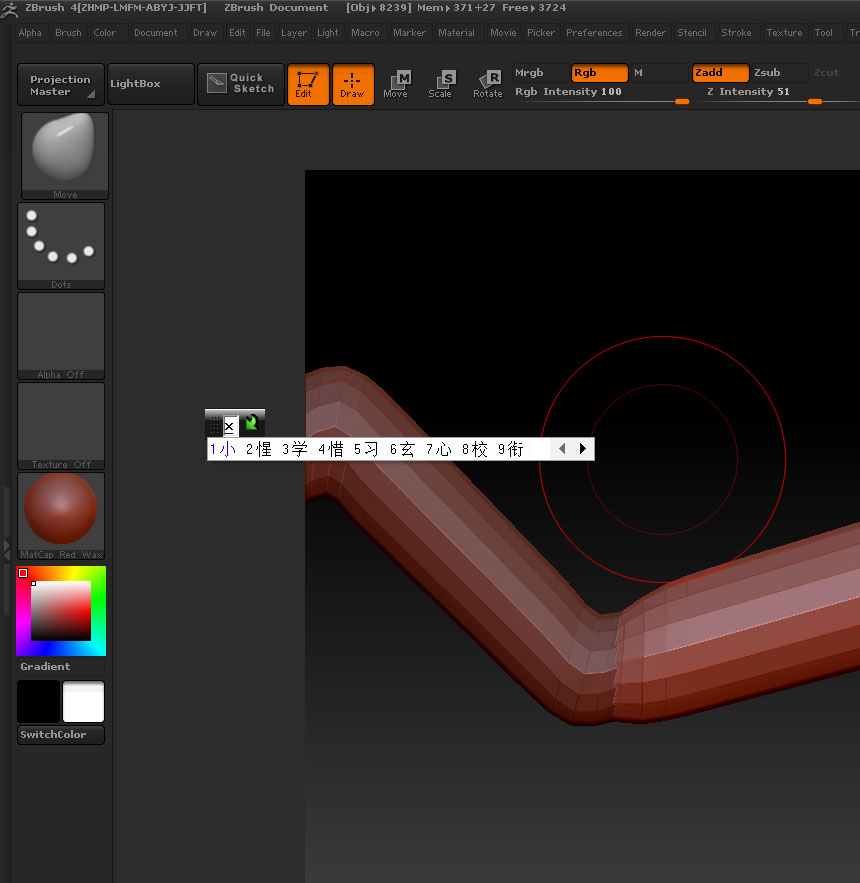
X_keyboard_shortcut_result.jpg

This looks as though it is something to do with your particular setup which is causing a hotkey conflict. Take a look at settings for your keyboard or tablet or any particular software that you have installed that might use such a display. It’s certainly nothing to do with ZBrush.

This is a bit belated, but I found the problem and adding that info here if it comes up for someone else (well, it’ll be a bit vague at this point, but should be enough of a starter for someone with similar dilimma). I have an Asus laptop and they have a program to help their techs diagnose things, and the default keyboard command to activate it was a similar combo to something one would use in Zbrush (might have been a combination of control + shift + space… been a while). Anyway, identified the program, changed the default, and smooth sailing since.