Ok so I had my character in a t-pose. I sculpted all of the detail, did the color maps, etc. My model has multiple subtools, so that I can isolate certain areas while working. Since you can’t pose with multiple subtools at the same time in zbrush 3.1, I exported my groups as obj’s and brought them into maya. I then posed my model which always is a gamble for some reason when I reimport into zbrush…it either works with no problem at all, or it does what it’s doing now…exploding. I exported at it’s lowest divided number (i remembered to check mrg and uncheck grp), and reimported at the same level, it has the same number of points and nothing is different at all, other than its positioning. When I import, everything looks like it is fine as long as it stays on the 1st subdivision level. As soon as I bring it up to the saved levels, my geometry bursts and is unusable. Can anyone help me with this process? I can provide pictures if this doesnt make sense.
as far as I know turning off options in Preferences>ImportExport will prevent vertex reordering which is what I believe causes this.
Also, why don’t you use Transpose Master? And why are you still using 3.1? 
@Artesia:
Haha yeah, i know. Zbrush 4 is awesome. I have the transpose plug-in and am eager to use it- but when i brought in my zbrush 3 model (same model), all of the materials looked messed up. Using transpose breifly created a few issues for it as well. I want to be able to spend some time learning the differences before relying on it right now, so for this model I want to finish it in zbrush 3.
Your solution:
So what you are saying is to go to importexport under preferences and turn off the options? Which options? The ones that are checked are: eflipY, eflipZ, iflipY, iflipZ, import polygroups. I tried turning off import polygroups and that didnt fix it. Turning off eflip/iflip just messes with the orientation of the object. All in all…when i go up in subdivisions, I am running into the same problem. Any other suggestions or can you clarify what I need?
I meant try turning off the iflip/eflip
It does effect the orientation of the object, but to my knowledge when it is flipped (with the options on) the verticies can be reordered. When they are reordered your other subdivisions are messed up because, say vertex 145’s data is applied to a vertex that is in the wrong place, but still named 145 due to the reordering.
@Artesia:
Is this something that you have had an issue with before, and doing what you said fixed it? …Or is this an idea that you feel might be the solution. I have tried every combination involving what you are saying, and nothing seems to keep the reimported mesh from breaking apart. Whenever I uncheck the iflip/eflip buttons and leave import poly groups selected…it only changes the orientation that it imports at- so it’s upside down… but it still explodes.
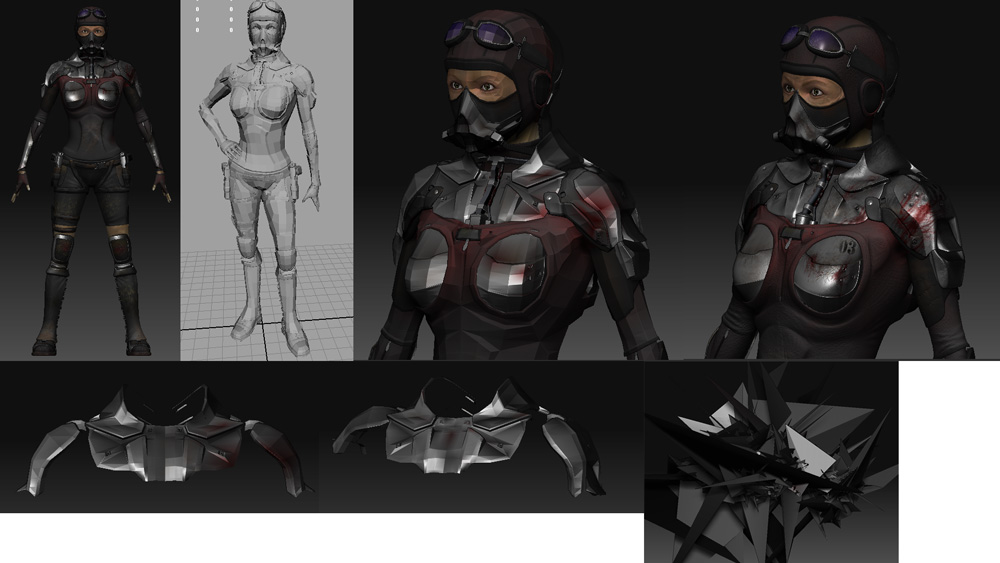
Image to hopfully help:
- Complete model in zbrush with maps.
- The posed model that I arranged in Maya
- & 4. Low vs High Poly of model with no issues. I exported everything at the low poly level
- Low poly exported shoulder area. This is how it was exported for maya
- Low poly reimport after posing it in Maya and brought back to ZBrush
- The result when I check the higher subdivisions
?!?!?!?!
Attachments
Indeed I have had this problem before, specifically when making blendshapes for Maya. I saw the suggestion to turn those options off in a tutorial somewhere, they mentioned the reason of renumbering verticies. Now my meshes are upside down in 3ds max when I import them, but I just rotate them back into position. Has it solved the problem? Not completely sure, I haven’t had the problem again, but that doesn’t mean it won’t happen.
What I did before to solve the problem (didn’t always work.) was to export and reimport the base mesh so that both the Base pose and the new pose have the same vert order. Big difference is that I was working with blendshapes, so I didn’t have or need subdivision levels. In your case you might try exporting your model from Zbrush, into maya, then back out to Zbrush. Then use ProjectAll to transfer details (I’m not sure if ProjectAll works for textures, but hopefully you have it unwrapped.) then bringing in the new pose.
I hope this helps, it’s all I can think of. 
Not seeming to work… I get what you are saying, but it doesn’t seem to help what I’m doing. Thanks anyway though.
I really hope this isn’t some issue people have that just never gets solved…if anyone knows a way to prevent it- or even better, fix it, that would be great!